Best HEOS Compatible Speakers: Review and Guide

31 October, 2022 by Admin

Although HEOS makes it easier to work with multiroom audio, the sound could be improved further with dynamics. You can choose HEOS wireless speakers based on your room size and setup scenario. There are several options to arrange a setup. You can pair two HEOS 1 or 3 for stereo and then connect multiple HEOS 5 in different rooms for seamless sound throughout the house.

It always not necessary to pick HEOS compatible speaker. HEOS Link will work with any receiver or amplifier which you can use to set speakers in different rooms. in most cases, HEOS 1, 3, 5 or 7 speakers will result in easier setup and seamless audio playback. Although user experience may tell you about interruptions, this is mostly due to weak Wi-Fi signal.

Denon and Marantz also have receivers with built-in HEOS. With that you can create multiroom sound based on the number of zones. HEOS and Alexa works together that makes controlling speakers quite easy. If you want a soundbar for TV, you can also do this with HEOS. Once you setup the soundbar, use HEOS to connect surround or rear speakers.

What is HEOS and How does it work?

HEOS stands for Home Entertainment Operating System. This is a system that allows multi-room speaker setup wirelessly and is a platform made by Denon. Along with Denon, Marantz receivers also support HEOS feature. Denon has several wireless speakers, soundbars and receivers with HEOS compatibility. You will need internet connection as HEOS will work via Wi-Fi.

Working over Wi-Fi allows transmission of uncompressed audio files. This is a better option than streaming with Bluetooth. It supports MP3, AAC, Apple, DSD, FLAC, wav, wma. Along with streaming from internet or Bluetooth, you can play songs from CD/turntable in HEOS compatible wireless speakers via HEOS amplifiers.

Create stereo or surround sound with HEOS. Make sure to pair speakers of same model or brand for stereo like two HEOS 5 speakers. You can also use HEOS for rear speakers. In case you want HEOS surround, make sure the receiver supports this. If you don’t have a HEOS receiver, then you can also use the HEOS Link. This is a preamplifier via which you can connect non-HEOS receiver or soundbar.

Control Option:

Download the HEOS app in iOS or Android. Install it and you are good to go for installation. The following devices will work with HEOS app: iPhone, iPad, or iPod running iOS 7 or higher, Android Smartphone or Tablet running Android 2.3 or higher and Kindle Mobile device. 

Best HEOS Compatible Speakers:

HEOS wireless speakers are available for different use cases. Based on your room size you can choose the wireless HEOS speaker, or you can also pick a soundbar. HEOS system is quite versatile as you have the option to go for a complete home theater system.

Denon Home 350 Wireless Speaker Review and Guide To Use:

6.04 Mixed Usages
7.6 Music:
6.7 Movies:
1 Outdoors:
6.2 Podcasts
8.7 Voice Assistant:

Denon Home 350 speakers are great for music and produce stereo sound on its own. The speakers have excellent frequency response. It works with Airplay and HEOS; this makes it a versatile speaker. It shows decent performance with movies and shows. Playing music from different streaming platforms is very easy. Make sure you have a stable Wi-Fi connection. While you can also enjoy movies with clear vocals, we suggest a stereo pair or a 5.1 system.

Our Verdict

If you want a versatile speaker with an all-in-one solution, then Denon Home 350 is best for you. Use it to setup multiroom audio with the same song in all rooms or different ones for different rooms. While the bass shows its presence, if you consider yourself a bass head, you will need a subwoofer. The sound quality is engaging and impactful, especially for music.

PROS
  • Supports hi-res audio
  • Clear highs and decent lows
  • Bluetooth and Wi-Fi available
  • Good sonic accuracy
  • Easy to use with multiple control options
CONS
  • No rating against dust or water
Where to Buy

Specification

GENERAL

Recommended Usage Home Bluetooth Speaker , Home Wi-Fi Speaker
Release Year 2019
Power Source AC Only
Multi-Device Pairing: N/A

BUILD QUALITY

Material Quality Great
Water Resistance: No
Dust Resistance No
Floats In Water: No

STYLE

RGB Light: N/A
Color Variation Black and White.
Sizes And Variants N/A

PORTABILITY:

Power Source: AC Only
Hand Carry N/A
Weight 15.0 lbs (6.8 kg)
Volume: 939 in³ (15,390 cm³)
Connectivity: Bluetooth & Wi-Fi and Wired

BATTERY:

Battery Powered: N/A
Battery Life N/A
Charging Time: N/A
Power Saving: N/A
Charging Port: No Battery

Bluetooth Specification:

Bluetooth: Yes
Bluetooth Version: Unspecified
Bluetooth Range: 328.1 ft (100.0 m)
Bluetooth iOS Latency: 575 ms
Bluetooth Android Latency: 499 ms
Multi-Device Pairing: N/A

Wi-Fi Specification:

Wi-Fi: Yes
Wi-Fi Version: Wi-Fi 5
Wi-Fi Frequency Band: 2.4GHz & 5GHz
Apple AirPlay: Yes
AirPlay Latency: 2 ms
Google Chromecast: N/A
Chromecast Latency: N/A

Wired Connectivity:

Aux Input: Yes
USB Audio: N/A
Other Ports: Yes

CONTROLS (physical buttons):

Ease Of Use: Great
Music Play/Pause [Button/Touch]: Yes
Call Answer/End [Button/Touch]: N/A
Volume Up/Down [Button/Touch]: Yes
Track Next/Previous [Button/Touch]: Yes
Microphone On/Off: N/A
Additional Controls: Yes

VOICE CONTROL:

Voice Assistant: Yes
Voice Activation: Yes
Speakerphone: N/A
Alexa: Built-in (Wi-Fi Only)
Siri: No
Google Assistant: No
Microphone Mute: Yes
Far-Field Performance: Excellent
Ambient Noise Performance Excellent

App:

App Name: Heos
iOS: Yes
Android: Yes
EQ: Bass/Treble
Stereo Pair Mode: Yes
Party Mode: Yes
Multi-Room: Yes

AUDIO QUALITY [TESTED RESULT]:

Frequency Response Accuracy: Great
Soundstage: Okay
Dynamics: Decent

IN THE BOX

Accessories: Denon Home 350 speaker, Power cable, Screw for wall mounting.
User manual: Yes

Specs:

  • Supports ALAC, FLAC and WAV files up to 192kHz/24-bit
  • 6 class D amp
  • USB and Aux in
  • Dimension: 380 x 225 x 180 mm
  • Supports Hi-res audio

Denon Home 350 is a one of the HEOS built in speakers that supports both Bluetooth and Wi-Fi. It works with voice assistants. It consists of 2 0.75” tweeters, 2 2” mid-bass drivers and 2 6/5” woofers. Wi-Fi makes it easy to stream from Amazon Music, Deezer, TuneIn, etc. This speaker with Denon HEOS and Alexa makes it easier to control different options with Alexa.

Built-in microphone helps in this case to pick you voice even in noisy environments. It has a glass top and mesh like grille. Build quality is decent. If you are an Apple user, use Aiplay 2 or simply pair with other Aiplay supported speakers. Precise tuning of the speaker ensures balanced audio profile. Although the bass is decent, it is futureproof as it supports sub with built-in HEOS like the Denon DSW-H1.

If you are using the DHT-S716H soundbar, you can use this speaker as surround. You can also use two of these 350 Home speakers as HEOS rear surround speakers. This 350 Home speaker has an average soundstage, and it can get quite loud. If you want a small speaker, then check the Denon Home 150

[amazon box="B0837K4WXB" title= " "] [/amazon]

It has two Class D amplifiers and a total of 4 drivers. If you want to broaden the sound, place it nearby walls. You can pair two of these but, if you use Airplay mostly, you won’t get stereo.

What can you do with HEOS?

With the HEOS app you can tweak bass and treble settings. While using the app, make sure to update it to the latest firmware in order to use Amazon Alexa. With HEOS you can connect two of the speakers or can create You can also pair two speakers together to create a multi-room audio by connecting several speakers in different rooms.

For adding several speakers in a group, use the Room option of the app. Then give the group a name so that it’s easier to understand. The app gives you group volume control or individual volume sliders as well. While setting up speaker using HEOS app, go to the back side and check for a Connect button. A step-by-step instruction is given below as well.

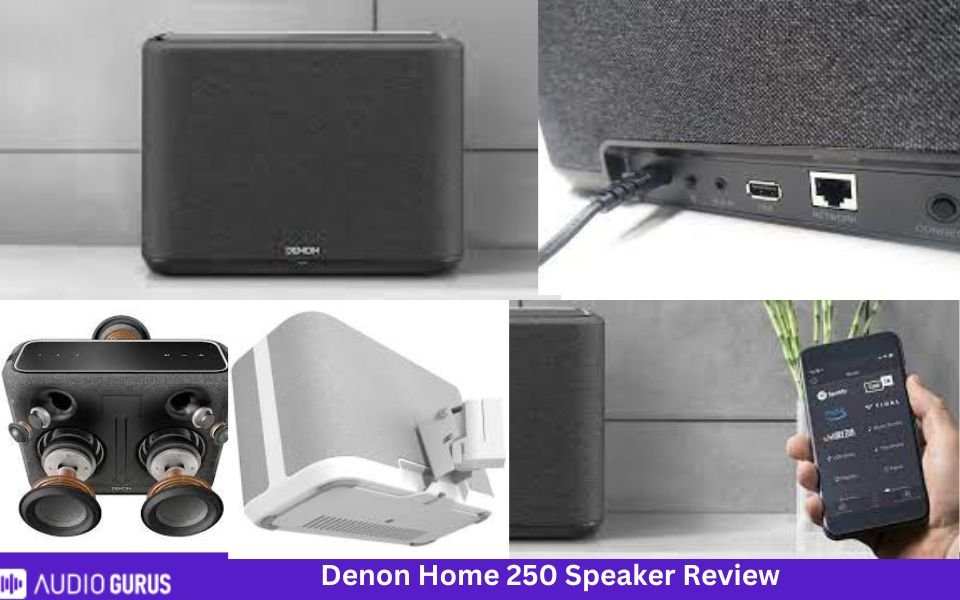
Denon Home 250 Wireless Speaker Review and Guide To Use:
5.7 Mixed Usages
6.8 Music:
6.3 Movies:
1 Outdoors:
6.7 Podcasts
7.6 Voice Assistant:
Specification

GENERAL

Recommended Usage Home Bluetooth Speaker , Home Wi-Fi Speaker
Release Year 2019
Power Source AC Only
Multi-Device Pairing: N/A

BUILD QUALITY

Material Quality Great
Water Resistance: No
Dust Resistance No
Floats In Water: No

STYLE

RGB Light: N/A
Color Variation Black and white
Sizes And Variants N/A

PORTABILITY:

Power Source: AC Only
Hand Carry N/A
Weight 8.16 lbs
Volume: 466.6 in3
Connectivity: Bluetooth & Wi-Fi and Wired

BATTERY:

Battery Powered: N/A
Battery Life N/A
Charging Time: N/A
Power Saving: N/A
Charging Port: No Battery

Bluetooth Specification:

Bluetooth: Yes
Bluetooth Version: 802.11ac
Bluetooth Range: N/A
Bluetooth iOS Latency: N/A
Bluetooth Android Latency: N/A
Multi-Device Pairing: N/A

Wi-Fi Specification:

Wi-Fi: Yes
Wi-Fi Version: Wi-Fi 5
Wi-Fi Frequency Band: 2.4GHz & 5GHz
Apple AirPlay: Yes
AirPlay Latency: not specified
Google Chromecast: N/A
Chromecast Latency: N/A

Wired Connectivity:

Aux Input: Yes
USB Audio: Yes
Other Ports: Yes

CONTROLS (physical buttons):

Ease Of Use: Great
Music Play/Pause [Button/Touch]: Yes
Call Answer/End [Button/Touch]: N/A
Volume Up/Down [Button/Touch]: Yes
Track Next/Previous [Button/Touch]: Yes
Microphone On/Off: Yes
Additional Controls: Yes

VOICE CONTROL:

Voice Assistant: Yes
Voice Activation: Yes
Speakerphone: N/A
Alexa: Built-in (Wi-Fi Only)
Siri: No
Google Assistant: No
Microphone Mute: Yes
Far-Field Performance: Excellent
Ambient Noise Performance Excellent

App:

App Name: HEOS
iOS: Yes
Android: Yes
EQ: Bass/Treble
Stereo Pair Mode: Yes
Party Mode: Yes
Multi-Room: Yes

AUDIO QUALITY [TESTED RESULT]:

Frequency Response Accuracy: Great
Soundstage: Decent
Dynamics: Okey

Rating System

Music: 6.79
Movies: 6.31
Outdoors: 1
Podcasts 6.74
Voice Assistant: 7.64

IN THE BOX

Accessories: Denon 250 speaker, AC power cord, Screw, Quick Start Guide, Safety Instructions, Warranty Information
User manual: Yes

Specs:

  • 4 class D amps
  • Has proximity sensor
  • 3 quick preset buttons
  • Dimension: 295 x 216 x 120 mm

What if Denon Home 350 is too large and Home 150 is too small for you? Well, Denon has got your back. You can see this Denon Home 250 wireless speaker which falls between 350 and 150 in terms of size and sound. Inside the speaker there are two 0.75” tweeter, two 4” mid-bass driver and a 5.25” passive radiator. It has crystal clear treble and precise midrange.

Similar to Denon 350, it works with Alexa and supports streaming through Bluetooth or Wi-Fi. The performance is adequate if placed in mid-sized rooms. You can use it to play music and it can get quite loud. It is better to use it as front speaker near walls rather than rear. Before you feel too much disappointed, understand that these are mono speakers. Pairing two of them might improve the sound.

Speaker placement plays a huge role in the audio quality. Denon HEOS speaker manual suggests placing it 3 to 12” from the wall and around 12” from TV or PC. Make sure to place it nearby your listening position and within Wi-Fi range for stable connection. In case you want to play music from PC or NAS, use the app, go to Music option and select Music Server.

Denon Home 250 Bluetooth compatibility allows you to stream files from Bluetooth enabled devices. You can also stream content from iPhone, iPad or iPod if it is upgraded to iOS 10.0.2 or later versions.

What can you do with HEOS?

HEOS app and system works in the same way as in Home 350 speakers. The app is user-friendly and is easy to use. Creating multiroom is simply a press away. You will experience True multiroom audio with HEOS. You can the same song in all rooms or different songs in each room. Connect additional wired speakers with Ethernet cable and the speaker’s name will appear on the app.

If you want to add wireless speakers, go to Settings in the app and click on Add device. With HEOS, this Denon Home 250 speaker can connect to 100000 internet radio through TuneIn. For changing the speaker performance, go to the EQ settings in the app to adjust bass or treble.

Denon HEOS 5 Review and Guide To Use:

[amazon box="B00KJJW39I" title= " "] [/amazon]

Specs:

  • 4 Class D amp
  • Picture formats: PG, PNG, BMP and GIF
  • Audio formats: WMA, AAC, MP3, WAV, ALAC and FLAC
  • Dual band Wi-Fi
  • Dimensions: 209 x 294 x 166 mm

 Denon HEOS 5 has a neutral audio profile. It delivers sound with optimum clarity. It has two tweeters, two woofers and a passive radiator. It is best for medium sized spaces in living room, bedroom or offices. If you prefer stereo sound or have a large space to cover, it is best to use HEOS to connect two of these HEOS 5 speakers.

Acoustical processing algorithms enhance the audio quality. Use Alexa to control audio playback with your voice. Go to Alexa app and press on Skills options. Add and enable the HEOS Home Entertainment. In the Smart Home option of Alexa app, find out your speaker. You can use Alexa to control other HEOS compatible speakers as well.

You can also use Google Assistant with HEOS. With the help of Google Home, app or device with built-in Google Assistant to use and control options with voice. HEOS speakers have very easy setup and installation procedure. They excel in producing sound from these compact speakers due to intelligent engineering.

The speaker size is different from others and although it isn’t a battery powered portable speaker, it comes with a handle. We presume its because you can hold it to carry it from one place or room to another. On the rear side you will see the following ports: USB port, 3.5mm audio jack and Ethernet. HEOS 5 speaker is powerful than the HEOS 3 but HEOS 7 is much better than the 5.

What can you do with HEOS?

With HEOS app, you can stream content from Spotify, TuneIn, SoundCloud, TIDAL, Deezer, Napster, etc. You can also play files from USB, NAS, smartphone or tab. It supports multiroom and Hi-res audio. Once the setup is complete, the speakers will become available in different music streaming apps like Spotify, TuneIn or others.

HEOS app integrates quite well with those music services. If you face any connection interruption with HEOS, or feel discouraged by reading other user feedback, understand that each user has a different setup. If the Wi-Fi network faces a barrier by travelling through walls or too many devices are connected that makes it congested, playback might be interrupted. So, make sure your internet has strong signal and is stable.

Denon DHT-S716H Home Theater Soundbar Review and Guide:

[amazon box="B07XPF1BNM" title= " "] [/amazon]

Specs:

  • 6 Class D amp
  • Supports WMA, AAC and MP3, FLAC, WAV and ALAC
  • JPG, PNG, BMP and GIF
  • 72 x 1100 x 148 mm

Denon DHT-S716H is a 3.0 soundbar that has a total of 9 drivers. There are three tweeters and six mid-range cones.  This Denon HEOS soundbar delivers rich and deep audio. Its warm sound profile ensures movies are engaging. Just because it is a standalone soundbar doesn’t mean it is poor sounding. It is futureproof so if you want you can add wireless sub and surround sound.

With a length of 43.3”, you can easily place it under 55 or 65” smart TVs. If you aren’t satisfied with single soundbars, you can always check Denon HEOS 5.1 home theater system. For smaller setup, a 3.1 home theater system is also available. It supports the following surround sound formats: Dolby TrueHD, DTS-HD Master, Dolby Digital, Dolby Digital Plus, DTS Decoding.

However, you won’t find Atmos of DTS: X. if you want 3D sound with Dolby Atmos and DTS:X, you can check the

Denon Home 550 compact soundbar Review

7.1 Mixed Usages
7.1 SOUND QUALITY
7.1 BASS ACCURACY :
8.7 AUDIO & VIDEO LATENCY:
4.6 AUDIO ENHANCEMENT FEATURES:
8 BUILD QUALITY :
Specification

GENERAL

Number of Channel 2.0 Channel
Placement Type Wall-mountable
Connectivity Type Both (Wired & Wireless)
Subwoofer Feature Without Subwoofer
Rear Speaker N/A
Central Channel Speaker N/A
Audio Enhancement Features Yes
HDMI input/output Yes
Analog Audio In 3.5mm (Aux) Yes
Loudness High Volume ( > 92db )
Warranty 24 months Months

Connectivity:

Digital Optical Audio Input ( Toslink ) 1 Optical Audio Input
HDMI ARC 1 (shared)
HDMI Out 1 (shared)
Full HDMI In 1
Analog Audio In 3.5mm (Aux) 1
RCA Ports
USB Port 1 USB Port
Ethernet Jack Yes

Audio Quality ( Tested )

Dialogue & Vocal Accuracy Frequency deviation from target is less than standard error (3.4 dB ); which means soundbar is very good to reproduce dialog and instrumental music
Bass Accuracy ( for music, film scores, movies, and games) Soundbar 's Low-Frequency-Extension is more than 35 Hz. Which means It can reproduce the deep thump and rumble in the low-bass accurately.
3- Dimensional Sound Accuracy ( Sound Stage) soundstage has good focus overall but but some sound tracks seem to be bit more diffused and lack separation.
Total Harmonic Distortion ( Center Channel ) No Dedicated Center Channel Speaker. So, it can not produce sound quite as clear as 3.0, 3.2 , 5.1 or 7.2 channels Soundbar. But It has decent center performance to produce accurate audio and dialogue.
Surround Sound Imaging ( Rear Channel ) No dedicated or alternative channel for surround content. So it downmixes surround content to stereo.
Streo Dynamics ( Loudness ): Dynamic Range Compression @ Standard Volume (80 dB) is more than standard deviation (<2 dB).
Audio & Video Latency Here no visible latency via ARC (15 ms) and Optical (38 ms) but visuals difference may found via Full HDMI Input (-56 ms).

Audio Enhancement Features:

Digital Room Correction: N/A
Auto Volume Adjustment/ Night Mode: Yes
Equilizer Options: Presets
Bass Adjustment ( Thump & Punch of sound) Yes
Treble Adjustent ( Brightness and Clarity od Audio) Yes
Surround Level Adjustment: N/A
Virtual Surround Effect: Yes

Supported Audio Format ( HDMI ARC)

eARC Standard Yes
Dolby Atmos Yes
Dolby Digital Yes
Dolby Digital Plus Yes
DTS Yes
DTS: X Yes
Dolby True HD ( eARC only ) Yes
DTS- HD MA (eARC only) Yes
5.1 PCM ( eARC only ) Yes

Supported Audio Format (Full HDMI In' port ):

Dolby Atmos : Yes
DTS:X : Yes
Dolby Digital : Yes
Dolby Digital Plus: Yes
DTS : Yes
Dolby TrueHD : Yes
DTS-HD MA : Yes
5.1 PCM Yes

Audio Format Support ( Optical Port ):

Dolby Digital : Yes
DTS : Yes

Drivers Specs

Tweeter Size and Type : 0.75" Dome (2)
Midrange Size & Types: 2.1875" Cone (4)
Woofer Size & Type : 2"x3.5" Passive Radiators
Subwoofer Driver None
Other

Build Material

Enclosure Passive Radiator
Finish The Denon has a great build- made of plastic, its feels solid and durable. Sides of the bar is made of fabric.
Color Black
Soundbar Width 25.6" (65.0 cm)
Soundbar Height 3.0" (7.5 cm)
Soundbar Depth 4.8" (12.2 cm)
Subwoofer Width N/A
Subwoofer Depth N/A

Rating System

SOUND QUALITY 7.1
BASS ACCURACY : 7.1
AUDIO ENHANCEMENT FEATURES: 4.6
AUDIO & VIDEO LATENCY: 8.7
BUILD QUALITY : 8

It has 4K HDMI Input and HDMI Output so connection with TV is much easier. Four HDMI input is much better than one or two and will be an advantage for people with several devices to connect.

You will also find analog line in, USB, optical (Toslink) and RCA digital audio in.Controlling this Denon HEOS soundbar is easier with knobs on the bar itself, or the remote. Remote isn’t backlit but with few buttons, it is user friendly. The remote has few buttons that includes 6 presets. You can save customized inputs with different sound mode and volume level. Similar to other Denon HEOS speakers, this soundbar doesn’t support Airplay.

What can you do with HEOS?

Similar to other Denon speakers, this soundbar supports HEOS multiroom audio. So you can play music files or TV audio to other HEOS compatible speakers. With HEOS expand this 3.0 system to 3.1 or 5.1 home theater system. Connect HEOS built-in speakers like HEOS 3 speakers along with a HEOS subwoofer like the DSW-11 model.

HEOS outdoor speakers:

[amazon box="B01CTUJQL2" title= " "] [/amazon]

HEOS 1 is a Denon wireless outdoor speaker that you can use in indoor as well. It is humidity resistant to suit well in outside environment. Splashguard protection ensures that it remains protected against water splashes. This compact speaker can deliver a punch and you can enjoy music by streaming through Wi-Fi or Bluetooth. it has a good battery life of around 6 hours.

Heos compatible Devices for Speakers:

Multiple speakers throughout the house need a media to connect each other. For this, HEOS amplifier and receivers will help.  The Drive HS2 is a HEOS multi zone amp with which you can create a 4-zone multi-room speaker system. If you have wired speakers and want a multiroom setup with Bluetooth, you will need a HEOS Amp HS2.

Denon HEOS LINK Wireless Pre-amplifier User Exprience:

1 Mixed Usages
1 VIDEO FEATURES:
1 CONNECTIVITY OPTIONS:
1 AUDIO FEATURES:
1 MULTIZONE:
1 AMPLIFICATION:
Specification

General

Receiver Type Preamp
Number Of Channel 2 Channel
Number Channel Processing 2
Audio Feature Auro 3D
Video Feature 4K Passthrough
Watts Per Channel 100 W
Zones 4
Radio Internet Radio , Pandora , Spotify , Tidal , SiriusXM
Amplifier

Connectivity

Ethernet Yes
Wi-Fi Yes
Bluetooth Yes
USB Yes
RCA LIne Input: yes
RCA LIne Output: N/A
RCA Pre-Outs: N/A
XLR Line Inputs: no
XLR Pre-Outs: N/A
Phono Input: N/A
Optical Inputs: 1
Optical Output: 1
Coaxial Inputs: N/A
Multi-Channel Input: N/A
Headphone Out: No
HDMI Inputs: No
HDMI Outputs: No
8K Inputs: No
Composite Video Input N/A
Composite Video Output: N/A
Component Video Input: N/A
Component Video Output: N/A
Front A/V Inputs: N/A
Speaker A/B: N/A

AUDIO FEATURES:

Maximum Channel Processing 2
Dolby Atmos no
Dolby Atmos Height Virtualization N/A
Dolby Atmos Music N/A
Dolby TrueHD N/A
Dolby Digital Plus N/A
Dolby Surround Upmixer N/A
Dolby Pro Logic N/A
Dolby Digital EX N/A
Surround EX N/A
DTS:X N/A
DTS Neural:X N/A
DTS Virtual:X N/A
DTS Neo N/A
DTS-HD Master Audio N/A
DTS-HD High Resolution Audio N/A
DTS 96/24 N/A
DTS Express N/A
DTS-ES N/A
IMAX Enhanced N/A
PCM 16-bit, 20-bit,
Music Playback via USB yes
High Resolution Music Playback via USB and/or Network yes
High Resolution Audio Formats via USB FLAC, WAV, ALAC, DSD (up to 2.8 MHz and 5.6 MHz), MP3, WMA, AAC, AIFF
Gapless Playback Yes
DSD via HDMI N/A
DSD via USB yes
DSD to PCM Converter Yes
USB DAC Yes
Jitter Reduction N/A
DTS Dialog Control N/A
Dialog Enhancement N/A
Dialog Level Adjustment N/A
Dialog Normalization N/A
Dialogue Lift N/A
Compressed Music Enhancer n/a
High-resolution Music Enhancer N/A
Audyssey Dynamic EQ N/A
Audyssey Dynamic Volume N/A
Audyssey LFC N/A
Audyssey Sub EQ HT N/A
Audyssey DSX N/A
Direct Mode N/A
Pure Direct Mode N/A
Independent Subwoofer Outputs Yes
Auto Speaker Calibration System with Mic. n/a
Audyssey App Support N/A
Bass Sync N/A
Optimized Bass Redirection N/A

VIDEO FEATURES:

HDMI Version N/A
Enhanced ARC N/A
HDCP Version N/A
HDR10+ N/A
Dynamic HDR N/A
Dolby Vision N/A
HLG (Hybrid Log Gamma) N/A
QMS (Quick Media Switching) N/A
3-D Ready N/A
Video Signal Passthrough N/A
Video Signal Upscaling N/A
Analog To HDMI Upconversion N/A
Component Video Upscaling N/A
isf Certified Calibration Control N/A

Amplifiers

Channels 2
Front Wide Channel Support N/A
Current Feedback Topology N/A
Discrete Amplification N/A
HDAM N/A
THX™ Certification N/A
Continuous 6 Ω Rated Yes
Certified 4 Ω Performance Yes
Bi-amp Capability no

Gaming Features

Auto Low Latency Mode (ALLM) N/A
Variable Refresh Rate (VRR) N/A
Quick Frame Transport (QFT) N/A

Zones

Zones 8
Powered Zones n/a
Zone 2 Outs n/a
Zone 3 Outs n/a
RS-232C Interface N/A
+12V Trigger Output 1

Radio

Analog Tuner n/a
Digital Radio N/A
Internet Radio TuneIn
Pandora Yes
Spotify Yes
Tidal Yes
Deezer Yes
SiriusXM Internet Radio Yes
Napster N/A

Additional Features

On-Screen Display no
GUI Languages 12
Web Browser Control N/A
IP Control for CI Yes
Control4 SDDP Yes
PreAmp Mode Yes
Display no
Remote Controller no
Remote Control In/Out no
LCD Display N/A
Detachable Power Cord N/A
Setup Assistant Yes

Power

Power Output (6 Ω, 1 kHz, 2 n/a
Rated Power Output (6 Ω, 1 kHz, 1 channel driven, IEC) n/a
Dynamic Power per Channel (3 Ω, Front) n/a
Dynamic Power per Channel (4 Ω, Front) n/a
Dynamic Power per Channel (8 Ω, Front) n/a
Power Output (8 Ω, 20 Hz - 20 kHz, 2 n/a
Maximum Effective Power Output (6 Ω, 1 kHz, 1 channel driven, JEITA) n/a
Power Supply AC 120 V, 60 Hz (for North America) AC 220 - 240 V, 50/60 Hz (for Europe)
Toroidal Transformer N/A
Power Consumption 20W
No Sound Power n/a
Standby Power n/a

Rating System

AUDIO FEATURES: 1
VIDEO FEATURES: 1
CONNECTIVITY OPTIONS: 1
MULTIZONE: 1
AMPLIFICATION: 1

Build

Dimensions (W x H x D) 6.1x2.9x7
Weight 1.3 kg
Chassis ABS plastic
Front Panel status led
Speaker Terminals 4
Large Speaker Terminals n/a
Color-Coded Speaker Terminals N/A
Transparent High-Grade Speaker Terminals N/A
High Grade Audio Components N/A
ECO Mode / Hybrid Standby Function N/A
Auto Power off Yes
Warranty 2 years

Specifications

THD digital n/a
Analog Distortion n/a
Phono Distortion n/a
Input Sensitivity and Impedance (Line) 200mV/10 kΩ
Input Sensitivity and Impedance (Phono MM) n/a
Rated Lineout Level and Impedance n/a
Rated Output digital n/a
S/N Ratio (Line, IHF-A) n/a
S/N Ratio (Phono MM, IHF-A) n/a
S/N Ratio (digital) n/a
Phono RIAA Deviation n/a
Frequency Response (Analog In) 10 Hz to 100 kHz (+1 dB, -3 dB)
DSD Sampling Rates via HDMI n/a
DSD Sampling Rates via USB 2.8224/5.6448 /11.2896 MHz
Video Input Sensitivity/Output Level and Impedance n/a
Video Frequency Response n/a
Ethernet Standard IEEE 802.3ab
Wi-Fi Standard 802.11ac
Wi-Fi Terminal Frequency 2.4, 5GHz
Bluetooth Version 4.2
Bluetooth Frequency 2.4 GHz
USB Terminal type-a
FM Frequency n/a
FM 50 dB Quiet Sensitivity (IHF, 1 kHz, 100% MOD.) n/a
FM S/N Ratio n/a
FM Harmonic Distortion (IHF, 1 kHz) n/a
AM Effective Sensitivity n/a
AM Frequency n/a

Specs:

  • Frequency response: 10 Hz to 100 kHz: +1, -3dB
  • Dual band Wi-Fi
  • S/N ratio: 100 dB
  • 74 x 155 x 150 mm

With Denon HEOS Link preamplifier, you can connect any receiver, amplifier or home audio and create multiroom wireless system. On the front panel there is a status LED and on the top section you will find volume and mute button. The rear panel is flooded with ports: IR out, Trigger out, Coax out, optical out, optical in, USB, aux in, analog pre out, subwoofer connector, etc.

It also has two buttons: Bluetooth and Connect. Place the preamp close to the device through which you will connect speakers to create multiroom. It could be a receiver or amp. Also, make sure to be within strong Wi-Fi range. It supports the following files: WMA (192kbps), AAC and MP3 (320kbps), WAV, ALAC and FLAC: (24-bit/192kHz) and DSD (2.8MHz, 5.6MHz).

Looking into consumer feedback, we didn’t encounter any app bugs. Use the free app, create an account and go through any available firmware update. When connected to a good quality device, the sound is pleasing and impressive. It can transfer high-res digital file to external DAC or vintage stereo receiver. Whether you are connecting an old school receiver or speakers, the audio is glorious and noteworthy.

Connect the receiver or amp through preout, coax out or optical out. To achieve a HEOS multiroom system you can connect wired or wireless speakers. For wired speakers you need Ethernet cable. You can stream content from external device and play it through the network to multiple speakers. Use the EQ settings to adjust bass and treble. For changing the sound, you can select either Normal or High.

Denon HEOS Link allows streaming from music services, via Bluetooth, or connecting other devices. This HEOS preamplifier will work with both Denon and Marantz receivers but make sure they are sold after 2010.

Denon (AVRS540BT) 5.2 Receiver User Experience and Review:

[amazon box="B07C49F2LD" title= " "] [/amazon]

Spec:

  • Stereo RMS power: 70W
  • Discrete power amp
  • Supports HEOS Link
  • Built in Bluetooth
  • Dimension: 17.2x6x13.4”

While we talk about Denon or Marantz receivers, Audyssey room calibration software is something that we look into. Denon AVRS540BT doesn’t support Audyssey or AirPlay. It supports DTS HD Master, Dolby TrueHD. For wireless multiroom audio, you need to connect it to Denon HEOS Link. The front panel is made of metal and quality of construction is very good.

It has 5 HDMI In, I HDMI out, composite in, analog in, optical in, sub out, etc. It can smoothly drive high quality speakers. Audio quality is rich and detailed with excellent dynamics. It supports 4k @60Hz input and output. If you connect it to a 4k Ultra HD TV, you can enjoy high resolution images. With HDR 10, HLG, DV and BT.2020, you will view vibrant colors.

As it supports 3D video passthrough, you can connect it to 3D-compatible Blu-ray, games and broadcast devices to 3D-compatible HDTVs. Multiple HDMI inputs allow you to connect different devices like Blu-ray Disc players, game consoles and etc. Go wireless with Bluetooth connection and stream through smartphone or tab.

GUI and setup assistant make the installation easier. The remote control has several buttons and you can use it to adjust channel level button, select sound mode and etc. You can create a 5.1 home theater system and also connect additional sub with sub out. Multiple subwoofers are better than a single one. Two or four subwoofers deliver broader sweet spot in terms of lower frequencies.

This receiver is packed with several settings and adjustment option. You can select room EQ or set Surr. Parameter. For Auto setup use the Sound Calibration microphone and place it on listening position. Use the Manual setup option if you want to set each option like crossover, distance, bass, levels, manually.

Marantz Receptor AV 8K Ultra HD SR5015 User Exprience:

[amazon box="B08F9ZHQTF" title= " "] [/amazon]

Specs:

  • Supports voice assistants
  • 4k and 8k signal passthrough
  • Multiple HDMI ports
  • Power output: 100 W (8-ohm, 20 Hz - 20 kHz, 0.08% 2ch Drive)

Unlike Denon, this is a Marantz receiver with built-in HEOS. It also has several basic features that are missed out in Denon. It supports Wi-Fi, AirPlay and Dolby Atmos. This Marantz NR1510 Slim 5.2 Channels supports Amazon Alexa, Google Assistant and Apple Homepod.For multichannel surround, it supports DTS HD Master, DTS:X, DTS Neutral:X, DTS Virtual:X, Dolby Atmos Height Virtualization.

All these means you will receive an engulfing, room filling audio with overhead effects when connected to speakers or soundbar. This means movies will be immersive, realistic with enveloping sound. It uses Audyssey MultEQ XT room calibration software and supports Dynamic EQ and Dynamic Volume. Aydyssey is one of the most reliable software for room calibration.

It is one of the best HEOS multizone receiver that is suitable for any type of content. With this 7.2 channel HEOS receiver, you can create a 5.1.2 home theater. Dedicated Atmos speakers will produce powerful sound. If you want to create multiroom audio, you can create a 5.1 system and use two channels to play audio in another room.

HEOS multiroom integrated feature allows two zones. In terms of connectivity, it has 6 HDMI In and 2 out, there are other basic ports like composite in, analog in, optical, coax, 2 sub out, USB, etc. With built-in phono in, you can also connect turntable. Support for HDR, HLG, Dolby Vision, HDR10+, Dynamic HDR makes images clearer and richer.

Picture adjust and noise reduction improves picture even more. The receiver wins in terms of dynamic range and excellent clarity. choose any one of the audio enhancements as per the content: DRC, Cinema EQ, etc. HDMI 2.1 with the support for VRR, ALLM and QFT makes it the best HEOS built-in receiver for gaming. Lower lag and faster response time make the gaming scenes clear.

How to setup HEOS?

Follow these steps to establish HEOS connection. The image will give you an idea of on screen prompts:

  • Plug in the speaker to the power outlet and place it in desired position.
  • Take you smartphone, go to HEOS app
  • Use the audio cable to insert into Aux in of the speaker and headphone out of the smartphone
  • Tap on next and check LED light on the speaker to see if its yellow.
  • Then press on the Connect button on the speaker
  • See whether the light glows green continuously
  • On the app, select Next. The light will be solid green
  • Then select ‘light is solid green’
  • Connect the speaker to the Wi-Fi
  • Since you have multiple speakers, give a name for the speaker and the room

HEOS vs Sonos:

[amazon bestseller="Sonos multiroom speakers" template="bestseller_table" items="5"]

Comparing Sonos and HEOS, the HEOS supports 5GHz band of Wi-Fi which isn’t available in Sonos. Sonos supports multiroom as well where you can connect speakers in different rooms over Wi-Fi. Some of the best Sonos multiroom speakers are Sonos Play 1, Play 3, etc. Denon HEOS is comparatively pricier than Sonos systems.

Bluetooth function is available in all Denon HEOS compatible speakers or receivers. With Sonos, this isn’t the case. It’s rare to find a speaker with Bluetooth, Sonos Move is one of them. Sonos app is simple and easy compared to HEOS app. Consumers sometimes complain about lag or bug issues of HEOS app. For others HEOS app worked smoothly.

HEOS app has more function, features and options. If you get to know them you won’t find it harder to use. Setup or installation is easy for both but with Sonos it might be easier.

Parting words:

Are you looking for a HEOS compatible speaker? Some of the best HEOS compatible speakers are HEOS 5 and Home 350. If you want a HEOS compatible outdoor speaker, you can use HEOS 1. Denon HEOS gives you the freedom to spread audio throughout your house in the easiest way possible. Streaming via music services and Bluetooth is the best way to listen to music.

Denon HEOS is a versatile multiroom platform with unlimited possibilities. Consumers also use Sonos for audio in multiroom and it is a competitor of Denon. Denon is best for home theaters. This is because they excel in making the best receiver or amplifiers. If you want a home theater and multiroom audio, this is possible with Denon receiver with HEOS built-in.

HEOS app works well but some may experience few issues as well. Grouping different speakers for different rooms and naming them makes it easy for you to understand. User manual will help you understand each option and how to use the HEOS app. Most HEOS compatible speakers work support Airplay or you can connect smartphone with 3.5mm port. 

What is HEOS Link?

Instead of selecting a HEOS compatible speaker, you can choose HEOS Link. This preamplifier with HEOS will work with receivers or amplifiers that doesn’t support multiroom audio.

Which HEOS speaker is right for me?

HEOS 5 and 7 wireless speakers are best for large spaces, HEOS 3 speaker is best for medium sized rooms. In space limitations, use the HEOS 1.

More Articles


How to Reset Vizio TV Without Remote
HDTVs have become a lot more affordable over time, and they have also added a lot of new features, which can lead to problems later on, but this is not always the case. HDTVs have become a lot more affordable over time, and they have also added a lot of new features, which can lead to problems later on, but this is not always the case.  Vizio TVs are a popular choice for people who want HDTV for a low price. Many people like them. But they have their own set of problems, too. An easy way to fix many problems quickly is to do a "factory or hard reset." This can help with things like a frozen or unresponsive screen and other problems. Using the Vizio TV's own remote, you can turn it off and on again. There is no need to worry, though, if you really have lost your remote or it doesn't work. To help you with this guide, we'll show you a few ways to reset your Vizio TV without a remote. When you reset your Vizio TV to the manufacturer's default settings, all of your saved data, preferences, and configurations are lost, and you must re-configure the device from scratch. Ready to start? Let's get to it now. How To Reset Vizio TV Without Remote As with any other Smart TV on the market, the Vizio TV can have problems when it comes to fixing them. When electronic devices don't work right, the first thing to try to fix them is to reset them. Here are some reasons why you might want to reset your Vizio TV: This means that the TV is not responding to the things you say to it. The TV freezes or slows down. Suddenly, the apps won't work. No matter how many times you press the power button, your TV doesn't turn on. The TV shows a black screen all the time. It's hard to watch or listen to videos or music on the TV. If you bought or are giving away the TV, you must reset it to get rid of any stored data or information. This means that the device isn't connected to the web or WiFi. You don't know the TV's password and can't get to the home screen because you don't know it. Resetting the TV removes all the data that has been stored on it, putting it back to how it was when it was new. After you reset your phone, you will have to do all the settings and enter all of the information over again. If you don't have a remote for your Vizio TV, you can still set it back up. Instructions on how to reset your Vizio TV without a remote are provided below whether you have lost your remote. There are two ways to reset your Vizio TV: soft and hard. Read: How to Connect External Speakers to TV without Audio Output? Soft Reset The soft reset, also known as power cycling, removes the device's temporary memory and doesn't change the settings or apps that are already there. A soft reset is the best way to fix many unknown problems. This reset is easy to do and can be done in a minute or two. All you need to do is: Turn off the TV and press the power button. The power button will be on the back of the computer. Hold the button down for 30 seconds to a minute, but don't let go of it. Factory Reset Your Vizio TV will lose all of its data if you do a hard reset or factory reset. This means that all the data on the TV will be erased permanently. All of the settings and apps must be set up again after a hard reset. After a soft reset doesn't work, try this method only if the software problems don't get better. A factory reset is the last thing you can do. However, if you have malware, connection problems, video or audio distortion, or slow response times, you should keep going. If you lose your remote, the hard reset will be done by pressing the buttons on the TV set itself. Most Vizio TVs come with 4 to 5 buttons on the top, side, or back. Make sure you find these buttons and follow the rules below: Turn the TV on. Press and hold the "Input" and "Volume Down" buttons at the same time. Pause when a dialogue box is shown on the screen. To reset to the defaults, hold down the "Input" button for 10 seconds when the screen says that. "Memory is being cleaned up now," the screen will say. Allow the reset process to finish, then restart your device. If you want to hard reset your Vizio TV, you can follow these four steps. Read: How to Turn on Sony Soundbar without Remote How To Reset Vizio TV Without Remote: Other Suggestions Use the SmartCast App This is the SmartCast app for the Vizio TV. This version is great for having a home theater experience because it has a lot of streaming options as well as more advanced and smart options. If you have the Vizio SmartCast iOS or Android app, you can use it with the Vizio SmartCast app. You can use this app to reset your Vizio TV by following the steps below: There is an app called SmartCast that you can download and set up on your phone. It works with your Vizio SmartCast TV over WiFi. Then, open the app and look for the setting. Go into the system, reset, and then go to the admin area to change things back again. Take a look at the "restore TV to factory settings." To get to the reset process, keep going. In the SmartCast app, you were able to reset your Vizio TV without having to use the TV remote. Read: Polk Soundbar Keeps Turning Off Get a New Remote Control for Your Device There is no volume or input button on your TV, and the SmartCast app doesn't work with your TV. You'll need to buy a new remote. If you will not have a universal remote around the house, then you can't use it. Use the correct codes for your Vizio TV and your set. In certain cases, you can buy one from Vizio. Other online stores should have one that fits your Vizio TV model. As soon as you connect the remote, you can use this to navigate the settings menus and look for a way to reset the device to its factory settings. With Mi Remote Controller App If the buttons on your TV don't work or you can't reset your Vizio TV with these buttons, you can use a smartphone instead. Can you make a TV remote with your smartphone? If your phone has an infrared sensor, you can do this! Many phones have such an IR sensor that works like a real remote control. Make sure you have a universal remote app on your phone and then reset your Vizio TV. Another thing you need to do is make sure your TV and phone are connected to the same Wi-Fi. Follow the steps below. To get the Mi Remote Controller App on your smartphone, go to the PlayStore and look for the app. As soon as you get it, follow the on-screen instructions to connect it to your Vizio TV. In the app, click on the digital button. Then, go to the TV menu. This will show a lot of different settings and options. Reset and Admin are in the settings. Choose System and then "Reset and Admin." Select "Reset TV to Factory Defaults" as your next choice. If you need to enter a pin, do so. Then, finish the process. That's how you can get the Vizio TV back to how it was when it was new. It might start up again more than once. This means that you should not turn off the TV or press any button. You have to set up the smartphone remote controller app before you can use your phone as a TV remote. This means that you have to do this before you can use your phone as a remote for your Vizio TV. However, if you haven't set up the remote control app on your Vizio TV and not have a remote, this technique won't work for you, either. Unfortunately, you need to connect your Vizio TV to a control port in order to set up the remote app on your phone. In other words, if you have set up your smartphone app to work with your Vizio TV, this method is for you. Also, be careful if you use your smartphone to control your Vizio TV. Just after default restore, your remote smartphone app won't be able to connect to the Vizio TV. Not only that, but you won't be able to do anything with it. Read: How To Reset Blackweb Bluetooth Speaker Via the Back Panel Buttons Another way to reset a Vizio TV without a remote is to use the buttons on the back of the TV. To do this, follow the steps in the table below: Before you begin, check to see whether your Vizio TV has been switched on. Hold down both the Input and Volume Down keys at once. Once the message "To Reset to Default" displays, push the input button on the rear panel for 10 seconds. As the message says, you can let go of the two buttons. Presently, press and hold down the input button for 10 seconds, and then let go of the button. It will say "memory is being cleared" if the reset is done right. The screen will be reset soon. Soon, your Vizio TV would then turn off and start up again. This is what will happen when the TV is turned on: It will automatically set itself back to its factory default setting. Steps 3 and 4 are important in this method, so don't skip them. If you do, the reset will not work. When you get to step four, make sure you hold down the input button right after the notice from the previous step appears. If you don't get it the first time, don't worry. You can keep trying as long as you want to keep trying. In the event that none of the aforementioned methods work for you, don't be discouraged! It's possible to get help from the official Vizio support team. They'll show you how to fix things, especially if the back panel buttons don't work. What if the Vizio TV still won't restart without the remote? If the methods above didn't work to get your Vizio TV back to its default state, there isn't any other way to do so. There's no need to lose hope since you still have a few choices. By going to the official Vizio support team and telling them about your problem and what you've tried so far, you will be able to get help quickly. If the buttons on your rear panel aren't functioning, they might be able to help you figure out what's wrong. There is a physical button on the back panel of your Vizio TV that doesn't work. You can try to fix it yourself by giving it several hard pushes and getting rid of the dust around it. Check your warranty, and if it's available, take use of it in the event that you're unable to fix the problem. Another cheap way to use your Vizio TV without having to use the original remote is to buy a universal remote. Their prices start at $13.99, and a lot of people have said that they work well and are very responsive. In this case, you can't think a great performance, but we're sure it would get the job done. You should make sure that your Vizio TV can use a universal remote before you buy one. Conclusion  When you don't have the remote for your Vizio TV, setting it back up without it is very simple. There are some times when a power cycle will also solve your problems, but if you're still having problems, a factory reset is a positive idea to do. Sometimes when factory resetting the TV doesn't help, it's likely that the TV does have a hardware problem that won't be easy to fix on your own. I hope the suggestions in this post were helpful in resolving your Vizio TV issues. Frequently Asked Questions How do I factory reset my Vizio TV without remote? If you don't have a remote for your Vizio TV, turn it on. At the same time, hold down the input as well as volume down buttons for about 15 seconds, then let go of them. When it tells you to, press the input button for ten seconds. As soon as you do this, your TV will finish the hard reset and start up on its own. How do I force restart my Vizio TV? Here are the steps to force restart your Vizio TV. Then, turn off the power without unplugging it first, then turn it back on. Press and hold the CH+ and CH- buttons on the remote at the same time, then turn the TV on and off again. Press the power switch. Let go of the CH+ and CH- buttons. Press the Menu button. Then, a menu will appear on the screen. F will be shown on the bottom right corner. This means that this is a factory screen. Press the Menu button for a while to get to the Service Menu. You can see how to do a factory reset from here. How do I reset my TV to factory settings without a remote? Without a remote, you can follow these steps to make your TV work like it did when it came out of the box. Remove the TV power cord. Press and hold down both the Volume Down and Power buttons on the TV at the same time to turn the TV off and on. Plug the cord back in while you do this. When a green LED light appears, press the buttons and let go.
-Read More
Connect Wired Speakers Directly To Phone
There are a lot of important things that speakers can do at home parties these days to keep the guests happy and excited. But, how can you get the playlist you want if you have wired speakers that play music? In this case, connecting your wired speakers to your phone is the best way to get this to work. It doesn't take long to get the party going by playing the music you want through the sound system. let's find out the way Connect Wired Speakers Directly To Phone. Despite their small size, phones are great convergence devices because they can do so much for so many different things at the same time. The volume and quality of the sound that they can make is usually limited by their small size. Fortunately, there are a lot of options for external speakers. They come in all shapes and sizes, and they range in price. A wired speaker might be the best choice for you, but you might also like a wireless model or even a dock for your cell phone. That's why we're here to tell you about how to connect wired speakers to your phone. Why wired speakers are so great Wired speakers are often easier to find in electronic gadget stores or in an electronics mall.  Higher priced speakers are likely to last longer and have a relatively better hearing than the ones with lower price.Selecting the proper speaker for installation requires many different decisions. Speakers come in different sizes, shapes, styles and resistance values. Another decision that must be made is whether a wired or wireless speaker is best for a particular installation. ■ Power: Typically, wired speakers do not require a separate power supply. The power is instead generated by the amplifier and sent to the speaker through its cabling. ■ Reliability: Interference or a Wi-Fi outage can ruin the connection between a wireless speaker and the audio source. This is not an issue with a wired speaker as it is directly connected to the audio source. The only thing that can interrupt it is flipping the power switch. ■ Price: Generally speaking, wired stereos tend to be less expensive when compared to the alternative.  ■ Wireless speakers produce a richer and more powerful sound source. Although many people attempt to minimise the importance of audio quality, it is a fact that cannot be denied. ■ A wired connection allows for better data flow and eliminates compressions that can inadvertently “steal” audio data.  ■ Wireless connections are more stable than wired connections. The power switch can only stop a wired speaker. Wireless connections can experience frequent, sudden, and often unplanned cutouts, which can be very annoying. ■ A device may disconnect from wifi more often than a power source. In this way, wired speaker systems can be more reliable. ■ Wired devices are more expensive because they are outdated and less traditional. Because of the fierce competition among manufacturers, this is how modern technology works.  ■ Every day, new products are released. Wireless speaker systems are prevalent, and there are many on the market. The companies that manufacture wired speaker systems must lower their prices to remain competitive. You can connect your wired speakers to the phone and the audio from the phone will be played directly through the speakers.  Connect Wired Speakers Directly To phone You don't even need to buy any extra equipment to connect your cell phone to your speakers. The easiest and fastest way to connect your wired speakers to your phone is to use an AUX cable, which is found in almost all phones. In this case, both ends have a 1/8′′ or 3.5mm jack. At the cheapest price, you can get one of them. Step 1 Turn the volume on your phone down so you don't blow out your speakers when you connect them to the phone. Step 2 Find the input cable for the speakers. Most speakers connect to each other, and the second one has a cable that looks like a headphone cable. Step 3 When you're done with step two, you have to turn your speaker volume all the way down. Plug in the input speaker cable to your cell phone's headset jack, and your cell phone will play the sound. Step 4 Play the music file or keep talking while you slowly turn the speaker volume up until it is at the right level. How do I connect my Android phone to a USB speaker? USB connecting your car stereo and Android phone Step 1 Check to see if there is a USB port. Make sure your car has a USB port and can use USB mass storage devices. Step 2 Connect your Android phone now. Step 3 Select the USB notification.  Step 4 Mount your SD card. … Step 5 Select USB audio source. Convert Wired Speakers To Wireless These days, almost everyone prefers wireless technology since it eliminates the need for cables. However, some older sound systems do not support wireless technology at all. Even if your old speakers are wired, there are methods to make them wireless so you can use them with your phone. A separate amplifier was required for older sound systems, which didn't include speakers in a single box. You can get only the newest wireless amplifier, but you can still use your old speakers with it. You don't have to do anything else to use a Bluetooth-enabled amplifier like this with your phone. You will need a Bluetooth adapter if you don't want to replace your existing amplifier, stereo, or receiver but also want to convert your audio speakers to wireless. In order to connect your phone to your audio receiver, you'll need this Bluetooth adapter. How can I play music on my phone through my speaker? If you have an Android phone or tablet, you can also use Google Home to stream music to your speakers and listen to it. In order to play music, you need to go into your Bluetooth settings on the device you want to use to play music. When you do this, you can connect to your speakers. The Soundtrack Player app is on your phone. You can open it now. Four Wired Speakers Home or Office Use A good speaker will make it even more fun to listen to music on your cell phone at home or work. Audioengine A5+ [amazon box="B005OA3BSY" title= " "] [/amazon] The Audioengine A5+ is a pair of high-quality powered speakers that can play a wide range of music. There are many different types of iDevices that can use the A5+. It can also be used with any kind of audio source, such as a TV, a computer, or even a smartphone. The A5+ also comes with a remote control and a USB port to keep your smartphone charged while it plays music through the auxiliary input jack. It costs $399 for the A5+ speakers in black or white. The bamboo version Harman Kardon Soundsticks III [amazon box="B0042F3K9W" title= " "] [/amazon] You can "listen to a piece of art" with the Soundsticks III from Harman Kardon. They have a very unique look. You don't get just one thing with a docking station. The Soundsticks III is a three-component system that gives you a 2.1 audio setup. This means that you get two stereo speakers, as well as a central subwoofer that fires downward. All of them have a transparent look. There is an MSRP for the Soundsticks III of $170. This is how each stereo channel works: It has four full-range transducers on each side. M-Audio Studiophile AV 40 [amazon box="B000MUXJCO" title= " "] [/amazon] The M-Audio Studiophile AV 40 small powered speakers give audiophiles a studio-like experience. They have a total power output of 40 watts, with 20 watts per channel. The MSRP for the M-Audio AV 40 is $200, but you can get it for free. The speakers have four-inch polypropylene-coated woofers and 3/4-inch silk dome tweeters that are ferrofluid-cooled. They also have ferrofluid cooling. On the front, there's a built-in volume control that makes it easy to change the sound. The magnetic shielding almost completely blocks any interference. The 3.5mm stereo input jack is also on the front, making it easy to connect your phone. Edifier Exclaim e10 [amazon box="B009XGH2HG" title= " "] [/amazon] There are a lot of people who want stereo speakers that make an impact. The Edifier Exclaim e10 Bi-Amped 2.0 speaker system could be a great choice. The price for the Edifier Exclaim e10 is $100. A three-inch woofer is at the bottom of each stereo speaker's base. The upper parts of each stereo speaker have two one-inch tweeters and a passive radiator for more sound. The 36 watts of total RMS output from the full-integral digital sound processing makes it great for any kind of music. Conclusion To play music in the whole house, you can connect a phone to a stereo. You can do this whether it's time to relax or party. There are always wires you need to be able to connect your phone to your wired speakers. I hope you now know how to connect wired speakers to your phone. FAQs This faq is here to solve some of the problem that may arise while looking for a away to connect your mobile with the speaker. How do I connect a USB speaker? It's easy to connect a set of USB speakers or headphones to your computer. Plug the device's USB cable into one of your computer's open USB ports (as shown in the picture). The computer should be able to figure out what the device is right away. For more information, check the user manual for your device. Can I connect my USB powered speakers to my phone charger? Yes, the speaker can be powered by a USB power adapter. A power adapter has a USB port. Plug the USB plug of the speaker into that port. Connect the USB adapter to the power source. How do I convert my wired speakers to Bluetooth? When you want to turn a wired speaker into a wireless one, all you need is a bluetooth adapter. With so many adapters out there, you can just pick one up and connect the dots to start listening to wireless sound right away. It is possible that you have speakers that only work if you use wires to connect them. When I plug in my speakers There is no sound? A speakers with the wrong sound setting could make your speakers work but not play sound. There are no Playback devices in the right-click context menu. If there are no Sounds in the menu, click Sounds. In the Playback tab, right-click on any empty space and choose Show Disabled Devices and Show Disconnected Devices from the drop-down menu. Why are external wired speakers not working? Check to see if the external speaker is set to play the same sound as the one that comes from your computer. Keep an eye on the external speaker to see if it has power and the cables are connected correctly. Connect the external speaker or headphone to another device and check to see if there is any sound coming out of it. It's a good idea to check the hardware of your computer.
-Read More
Home Theater Wiring Tips
Many people don't understand how home theater wiring works. It's hard to figure out all the different types of cables you need for your audio-visual equipment these days. Yes, it can be complicated, but that doesn't mean you can't do it on your own. If you're planning to build a big home theater system that changes the structure, you might want to think about hiring a professional home theater installer. Nonetheless, for many of us, all we need to do is spend a little time planning how we are going to connect our systems together, and we are ready to go. So, how do we go about setting up a home theater wiring? Let's find out. How To Do Wiring For Home Theater After connecting a few devices together, wiring your home theater will seem far less daunting than it initially appears to be. Wiring up the most common devices is covered in the following guide, but I also address the proper gauge of wire to use and the best approach to conceal the wires in your home theater.. Before you begin wiring your home theater, be sure you grasp the scope of the project. Professional help is recommended if you wish to install ceiling speakers or other showy gadgets that require structural changes. Do-it-yourself home theater installation is an option for those who want something more modest or are confident with their DIY skills. Be prepared for the possibility that the project will take longer than anticipated. The next step is to educate yourself with the types of cords and connections you'll be using in your home theater. Even though TVs and receivers for audio and video have the most connections, most manufacturers are considerate and clearly designate the various connectors. Inexperienced installers will have the most difficulty setting up speaker systems because they typically do not come equipped with the proper wiring. This means that you will have to purchase the appropriate gauge wire and do the final wiring yourself. Wire gauges will be discussed in more detail later, so it doesn't have to be too difficult. Read: What Need to Know About DTS Sound Basic Terminology Another thing you should know before you start wiring up your home theater is that there are different terms for the same thing. When people talk about their home theater equipment, they use words like interconnect, cable, and wire. But what do these words mean? It is something that connects two audio and video devices. For example, the wire that connects a DVD player to a TV, or the wire that connects a TV to a DVD player. A HDMI cable is a way to connect. Wire and cable are both words that are used to describe things that send audio signals from the amplifier to the speakers. However, these terms are used a lot together, and wire and cable are the most common. It does help to know the difference. Read: How to Turn on Sony Soundbar without Remote How well you know your wires There are many typical kinds of cable that you'll encounter while wiring your home cinema. Listed below are some of the most prevalent: HMDI TVs and other gadgets may be connected using this wire. A high-definition image is produced, often in 1080p. DVI Conventional projectors and computers are the most common applications for this kind of wire. SCART The only time you'll see these old-school wires is when you're trying to connect standard-definition equipment (such as a VCR). As a general rule, the majority of individuals who desire to accomplish this will already have some experience with these wires. Component High-definition photos may be sent over this connection, which is rather popular. Three different colored pins form the basis of a component connection (usually red, blue, and green). VGA/RGB When it comes to PCs and laptops, the most popular method of connecting them to each other is through a USB port. S-Video There are many items using this kind of analog video connection, however it doesn't generate as nice a picture as others. Coaxial This is a popular option among home theater aficionados for transmitting high-quality audio signals across devices. RCA stereo and multichannel Analog audio signals may be sent via RCA, which is available in two-channel and surround sound forms. In this essay, I go into great depth regarding these wires. The most frequent kinds of cable in a home theater are the ones listed above, although there are many more. If I listed every sort of cable and every technique to connect it, we'd be here all day. Instead, I'll stick to the most popular. Even if you're using a less common cable, it's probable that you already understand how to connect it. In general, these wires are quite simple to put together. It's a simple matter of plugging the gadgets in and you're ready to go. An adapter is all you need if one device doesn't have the correct sort of connection. They're simple to get online, and they'll cure a variety of problems. Read: How to Fix Samsung TV Optical Out No Sound Issue Follow the Safety Rules It's a no-brainer here. Safety is paramount when it comes to wiring, regardless of whether you're putting up a home entertainment system or just swapping out an old power wire in the kitchen. Use only cables and wires that meet or exceed all applicable safety standards. Fire, chemical, abrasion, and temperature change resistance are a few examples. A common mistake is to run the wires from beneath the chairs without properly insulating them beforehand. There is a risk of significant injury at the moment of the shot circuit because of this. Interconnect, Wire, Cable, or Lead: Which is better? Even the words used when connecting two systems together can be hard to understand. Anything that connects two AV devices is called an interconnect. e.g. from the DVD player to the amplifier. It is called a wire or cable when it sends audio from an amplifier to the speaker, and it is also called a wire. This is not true when it comes to wires and cables in home theater wiring discussions, where these terms are used very loosely. The term cable, lead, or wire is used by all types of connections. Wiring Your Home Theater Speakers So, as you can see, when it comes to connecting most of your home theater devices, all you have to do is plug the right cable into the right port. However, speakers are a little more complicated because they don't come with the right tools (like wires) and you have to connect them all together. So why do speaker systems not come with wires? Because people have different needs for their systems and different sized rooms, there can't be a single wiring system for every speaker. An audio system wired for 3ft rooms is not going to be very useful in a 9ft room, because it's not going to work. Getting the job done right doesn't take long if you have all the information you need before you start. The things you need to think about are: The size of your room There are a lot of speakers that you're wiring together. The level of sound quality you're expecting Whether or not you're going to hide the wires. Strings of thin metal called speaker wires let audio signals move from the speaker to the wires, where they can be picked up by the speaker itself. Simple, but there's more you need to know. The properties of the metal used to make the wires can help you figure out if it's going to work for you. Resistance and Impedance There is a certain amount of resistance in every cable, which is how much energy is lost when a signal is sent through it. A lot of people don't like it when people try to help them, but that's normal. The key is to balance the amount of resistance with how far a signal travels so that you can keep the quality as good as possible. Another thing to think about is the cable impedance. If we look at a circuit, this is how the voltage and the current work together. Mismatches in impedance can make a signal bounce back at any point in the circuit, which can damage your equipment and make your signal less clear. In this case, the reflected signal then shows up on your video device later than the original one. This is called "ghosting." It's a good rule of thumb that most home theater devices have an impedance of 75 ohms. It doesn't matter that this isn't very important, but it's good to know that devices can be connected without having an impedance match. Even so, it's important to keep in mind that if you have two devices that don't match each other in terms of impedance, you can solve the problem with a transformer, which are very easy to buy online. Getting The Right Type Of Wire A critical step in the installation procedure is deciding on the correct kind of cables to use. In my experience, many individuals see wiring as a last-minute task, which I've always found incongruous. Instead of investing much in high-quality gear, why not save some money by using bad wiring? Anyway, before I go into gauges, let's have a look at some of the greatest wire materials. It is important to know which metals are utilized in speaker cables in order to get the best performance from your speakers. The most common kinds of wire you'll encounter are: Copper There are several types of wire, but this is the least costly and most popular. Copper is an excellent conductor and has low resistance, however it oxidizes, which is a downside. When copper is exposed to oxygen, it becomes green. If left unchecked, this will lead to a significant rise in resistance. Silver Silver is more costly than copper, but it has a lower resistance. In addition, since it oxidizes, silver wire is seldom preferable to copper wire in terms of performance and cost. Gold The most costly metal is gold, but it is also the best. There is no oxidation, hence it has the lowest resistance and is the best conductor. However, because to its high price, gold is seldom utilized throughout the whole wire. Gold-plated connectors are common, although this is sufficient to increase signal quality. So, while deciding on speaker wire, keep in mind that resistance is a crucial consideration, and you want it to be as low as possible. Because copper wire is more affordable than silver, and "gold" cables are simply gold at the connectors, I choose copper. Copper wires are used in most cases. Here are a few more basic pointers to keep in mind while deciding on the right cables and putting up the speaker system. The longer a wire is, the more resistance it has. You should thus try to minimize the length of your cables. Plan your setup such that the distance between speakers is enough, but not so much that you run into problems with resistance. Keep your lengths the same, if possible. Again, this helps with resistance since wires of the same length have the same amount of resistance. A better audio balance will result as a result of this, and if your distance measurements are inaccurate, you will realize it immediately. Verify the area of the cross-section. A cross-sectional area's math isn't always useful in this context. A narrower cross section equals more resistance, according to the theory. Keep your cross-sectional area as broad as feasible in order to minimize resistance. Don't worry if this seems like a lot of information to take in, because it is. There are so many variables to consider when wiring a home cinema that I was completely stumped when I first started. Most wire makers, on the other hand, are really helpful and give thorough information on a wire's qualities, so all you really need to know is the gauge and the area to cover. These tidbits of information should help clarify the rest of the situation. What Gauge Wire Should You Use For A Home Theater? The most costly metal is gold, but it is also the best. There is no oxidation, hence it has the lowest resistance and is the best conductor. However, because to its high price, gold is seldom utilized throughout the whole wire. Gold-plated connectors are common, although this is sufficient to increase signal quality. So, while deciding on speaker wire, keep in mind that resistance is a crucial consideration, and you want it to be as low as possible. Because copper wire is more affordable than silver, and "gold" cables are simply gold at the connectors, I choose copper. Copper wires are used in most cases. Here are a few more basic pointers to keep in mind while deciding on the right cables and putting up the speaker system. The longer a wire is, the more resistance it has. You should thus try to minimize the length of your cables. Plan your setup such that the distance between speakers is enough, but not so much that you run into problems with resistance. Keep your lengths the same, if possible. Again, this helps with resistance since wires of the same length have the same amount of resistance. A better audio balance will result as a result of this, and if your distance measurements are inaccurate, you will realize it immediately. Verify the area of the cross-section. A cross-sectional area's math isn't always useful in this context. A narrower cross section equals more resistance, according to the theory. Keep your cross-sectional area as broad as feasible in order to minimize resistance. Don't worry if this seems like a lot of information to take in, because it is. There are so many variables to consider when wiring a home cinema that I was completely stumped when I first started. Most wire makers, on the other hand, are really helpful and give thorough information on a wire's qualities, so all you really need to know is the gauge and the area to cover. These tidbits of information should help clarify the rest of the situation. Some General Connection Tips So far, I've talked about how to choose the right wires, like which materials and gauges to use. It's also important to talk about how to actually install the wires. For the most part, connecting speakers together isn't too hard once you get the hang of it. It's important to remember that you're building a circuit, and each speaker needs to be connected in the right way for them to work together. Here are some other tips: Make sure you know which leads on your speaker wires are positive and which are negative before you connect them. Because this is a circuit, you must ensure that all of the components are correctly linked to one other. When connecting the speakers to one another and to the amplifier, this is critical. The result will be either no sound or terrible sound if it is not done correctly. If you don't want to use connectors, I propose getting some wire strippers instead. Remove about 1 cm of insulation from each end, and then twist the strands together so they're tightly bound. When this is connected to the speaker, loose copper strands might have an effect on the audio quality. The connecting terminals on speakers are either spring clips or binding posts. Spring clips, on the other hand, can only be used with bare wires or pin connections. Make sure your speakers are in working order before making a purchase decision on a speaker connection (if any). Binding posts, on the other hand, can accept any sort of connection, although working with bare wires is more challenging. Binding posts, as opposed to spring-loaded ones, provide a considerably more secure connection. When wiring speakers, electromagnetic interference (EMF) must be considered. A lot of cable may be a problem, especially if it's wrapped around itself. This is the reason why it is so critical to conduct accurate measurements. Try to keep wires out of mortal danger by concealing them in places where they won't be tripped on or damaged. To keep you safe, but also to maintain the wires in functioning condition, this is necessary. Because they're so delicate. Before you start measuring cords, develop a configuration for your speakers. To prevent the speakers from being squeezed too tightly together when connected, measure the distance between them and add an additional 15-20cm of wire. With this much leeway, you'll be able to get the job done. You might have too much distance between your speakers if they sound too quiet when connected. Opt for thicker cable instead of shifting the speakers (however, I suggest figuring this out before purchasing wire). How To Hide Home Theater Wires Setting up a home theater necessitates the use of a lot of wiring. It's understandable that someone like me would want to do all in her power to avoid having all of these cords strewn around. Even if it's not the end of the world, it should be avoided if possible. The most important thing to keep in mind is that cables may be a severe tripping danger. Even if you don't tread on or crush wires with furniture, they may still be damaged or even yanked away from their connections. Wires and devices will suffer as a result of these changes. For a home theater, how do you conceal the cables that connect the various components? "Trunking," as electricians describe it, is the simplest and least expensive choice. A variety of products fall under this umbrella word, but at its core it refers to a piece of plastic that is used to encase all of the wires and then adhered to a wall using glue or nails. This is a great method to keep all of your wires organized and out of the way, plus it's simple to put together. Plastic trunking is quite affordable and simple to get (see the image below). Self-adhesive backing is available on some at DIY stores and online, making installation more simpler. Although it is simple to conceal, it is not the most visually pleasant addition to a space in which it is placed. For the most part, I didn't like utilizing plastic trunking, but after a time, it becomes second nature. Its usefulness much outweighs its aesthetic appeal. However, if you're handy, the best option is to do the wiring inside the wall. Cables are hidden in wall cavities so they're out of the way, precisely as it sounds like. Installing low-voltage wiring by yourself is generally not restricted, but you should double-check (for example, if you're not the property owner or reside in an apartment complex) to make sure you're authorized. The fact that speakers are likely to be put on the wall makes this an excellent option. For my new home theater, I decided to go with a more professional and sleek aesthetic by using this method. A home theater may also be a smart option if you're remodeling a room and want to lay out the wires while you're at it, so it's a win-win situation for everyone. You'll need CL2 or CL3 certified in-wall wires for this. Designed for the function, they are the best. How To Hide Wires In-wall In spite of the fact that you'll need to cut and drill, drywall jobs aren't very difficult. Just a few holes need to be drilled, wires routed to their proper locations, and a few plates and brackets installed. Despite the fact that this may seem to be a simpler form, wiring speakers in any setting is quite similar. These guidelines can help you get started: Make a detailed plan before beginning any project. Make a mark on the wall wherever you want the speakers, A/V receiver, and TV to be. Make sure you plan everything out before you cut any wood. There is no turning back after you've dug a hole. Take advantage of any open areas that may be available. If you have a basement or crawlspace, for example, you may make advantage of them to minimize the amount of cutting required. Attic wiring may also be done, and then gadgets can be dropped into the gaps. Make sure you get lots of additional wire when making your purchase. Installing ceiling speakers? Make sure there's enough spare cable to set the speaker someplace while you link everything up, for example. Allow 10% to 15% extra wire than you think you'll need as a general guideline. Use this information to determine which wall plates best suit your needs. Wall-mounted volume controls are also available, so if you're going to drill holes in the drywall, you may as well install them. There are drywall support brackets designed particularly for speakers that may be purchased. The drywall must be removed before this can be done, so if you're constructing from scratch, these could be the better alternative. Make sure you obtain the proper junction boxes for your gadgets by doing some research beforehand. Finally, if you're running wire behind walls, be sure to use nail plates and secure them with screws. For example, if you're running a cable through a joist, a nail plate would be the metal component that covers the cable. The nail plate protects the wires from any future wall construction. Before Purchasing Equipment, Understand the Connections If you think about this before you acquire your equipment, it will make your life lot simpler. It's possible to factor in your intended method of interconnecting your devices when making hardware purchases. To avoid having to return a piece of equipment because the connection types it has aren't compatible with your current gear, this is a good idea. In other words, you don't have to purchase everything separately; you can only budget for the particular connecting cable. Check to see whether the wires you need have male or female connectors. Female connectors are the most common on gadgets. As a result, male connectors are required on the majority of cables. However, it's always a good idea to double-check the cable before purchasing it. What is the other device's input connection type? What gender are you? You can ensure that you purchase the right cable by first verifying this. There's no need to buy a new cable or adapters to fix your initial error if you use this. Avoid Overpaying for ‘High-Quality' Cables The picture/sound quality you'll receive from a cable isn't always directly correlated to the money you pay for it. For shorter cable runs, say 3-4 meters, a well-made no-frills cable will operate just as well as most costly cables and interconnects. Investing a little extra on long cable lines may be worthwhile, but don't overdo it. Most individuals won't be able to profit from any improvement since they don't have the high-quality hardware required. There is little difference in sound quality between inexpensive and costly cables for most casual listeners and watchers. That is, if there is any difference to be made. Separate power and audio-video cables Due to the low voltage of audio and video wires, electromagnetic interference might occur. Because of this, you must keep them apart. If at all feasible, run your power cables on one side and your audio-video wires on the other using cable hangers or managers. Looping power cords may also result in a humming or buzzing sound emanating from the speakers or scrolling bands on the display screen, therefore you should avoid doing this. You may solve this problem by plugging all your power cords into a single power strip or surge protector. Final Thoughts Wiring your home theater doesn't have to be hard. It can be hard to figure out which speakers are which in home theater development, but once you get the terminology down, it's not that hard. It's up to you to choose the right cables for your needs, so the best thing I can tell you is to make sure you plan everything out before you buy anything (or cutting any holes). FAQs Take this FAQ as a parting gift from us to help you with wiring of a hometheatre. Do I need conduit for speaker wire? If you are in an air space, you don't need a conduit to connect things. Ceiling tiles aren't strong enough to hold it up. In the NEC codes, they say that if the voltage is more than 100 volts, it must be in a conduit or have a suitable outer sheath.. How do I organize the cables on the back of my TV? If you don't want to have a bunch of cables behind your TV, use cable ties to keep them straight. To keep cables from getting tangled, plastic zip ties that cinch shut or hook and loop fastener strips wrap around bundles of them to keep them from getting loose or getting tangled. If your home theater components are close together, you can use these to keep them all in order. Does speaker wire cause interference? If you have high-level speaker wire in your system, it isn't likely to make noise. Buy primary wire for speaker wire and use a drill to twist the wire together, then run that to your speakers.
-Read More
Best Bluetooth Speaker Under $500
As a fellow music geek, I can tell you choosing a good Bluetooth Speaker under your budget is challenging. Especially when there are hundreds of types on the market today and only a few of them give the finest sound quality for your music. In this article, I tried to list down a few of the best Bluetooth Speaker Under $500 in the market right now. That not only the output should be top-notch, but the handful that does turn out to be worthwhile investments also need to have long battery life. This practical design is either portable or elegantly sits on your coffee table. They also should keep state with the most excellent headphones in terms of balanced output. Best Overall: Sony SRS-XB43 [amazon box="B086CYQ22F" title= " "] [/amazon] The audio quality of the Sony SRS series speakers is excellent. The most popular Bluetooth speaker is the Sony SRS-XB43. Its deep bass and realistic sound effect set it apart from competing products. The Sony XB43 is an excellent budget option. It comes with a lot of features for less than $500. For example, the Sony XB43 transmits distortion-free audio with no lag, unlike low-quality speakers. Additional Info Dual speakers, a single woofer, and two-sided passive radiators are included in this smart speaker. All of the professional audio features are available with this four-speaker setup. It produces crystal clear sound with the best mid- and low-range frequencies and heavy bass. The speaker comes in 3 colors and has an elegant design. Multiple control buttons are located on the speaker's top panel. The charging port is on the back of the device. It has a rechargeable battery. The battery can last up to 24 hours. As a result, this gadget is excellent for picnics. Another fantastic feature of this speaker is the Party Connect feature.  Sony XB43 may also use a USB-A plug on the speaker to charge your phone. On the speaker, there are additional LED indications. They will tell you about the source of input. The speaker comes with a variety of connecting options. It has Bluetooth 5.0, which assures a smooth audio stream. It contains a 3.5mm Aux input and NFC in addition to Bluetooth. Furthermore, its high IP certification makes it ideal for use in the outdoors. This Bluetooth speaker is dust- and water-resistant, with an IP67 rating. It can endure Snow, high-pressure of water, rainfall, dirt, and heat are all things. It can be immersed to a depth of 3 feet. As a result, it's great for beach parties, picnics, and showers. Reasons To Buy: Excellent audio quality Numerous sound modes For 3D immersive audio, the Live Sound option. Bluetooth 5.0 is supported. NFC technology allows you to connect up to 100 speakers. For easy control, it's compatible with two apps simultaneously. Beach parties and barbecues are a joy with this set. IP67 certified and completely weatherproof IP67 certified, and completely weatherproof powerful speakers are included. Battery life is extended to 24 hours.  Hands-free call with built-in microphones Reasons To Avoid: aptX audio codecs are not supported. Although it is a little bulky, it is easily portable. Wifi and a PC app are not supported. Marshall Stanmore II [amazon box="B07HPS9XJR" title= " "] [/amazon] For around $500, the Marshall Stanmore II is a legendary Bluetooth speaker. This little speaker is ideal for smartphones, tablets, and other mobile devices. This speaker includes two 15W class-D amps for tweeters and one 50W Class-D amp for the subwoofer. The sound quality is excellent, thanks to these strong drivers. You'll have a fantastic listening experience thanks to the superb Sound. Even at high levels, the speaker produces an excellent sound. The audio flow is consistent and seamless. Regardless of which method you use to listen to music, the Marshall produces excellent Sound. You can hear it from 150 feet away. There is no lag or distortion in the audio. In addition, Alexa is better at detecting voice commands than competing speakers in the same price bracket. Additional Info The built-in Alexa is one of the speaker's most impressive features. Without raising a finger, you may execute a variety of tasks. In addition, Alexa is quite good at recognizing voice instructions. The Marshall II may be used to plug in with a guitar. It operates at a frequency range of 50Hz to 20kHz. This sound range is exceptionally high for a smart speaker. In addition, Marshal II has a pleasant expression physically. The front section shows a set of LED indicators. It works with Bluetooth, Wifi, and Spotify in addition to Bluetooth. As a result, you'll be able to listen to music from your favorite applications and services. The physical connectivity options are RCA and AUX. It also works with the Marshall smartphone app. This Bluetooth speaker is small enough to put on a table or shelf. It is 14*8*7" in length and weighs ten pounds. It's a perfect complement for your desktop or laptop PC. You may also use the Marshall speaker in a multi-room setup. The company provides a one-year warranty. So if you're searching for a Bluetooth speaker on a tight budget (around $500), the Marshall Stanmore II is a must-have. Reasons To Buy Design that is both compact and portable Spotify Connect (wifi-enabled) Marshall's mobile app Bluetooth guarantees a continuous sound stream. Alexa is built-in for voice control. AUX and RCA connections. Bass and treble controls are adjustable. Two powerful tweeters and a subwoofer included. No audio latency; the Sound is louder. Affordable price with excellent performance. Reasons To Avoid no option for a rechargeable battery. Apple Music isn't compatible. Some users may find the LED lights unpleasant. Bose Portable Wireless Bluetooth Speaker [amazon box="B07VFKBQ3K" title= " "] [/amazon]   BOSE is a multi-functional Bluetooth speaker. The superior integrated features of this contemporary speaker have made it famous. It provides 360-degree sound quality, powerful bass, and crisp, lifelike audio. It is the most incredible portable speaker, around $500. The audio quality is unaffected by its compact size. Instead, it astonishes you with its thunderous Sound. It performs well on both the low and high end of the spectrum. You may also adjust the bass and treble. It includes Amazon Alexa built-in for voice control. Marshal can also use it with Google Assistant. As a result, you may listen to Amazon Music, Spotify, and Pandora. Additional Information This speaker is genuinely clever because of its 2.34-pound weight and 7.54" x 4.69" x 4.09" measurements. As a result, it's a gadget that you can grab and go. In addition, the speaker's grip provides extra convenience in terms of portability. You can place it on a tabletop or carry it in a travel bag. It's a stylish option with an excellent design. This speaker's battery lasts for up to 10 hours. It's also a fantastic option for multi-room setups. In addition, you can connect this Bose speaker to other smart speakers. You can easily set up this speaker by downloading the Bose mobile app. In addition, the Bose speaker has an IPX4 rating. It can withstand fine water spray and is splash-proof. It's perfect for the pool and the beach because of its function. Its Wifi compatibility is another fantastic feature. It supports streaming via a variety of popular apps and services. In addition, you can broadcast through Bluetooth when you're offline. Connect your smartphone, tablet, or laptop to this speaker. Reasons To Buy Versatile Speaker Supports Bluetooth and Wifi For the size, there is no rival for the loud Sound. strong bass and a realistic audio quality Rechargeable battery with a 10-hour life. High portability and ease of use Dimensions are pretty small and light. Pandora, Spotify, Amazon Music, and AirPlay 2 are all supported. Splash-proof and IPX4 rated Both indoor and outdoor use is possible. Adjustable bass and treble, as well as EQ settings Reasons To Avoid The Bose Connect app does not work correctly. Water and weather resistance isn't perfect. JBL Boombox 2 [amazon box="B086C14ZPY" title= " "] [/amazon] JBL specializes in producing the best portable smart speakers in the market. There are speakers and soundbars in every price bracket. The JBL Boombox 2 is a new addition to the JBL audio lineup. It's a more advanced version of the JBL Boombox. This ultra-loud speaker includes two passive radiators, 20mm tweeters, and 4" woofers. The combination of all the drivers is sufficient to produce a thunderous sound. This Bluetooth speaker has a lot of basses and a lot of volumes. For audiophiles, it is the ideal option. Additional Info The JBL Boombox 2 has a 24-hour playback duration. It has a robust battery that allows you to listen to music during the hours of the day and night. In addition, it's a fantastic Bluetooth speaker for around $500. The speaker's grip makes it a great portable speaker. It also has an exquisite and trendy appearance. You'll like using this speaker on your computer desktop or taking it with you on a picnic. This speaker is also available in black and camo. It features a cylindrical body with 12.76 x 9.33 x 21.97 inches. Although this JBL Bluetooth speaker is portable, it weighs roughly 13 pounds. It has Bluetooth 5.1, which provides a robust connection with minimal pairing effort. It also comes with a power bank for charging the phone. This speaker is waterproof to IPX7 standards. The speaker can endure high-pressure water spray and unexpected downpours. It may also be played underwater, up to 3 feet. As a result, it's ideal for pool parties and beach picnics. A PartyBoost function is available for this speaker. In addition, it can be linked with other JBL Bluetooth speakers in stereo mode. However, the Connect Plus app does not work with the JBL Boombox 2. Even though it lacks some of the capabilities of the original JBL Boombox 2, it is well worth the money. Overall, it's a fantastic speaker with terrific Sound and deeper bass. Reasons To Buy: An extra-deep bass The Sound is loud and isn't distorted Bluetooth 5.1 is included. Waterproof and IPX7 rated The design is stylish, and it has a lovely appearance. Ideal for outdoor events. Power bank built-in With 50% loudness, the battery lasts 24 hours. Connect with other JBL speakers using the PartyBoot feature. Worth paying Reasons To Avoid: No indoor/outdoor modes. No Wifi compatibility. Codecs aren't supported. Bang & Olufsen Beolit 20 [amazon box="B08GKVL7FN" title= " "] [/amazon]   Bang & Olufsen, founded in Denmark, is known for its high-end Bluetooth speakers. With elegant Nordic aesthetics, innovative functionality, and outstanding audio performance, the Beolit 20 is one of their standout products. Additional Info Twin amps pump out 35W each to three 1.5" drivers and a big 5.5" woofer under the hood. There's enough headroom to turn it up, thanks to cutting-edge DSP. A pair of enormous 4" radiators are also included in the Beolit 20 for exceptionally profound bass response. Reasons To Buy: A compact and lightweight speaker Bluetooth 5.1 technology is included Powerful drivers for a powerful sound. A strong bass The Sound is impressive. The audio outperforms the size. Budget-friendly, but with a lot of features Response to higher frequencies Beautiful design with a long life span There is a power bank included. The use of DSP technology improves Sound quality. It's backed up with a smartphone app. Reasons To Avoid: There is no IP rating, and it is not weatherproof. The Wifi isn't supported. There is no visible indication of battery power. Ultimate Ears Hyperboom [amazon box="B07XJ8B9NV" title= " "] [/amazon]   Another great Bluetooth speaker under $500 is the Ultimate Ears Hyperboom. This speaker produces not only a loud sound but also a powerful bass. In addition, the audio range of this device is relatively large, reaching up to 150 feet. This speaker is great for use with your computer, tablet, or smartphone. It will make your pool parties and beach picnics more enjoyable. It has an adaptive equalization that senses the surroundings and adjusts the sound effect accordingly. As a result, you get high-quality audio that is properly synced. Additional Information This Bluetooth speaker is a flexible gadget because it has both wired and wireless connectivity. It has one Aux input and one optical input. It also has a USB charging port. Amazingly, the output power of this intelligent Bluetooth speaker is 229 watts. The Sound is very authentic and complete. Hyperboom maintains sound clarity even at the highest levels. It also comes with a strong battery that may last up to 24 hours. It allows you to listen to songs indefinitely. This speaker makes it incredibly easy to share music. You may listen to music from four different sources. Switching between devices is as simple as hitting a button. This gadget is rated IPX4. It's water-resistant and may be worn in mild rain. However, it cannot be immersed underwater since it is not water-resistant or weather-resistant. The speaker is about 13 pounds in weight. It is 7.5 x 7.5 x 14.33 inches in size. The design is straightforward but appealing. Even though this site is not designed for portability, it does not take up a lot of space. It comes with a pull-out strap for easier handling. Reasons To Buy: Loud and clear sounding speakers. IPX 4 water-resistant. Adaptive EQ. Powerful audio performance with intense bass depth. Dual Bluetooth inputs with seamless switching is seriously clever Optical input is nice to have Excellent battery life Reasons To Avoid: Expensive At 13 pounds, it's not a speaker you want to carry too far Lacks smart functionality No high-quality Bluetooth codec support No audio cables included Sonos Move [amazon box="B07W95RBZM" title= " "] [/amazon] The Sonos Move weighs 6.61 pounds, so it's unlikely to accompany you on lengthy treks. However, it excels in the use for which it was designed: A semi-permanent yet portable audio solution for the house. We call it semi-permanent because it contains a wireless charging port that also serves as a home base. (However, you may also charge it through USB.) Additional Info The 45W of power is far more than its size would imply, which is because Sonos' unique Trueplay technology considers the music being played and the physical surroundings around the speaker to adjust sound settings automatically. While there are many things to like about the Move's feature set, the audio quality is unquestionably the most popular. The detail in your music is faithfully captured by responsive bass, silky highs, and dramatic mids. Sonos Move provides various control options, including Alexa voice control, AirPlay 2, the Sonos mobile app, and more. With IP56 weatherproofing, the build quality is strong and can withstand physical abuse as you carry it around the house. Moreover, even at high levels, the battery life is a comfortable 11 hours. Reasons To Buy: Loud, full Sound Reliable wireless connectivity Seamlessly integrates with other Sonos products Amazon Alexa and Google Assistant on board Sounds excellent indoors or out Reasons To Avoid: Pricey Some significant setup bugs Too big and heavy to travel with 10-hour battery life is relatively short JBL PartyBox 100 [amazon box="B07VHTF419" title= " "] [/amazon]   JBL created this fantastic Bluetooth speaker to allow you to carry your music with you anywhere you go. The JBL Partybox 100 not only provides excellent music quality owing to 160 watts of pure power, but it also lights up the party with a built-in LED light display, which is ideal for late-night get-togethers. The JBL Partybox 100 is sleeker, smaller, and more compact than the more oversized items in the JBL Partybox lineup, making it easier to transport. Additional Info The design, despite its bulk, is surprisingly lightweight at 24.9 pounds. PartBox 100 is also the only device in the Partybox JBL Portable Bluetooth series that allows you to install your speaker on a post and transform it into a versatile PA system. Although the JBL Partybox 100 is much smaller than the PartyBox 300, it still packs a punch, with a 160-watt portable speaker that can fill any room or yard with Sound in seconds. The two 2.25-inch tweeters and two 5.25-inch woofers provide lots of depth to your Sound. The JBL PartyBox's Bluetooth capabilities aren't simply for audio streaming. You may also wirelessly connect your JBL speakers for a complete stereo surround-sound experience. However, keep in mind that doubling the size equals double the volume. If you're seeking a way to install your speakers with a pole and stand, the JBL PartyBox 100 is your only choice within the PartyBox series. Reasons To Buy: Powerful, dynamic Energetic and detailed Sound Build Quality Versatile Reasons To Avoid: Battery life No remote Why Should You Consider A Bluetooth Speaker? Although you may still think these speakers are overrated and prefer to listen to music on your phone, you should be aware of why Bluetooth Speakers are becoming increasingly popular. Consider the following aspects to make sure the product you are looking to buy meets your requirements and will also assist you in determining why you might need a Bluetooth speaker in the first place. It’s Portable Who wants the embarrassment or hassle of running through the home with a cord in hand? With a Bluetooth speaker, all you need to do is connect your phone with your device through Bluetooth, and that's all. Attaining Phone Calls Attending phone calls is probably a significant highlight of your day if you do business-related tasks or are just usually busy regularly. A Bluetooth Speaker is handy in these situations, mainly because it has a built-in microphone for hands-free calling. In addition, Bluetooth speakers, as previously stated, have better audio quality, allowing you to listen to the other person clearly while performing your tasks. The Sound That YOU Need The Bluetooth speaker's wireless and battery-powered functionality does not alter anything about the music you play from your phone. So what you hear through your phone's speaker is what you'll listen to through the Bluetooth speaker, if not better! It's also nice because the Sound's characteristics, such as bass levels, will be highlighted more. You'd be amazed at how such a small speaker can produce good sound quality up to a maximum volume that is pleasant to hear! Easy to Use Anyone can use a Bluetooth speaker — literally "can" because it is so simple to use. After opening it, pairing, and connecting a Bluetooth device to it, you can use it right away. Energy Efficient Because a Bluetooth speaker has no wires, it's unlikely that you'll need to plug it in unless you're going to charge it. In addition, it's battery-operated and wireless, so it saves your money on electricity. Compatibility This technology works with a wide range of devices, including iPhones, Android phones, and so on. In addition, these speakers now include NFC, or near field communication, which allows you to create links and communicate with other devices with just a tap. It's simple to use the Bluetooth speaker because it can connect to any Bluetooth-enabled device. So any cell phone, tablet, or laptop will suffice! Conclusion So there you have it: 2022's best Bluetooth speakers. Just make sure the speaker you purchase has good battery life, is water-resistant and portable, and produces enough Sound for your needs, and you'll be satisfied. We put forth a lot of effort to find the best BlueTooth Speakers for you without hesitating to inform you about the disadvantages of each product so that you may select the best option. Hopefully, you will find this post helpful in your hunt for the most OK Bluetooth speaker under $500. FAQS This faq is here to solve some of your problems that may arise while looking for some good speaker. How many watts is a good speaker? 15 to 30 watts is the best wattage for the home speaker. Most people think 20 watts is enough. 50 watts or 100 watts: A speaker for a large group can be either. Which is best Bose or JBL? In this case, the JBL has better bass and can charge other things. Bose has good bass, is smaller, lighter, and can be taken with you when you go somewhere. Both have a lot of sound. The JBL is also waterproof.
-Read More
Sony vs JBL Bluetooth speaker: Different Model for Different Usage
Sony vs JBL Bluetooth Speaker: Comparing Sony vs JBL Bluetooth speakers, you can choose JBL if budget isn’t an issue. It will give you unique color and looks. JBL focuses on producing rich and detailed sound.  The Xtreme 3 and Boombox 2 are some of the best JBL Bluetooth speakers. They have good battery life, aux port and satisfying sound quality. Sony SRS-XG500 is an impressive speaker to spend after. It has good soundstage along with versatile ports. It can also get quite loud. You can choose other models if you want cheap speakers. Sony tries to give you affordable party speakers. While JBL speakers give you crisp-clear sound, Sony focuses on bass. Sony vs JBL Bluetooth Speaker Based On Usage: This section will compare Sony and JBL speakers and find out the best one depend on use case: Best for Mid-sized Room: Sony SRS-XB23 vs JBL Flip 5   [cmp]-786-777-[/cmp] Build Quality: These speakers weigh almost the same. They are very lightweight and highly portable. You can carry it in one hand, take it on your backpack or even when you are climbing. The Sony XB23 has an IP67 rating and is designed to be salt proof. It is tough enough to withstand any bumps or accidental falls. The speaker is covered with high quality netting and is long lasting. JBL Flip 5 If you compare the Sony SRS-XB23 vs JBL Flip 5, the Flip 5 has a IPX7 rating. Although it is quite durable, the Sony is better in this case. Flip 5 JBL Bluetooth speaker is made of plastic and covered in tight fabric. There is also a JBL Flip 5 eco-friendly model that is made of 90% plastic. Sound Quality: Sony SRS-XB23 has 2 passive radiators and can produce tighter low ends. It has X-Balanced driver and due to the 360-degree design, the speaker has broader soundstage. It allows you to choose mono or stereo mode from the app. It has crisp and clear highs and can produce undistorted sound. While sounds impressive, two will shine. The cost is cheap so you can easily afford two of them. This tonally balanced speaker can handle music, TV shows or movies quite well. Inside JBL Flip 5, there are racetrack drivers. Low ends are decent but average. The speaker can get loud enough to fill up mid-sized spaces. It sounds bigger than its size. You will hear rich and impactful sound that makes music enjoyable. It has balanced mid-range. You will hear clear vocals and it can easily play any type of music genre. The Flip 5 has good soundstage. You can pair two of the PartyBoost speakers to play in stereo. Overall, the highs are clear, and it is an engaging speaker. Connectivity: Both these speakers rely only on Bluetooth for connectivity and doesn’t have any ports for wireless connection. They can also connect two devices at the same time. Comparing Sony vs JBL Bluetooth speakers, the XB23 model has Bluetooth v 5.0 along with lower latency. Additional Features: Sony SRS-XB23 has a battery life of 12 hours but if you enable Extra Bass option, it will reduce. With Party Connect, you can pair multiple Sony speakers to work together. It comes with Sony Music Center app that you can use to adjust different settings including EQ, pairing, etc. Basic control options are available on the bar. The JBL Flip 5 has 12 hours of playback. It has several buttons like play/pause, volume up/down button on the speaker. JBL Portable app has 3-band EQ, PartyBoost feature and several other options. One this to note is, the Flip 5 will only work with PartyBoost supported speakers and not with every model (like Flip 4). Which is the best? If you are a bass lover, Sony SRS-XB23 is best for you. It has Extra Bass feature to enhance the low ends. Users who prefer a louder speaker for partying can choose the JBL Flip 5. Sony SRS-XB23 JBL Flip 5 Pros Supports speakerphone Voice assistants via smartphone USB-C charging Cheap Extra Bass feature Cons Average loudness Pros can get louder good physical controls several colors well built can play any music genre Cons No microphone ;     Best ultra-portable: Sony SRS-XB13 vs JBL Go 3 [cmp]-829-746-[/cmp] Build quality: Sony SRS-XB13 is a small and compact speaker. It has plastic body that is covered by metal grille. In case you want a smaller speaker, you can check the JBL Go 3. It is also slightly lighter than Sony. That said, both these speakers are highly portable and best to take anywhere with you. They have straps attached but personally we loved the looks of the rectangular shaped JBL Go 3. The hook in the Go 3 is non-adjustable and short in length but you can adjust the strap in Sony. The speakers have an IP67 rating. JBL Go 3 has a solid speaker body wrapped with net like grille. Rubber protection is used on the speaker as well. Sound Quality: Sony SRS-XB13 is one of the best Bluetooth speakers under $50. It has a balanced mid-range and deep low ends. You can connect another speaker to get a stereo pair. Soundstage is good and videos or movies are enjoyable. It focuses on producing omnidirectional sound and with Sound Diffusion Processor, it works with DSP to fill up the space with sound. It uses upward firing drivers and is one of the best Bluetooth speakers for camping. Although the base of the speaker is covered with rubber for stability, it moves with vibrations. JBL Go 3 focuses on producing decent sound quality. Vocals and instruments have good clarity. It has an average soundstage but plays content in mono. This small speaker produces exciting sound and has decent soundfield. It maintains clarity at all volume levels and is slightly louder than Sony XB13. Listen to audio books, podcasts or enjoy music with the Go 3. The speaker ensures clear vocals and gives solid performance.  It focuses on delivering a balanced sound signature. As long as you can limit your expectations from these small Bluetooth speakers, you will love them. Connectivity: Comparing Sony vs JBL Bluetooth speakers, the XB13 has Bluetooth v4.2 and the JBL Go 3 has the v5.1. They don’t have any ports for wired connectivity and none of them have Wi-Fi. Additional Features: Sony XB13 has a battery life of 16 hours from a 4-hour charging time whereas JBL can last up to 5 hours. The Go 3 needs 2.5 hours to charge. Both these speakers have basic physical controls like play/pause, volume, Bluetooth. Sony has answer receive/end and skip to previous track options, but these aren’t available in the JBL Go 3. In this case, Sony SRS-XB13 is the winner. Which is the best? If you want long battery life with good bass, Sony SRS-XB13 is best for you. In case you want eye-catching aesthetics with clear and loud sound, JBL Go 3 is best for you. Sony SRS-XB13 JBL Go 3 Pros Voice assistants with smartphone Good sound with DSP Extra Bass for low ends Longer battery life   Cons No NFC Pros Lightweight Attractive aesthetics Good clarity Great physical controls   Cons Can’t connect multiple speaker;     Best overall: Sony SRS-XE300 vs JBL Charge 5 [cmp]-790-751-[/cmp] Build quality: Sony SRS-ES300 is wrapped by a silicone cover. It is bigger and heavier than the JBL Charge 5. You can grip it by your hand as it doesn’t have any carrying strap. The speaker is covered with clothe material and feels durable. It can withstand sudden drop or bumps. JBL Charge 5 has a cylindrical design. It feels solid and is made of high-quality materials. Both have an IP67 rating so consider them as outdoor Bluetooth speakers. Sound Quality: Inside the speaker you will find two 1.9-by-2.8” full-range driver along with 2 passive radiators. You can easily choose the speaker to play in stereo mode from mono. It has rich highs and tighter low ends. The line-shape diffuser produces sound at a greater distance and reach the audience. It also has X-balanced driver that produces high quality sound. You can use the Clear Audio+ feature that will adjust sound as per the content. The speaker can be used for all types of contents: movies, music, TV shows. It has good soundstage and can get quite loud. Bass is adequate both for indoor and outdoor. JBL Charge 5 has 52 x 90mm bass driver and 20mm tweeter. Although it can produce clear dialogues, it isn’t actually designed for movies. Music and TV shows are handled well. It has a neutral audio profile with has average soundstage. JBL Sound Pro allows the speaker to produce rich and clear sound with deep bass. Compared to its size, the bass is impressive. You can increase the volume and hear louder sound without noticeable distortion. For compact spaces, around 30% of volume is enough for the speaker to shine. It has balanced mids and clear vocals. Connectivity: The ES300 model has a Bluetooth v5.2 and can connect two devices at once. JBL Charge 5 has v 5.1 and it can also connect a pair of devices. It has USB-A for charging other devices. Additional Feature: Physical controls on the Sony ES300 includes Bluetooth, multifunction, volume, mic mute/unmute, etc. It has easy to use mobile app, but you might need to search for some features. It allows you to tweak the EQ presets or choose different options like DJ Effect , Clear Audio+, etc. There is also a Fiestable app which you need to download. It has Echo Cancelling feature that allows seamless conversation. Party Connect or Stereo Pair allows you to connect multiple or two speakers. Similar to other Sony models, it supports voice assistants via phone. Comparing Sony SRS-ES300 vs JBL Charge 5, the Charge 5 can give out 20 hours of battery life. You can use PartyBoost feature to connect other speakers and create stereo sound. On the speaker there are buttons like play, volume, Bluetooth, etc. This speaker has JBL Portable app with which has basic EQ option but doesn’t support voice assistants. Which Is The Best? In case battery life and additional features are important to you, Sony SRS-ES300 is best for you. For good sound quality with deep bass and accuracy, go for JBL Charge 5. Sony SRS-XE300 JBL charge 5 Pros Environment-friendly Ideal for movies or music Easy to use Line-shape diffuser for better coverage; Cons No Wi-Fi Pros Affordable Portable IP67 rating Impressive sound   Cons No carrying strap     Best for partying: Sony SRS-XB43 vs JBL Xtreme 3 [cmp]-785-747-[/cmp] Build Quality: Sony SRS-XB43 has an IP67 rating and is salt proof as well. This makes it one of the best Sony Bluetooth speakers for beach. There is light on tweeter, speaker, and a multi-color line shaped light on both side of the speaker. Build quality is very good with net-like grille. It might collect dust so make sure to wipe it every now and then. Weighing around 3kg, it is a bit heavy, but you can still carry it around. You can easily attach a strap into the built-in hooks of the JBL Xtreme 3. The sides are covered with rubber and the speaker is covered by thick net. It has IP67 rating as well. Build quality is very good. Sound Quality: Sony SRS-XB43 has 2 tweeters and 2 woofers to ensure clarity and punchier low ends. It has X-balanced driver that produces rich and pleasing sound. In case you enable the Live Sound Button, you can hear music at 3-dimensional space. The speaker has excellent clarity and good stereo separation. You can use it for listening to music, audio books and others. With an SPL of around 90dB, the speaker can produce room filling sound in large spaces. We don’t suggest pushing it to 100% volume as it might reveal artifacts. Playing bass heavy songs, you will hear clean and tight bass. It has good depth and produces warm sound along with good soundstage. Comparing Sony SRS-XB43 vs JBL Xtreme 3, the Xtreme 3 has a better soundstage and stereo playback. JBL Xtreme 3 has 4 drivers and 2 bass radiators. High ends are good, mids are balanced and bass is adequate. Although it can fill-up large rooms, it is best to not to push to max volume. Along with newbies, bass heads will be pleased with this speaker. Along with good separation, instrumental sounds are produced with accuracy and clarity. It delivers rich and detailed sound with good dynamics. Connectivity: Both these portable Bluetooth speakers have 3.5mm port and USB to charge smartphones. They can connect two devices at a time. While JBL Xtreme 3 has Bluetooth v 5.1, the Sony has 5.0 version. Additional Feature: The Sony XB43 model can give a playback of 24 hours and 14 hours if you enable the Extra Bass feature.  Basic physical controls are available on the speaker, but it is easy to use the Sony Music Center app. Use it to tweak EQ or change light color. The JBL Xtreme 3 has a battery lifetime of 15 hours that you can get from a charging time of 2.5 hours. Overall, it is best for outdoor parties. Which is the best? Comparing Sony SRS-XB43 vs JBL Xtreme 3, the Sony is available at lower cost making it a good choice for budget-friendly users. If you like the aesthetics of JBL with bottle opener and its broad soundstage, we suggest you to go for JBL Xtreme 3. Sony SRS-XB43 JBL Xtreme 3 Pros PartyConnect to pair max 100 speakers Hands-free call Flexible placement NFC   Cons Bulky Pros PartyBoost to pair other speakers Built-in bottle opener Lossless playback through aux   Cons No speakerphone     Best powerful: Sony SRS-XG500 vs JBL Boombox 2 [cmp]-772-748-[/cmp] Build Quality: Sony SRS-XG500 has an IP66 rating. It weighs around 6 kg, but the built-in handle makes it easy to carry. Build quality is solid and the speaker has a plastic body that is covered with clothe type grille. Circular light rings are seen around passive radiators. The weight and handle design are same for JBL Boombox 2. It has an IP67 rating and can easily be used outdoors. It has a plastic base and handle. Overall, the build quality is very good. Sound Quality: Sony XG500 sounds full and rich in terms of audio. High-efficient tweeters and radiators produces impactful sound that is enough to create party mood. Vocals and lead instruments are clear. With an SPL of greater than 95dB, it can get loud enough for outdoor parties or large rooms. ClearAudio+ and Mega Bass options to tweak the sound. JBL Boombox 2 Bluetooth speaker has a balanced sound profile. The speaker has broad soundstage. It can produce crisp and clear sound with punchier bass. Stereo playback makes this speaker easily handle movies and music. The speaker can get quite loud and deliver sound with clarity. Overall, the speaker can produce immersive sound field and gives satisfactory performance. Connectivity: Sony SRS-XG500 has a guitar/mic input and 3.5 mm port. With several connectivity options, it is one of the best versatile Sony Bluetooth speakers. JBL Boombox 2 only has a 3.5mm port. Additional Features: Sony XG5000 outdoor Bluetooth speaker has a battery life of 30 hours. With a 10min charge, it can run for 3 hours. Use the mobile app to adjust graphic EQ and presets. JBL also allows you to use the app and tweak sound with EQ options. It has a battery life of 24 hours. Which is the best? If you want a mic/guitar input, then Sony SRS-XG500 is best for you. On the other hand, if you want broad soundstage with good bass, JBL Boombox 2 is ideal for you. Sony SRS-XG500 JBL Boombox 2 Pros PartyConnect Very long battery life Sleek design   Cons No voice assistant Pros Good built Wide soundstage Can get loud   Cons Costly; Parting words: Comparing Sony vs JBL Bluetooth speaker, JBL can produce reliable sound with good bass. It might be costlier than Sony in some cases but wins in terms of aesthetics and color options. Since outdoor speakers are easy to show off, you will love multi color options. Sony tries to focus on features along with performance. Most of the Sony Bluetooth speakers support speakerphone which is missing in JBL models. They also show a longer battery life. One reason to choose Bluetooth speaker is their ease of user and simple controls. No matter which brand you choose, the cost is also reasonable. FAQ: What should I consider in a party speaker? A party speaker must be loud enough for crowds. In case you want to take it outdoors, make sure its portable and has high IP rating. Is Bluetooth a must have in a party speaker? While partying or using a speaker outdoors, wired connections are convenient. They might also get wet in rain. So, wireless Bluetooth is the best option.
-Read More
Why is My Vizio TV So Slow
Isn't it annoying when  your Vizio TV takes a long time to turn on when you and your family want to watch a movie! I know what you're going through. At that point in time, you need a quick way to fix that problem. But you should figure out why the problem is happening before you try to fix it. So, once you get the point, it will be extremely easy for you to solve. So let's find out more about why Vizio TVs are slow to turn on and what to do about it. Why My Smart TV Is Slow Your smart TV may be experiencing a slowdown because of one of four possible issues. Bad connection to the internet If your internet connection is bad, your smart TV will likely run slowly. If this is the case, your Internet might just be too busy, out of data, or out of range. Your TV needs to get new software If your smart TV is slow, you might just need to update the software to the latest version. The memory on your TV is full If you haven't cleared your TV's memory in a while, it may be running slowly because it has too much data, like cookies and caches, stored on it. Read: Why Can’t I Download Apps on My Samsung TV Your TV is too old Everything gets old, but compared to other electronics, smart devices get old very quickly. If you've had your TV for a few years and it just started running slower, it might not be able to run new software updates. Restart Your TV When you are using online apps or play content online, your TV may also slow down if its software is broken. Restarting your TV is the easiest way to fix problems like this. Follow the steps below to get this done: Turn off the TV. Pull the TV's cord out of the wall. Don't plug the TV back in for at least a minute. Turn on the TV. If the method I just told you doesn't work, you can also try to restart the TV from the menus, which some Vizio TVs let you do. After you restart the TV, check to see if the Internet speeds are back to normal. Read: Home Theater Wiring Tips Reset Your Vizio TV You can try to fix the problem by restarting, but if that doesn't work, you can do a factory reset on your Vizio TV. So as to: Bring up the TV's menu. Go to System and then press OK. Press OK after you go to Reset and Admin. Select Reset TV to Factory Defaults and press OK to confirm. If you haven't set up a parental control PIN, the default code should be 0000. Choose Reset and hit OK. Now, the TV will start over. After the TV is done being reset, it will start up again. Install the apps you use and link the TV back up to your Wi-Fi network. Check to see if the speeds are back to what they should be. Restart Your Router If working on the TV doesn’t seem to fix the internet slowdowns, you might need to look at your internet router. Try restarting it and see if the issue fixes itself. To do this: Turn the router off. Unplug its power adapter from the wall. Wait for at least a minute before you plug it back in. Turn the router back on. When the router finishes restarting, check if the speeds are restored, and everything works on the Vizio TV. Read: What Need to Know About DTS Sound Reset Your Router If restarting the router doesn't help, you might need to reset it. If you do a factory reset, the network settings and any custom settings you may have made on the router will be erased. After you reset the router, you will need to set it up again with your own settings. On the back of most routers, there is a reset button that looks like a pinhole and is labeled reset. To restart your router, press and hold this button for at least 30 seconds. You'll need to consult your router's user manual for specific instructions on how to do a reset. After you've reset the router, you'll need to reconfigure it and connect your TV to the network. Check to see if all the TV apps are back to normal speed. How to Fix Vizio TV Slow Response to Remote When your Vizio TV takes a long time to respond to your Remote, it's usually because the software is old or broken, or because the network or streaming signals are weak. Read on to find out how to fix your slow-running Vizio TV. If you want to know how to fix a slow response on your Vizio TV and how to fix a slow response of your Vizio to the Remote, first power cycle your Vizio TV. Now, go ahead and pull the power cord out of the wall. Wait between sixty seconds and sixty minutes, then plug the power cord back into the socket and the power cord of the Vizio TV back into the electrical wall socket. Your Vizio TV may be slowing down because of a bad internet connection. You may check your internet speed to make sure that this is not the problem. If your WiFi connection isn't working well, it could be slowing down how quickly your Vizio TV responds. Make sure that all of the software on your Vizio Smart TV is up to date. Vizio's remote can be used to achieve this by pressing the V key. This will bring up the Menu, so choose System from there. Select Look for Updates. Then, any new information will be shown on the Vizio TV Screen. When you click OK, the updates will be put in. Go ahead and tap Menu, then System, then Reset, and finally Admin. Then, select Reset TV to Factory Settings. How to Fix Vizio Smart TV Loading Slow Follow the steps below to fix the problem if your Vizio Smart TV takes a long time to load or turn on. If your Vizio TV is slow to respond or takes a long time to load, try a soft reset. On the Vizio TV remote, go to Menu, then System, then Reset, and finally Admin. Then choose Soft Power Cycle and tap Yes. The Vizio TV should restart. How to Fix Vizio Smart TV Slow Menu If your Vizio Smart TV takes a long time to load the Menu, it can be very frustrating. Often, this problem can be fixed by clearing the Cache. If you want to know how to fix a slow response on a Visio TV or a slow menu on a Vizio Smart TV, go to Menu, then Admin and Privacy, and then Reboot TV. This will clear the cache. You can also try Rebooting by unplugging the power cord and then plugging it back in. How to Fix Vizio Smart TV Slow Streaming If you're having trouble with slow streaming, a Soft Power Cycle is often helpful. To do one, follow the steps below. On your Vizio TV remote, go to the Menu, then System, to find out how to solve Vizio TV Sluggish Streaming and how to fix slow response. Choose Reset, Admin, and Soft Power Cycle to turn off and then turn on the TV. How to Fix Vizio TV Slow to Turn On If your Vizio TV takes a long time to turn on, the problem might be with the Remote. Try these steps to see if they help solve the problem. In order to fix a slow reaction on Vizio TV, check to verify whether the batteries are working. If that doesn't work, take out the batteries and hold down the Power button on the remote for 15 seconds. Then try the TV. How to Fix Vizio TV Slow to Change Channels When your Vizio TV is slow to change channels, it is very frustrating. To fix this, try turning off and on your TV. If your Vizio TV is slow to respond or change channels, disconnect the power cord. Now hold down the Power Button on the side of the TV for 15 seconds. This will drain any power that might still be in the TV. Now reconnect the TV. Internet Problem If your internet is slow or keeps going out, the first thing you can do on your own to fix the problem is to reboot your router and modem. To reboot, pull the plugs out of your router and modem and leave them out for at least 30 seconds. Reconnect them and see if your internet speeds have returned. To see if it helps, try disconnecting your modem and router and then plugging them back in again. Every router model has a different way to do a factory reset, so you may need to look in your user's manual or on the internet for instructions on how to do it. Still, before you factory reset your router, you should always make sure you know the default password so you don't get locked out of your internet network. If restarting your internet hardware and putting it back to factory settings don't work, you will need to upgrade the modem or router. Older models of these devices might not even be able to provide a strong enough internet connection for smart TVs. How To Enhance Your TV’s Internet Connection There are a few ways to fix this problem, and they are all very easy. You can: Close the gap between your router and your smart TV. To improve your signal, use a wireless range extender. You can connect your TV to your modem using a wired Ethernet connection. A combination of these techniques can help speed up web browsing and video downloads on your TV. Update Your TV’s Software Try updating the software on your TV if it's sluggish even when your internet connection is OK. Most of the time, software updates fix bugs and make the program run better. Also, the software on your TV gets old over time and needs to be updated with code that works better. It's essential to do frequent software upgrades if you want your TV to function properly since they may free up space and improve the security of your network connections. Most Smart TVs will let you know when new software updates are available. Still, if you do have notifications turned off, you might not know when a new update is available. If you want to avoid problems, you can make sure you never forget to update your smart TV by turning on the auto-update setting. Most of the time, this can be found in the settings menu. If your TV doesn't have a setting for automatic updates, you should check for updates once a month to make sure everything works well. Stop Bandwidth Heavy Apps There are many reasons why your internet might be slowing down, one of the very first things that comes to mind would be that the TV might not be getting enough bandwidth. When a device on the network or perhaps an app on the Vizio TV consumes a large amount of bandwidth, this might happen. Downloads use up a lot of your network's bandwidth and can make your internet connection feel slow and sluggish. Close any apps on your computer and phone that use a lot of bandwidth. Check the TV and internet again to see if they get faster. When your TV's connection to your router isn't strong enough, it may run slower than usual. The less bandwidth you have, the farther away you are from your router. So, if your TV is in a room far from your wireless router, it will probably run slowly. Your TV’s memory is full Smart TVs, like all other devices, can only hold so many apps, cookies, and caches. You'll run out of storage space faster if you add more applications to your phone. Also, if you've had your TV in a year or more, your browsing history as well as cookies can build up, making streaming and searching take longer. If your TV's storage is full, it can't download anything, so it's important to keep the software clean if you want fast streaming speeds. Clearing the data will get rid of all the cache, personal information, and cookies in the app, while clearing the cache will only get rid of your search history. So, if you want to free up as much space as possible and make your TV run faster, you can delete all the data for all of your apps. This will give you a clean slate. To clear memory, you need to restart your TV, clear its caches, and delete its cookies. How you would do this depends on the brand of smart TV you have, so we'll only talk Vizio here. How To Clear Cookies and Caches Follow the steps below to clear the cache and cookies on a Vizio TV: Use your TV remote to go to "Home." Just click "Settings." Click on the "option for broadcasting." Choose "Expert Mode." Click on "Settings for HbbTV." Click "Erase Browsing History." Choose "Yes" to get rid of all the cookies. Open "Settings" by going back to the "Home" menu. Click on "Apps" and then "System Apps." Choose the app whose cache you want to clear. Click "OK" after choosing "Clear Cache." Your TV Is an Outdated Model Smart TVs are always getting updated in the fast-paced era of today technology. As new TVs come out, companies often stop making updates for their older models and phase out their older designs. After a few years, the gap between what your TV can do and what's popular will get bigger, and you won't be able to use the newest features. That also means that sometimes your smart TV will get slower after a few years. Many users have been disappointed because their smart TVs don't run at their optimal performance for lengthy periods of time after receiving software upgrades from smart TV manufacturers. Only newer TVs can run newer software because newer TVs have more storage space and can process information faster. Companies that are on the cutting edge change more quickly than others, which means that their older products will get old much faster. So, if you are working with an older TV that has had many software upgrades, the storage could get full of old versions of software and files that are no longer needed. You can still add new features to your TV with newer software, but these advanced features can slow down older TVs because they need more space and faster processing speeds to work well. If you think it's time to look at one of the best new models where you can watch your favorite tv shows as well as browse the web like a pro, I strongly suggest you check out this blog post where I broke down the best smart TVs for web browsing. How To Fix Slow Streaming on an Outdated Smart TV If your TV is more than 5 years old, you're likely to have trouble with the most famous streaming services. Eventually, applications with smart TV streaming platforms will no longer pay to give their services to older televisions since there are plenty of newer televisions they want to market. To avoid further deterioration, you'll need to replace your TV with one that's a generation newer. Still, you might be able to free up space temporarily by getting rid of apps. If you can't afford a new TV, you might want to think about getting a streaming device like an Amazon Fire Stick, Roku, or Chromecast. With these devices, you can turn any TV into a smart TV, so you'll never have to worry about being left behind again. Most of the time, these streaming devices don't need software updates because they work with other devices to stream to your TV. This means they usually last longer and use less data to stream well. Final Thoughts People like Vizio TVs because they are affordable and easy to use. But sometimes you'll have problems, and will hurt if you can't find a way out of them. If you're experiencing slowdowns when watching high-quality material on your Vizio TV, particularly at 4K, it's likely because your internet connection isn't fast enough. Plans that cost less have slower speeds, so if you need to, you should upgrade your plan. Also, if you haven't already, restart both your TV and your router before you start troubleshooting. FAQs Why does my Vizio TV keep freezing? A slow internet connection or old system firmware can cause a VIZIO TV to freeze at any time. As troubleshooting steps, you could check your internet connection and turn the TV off and on again. If the problem happens when you're using an app, look for updates or reinstall the app. How long do Vizio TVs last? On average, a Vizio TV will last about 7 years, but with a little care, you might be able to get 10 years out of it. Vizio TVs are great, and you can enjoy them for a long time. Today, we'll tell you everything you need to know to do that. How do you know when your TV is going bad? If your flat-screen TV's screen has bars, lines, dead pixels, or other strange things, it might be going bad. It could also be dying if it can't just turn on, the sound is bad, or the display keeps flickering and fading.
-Read More

ADVANCE COMPARE ENGINE

Select Two Audio / Video System for Detailed Comparison

ADVANCE SEARCH ENGINE

Find Your Sound System by Any Desire Specification