Epson Pro Cinema 6050UB 3LCD Projector Review
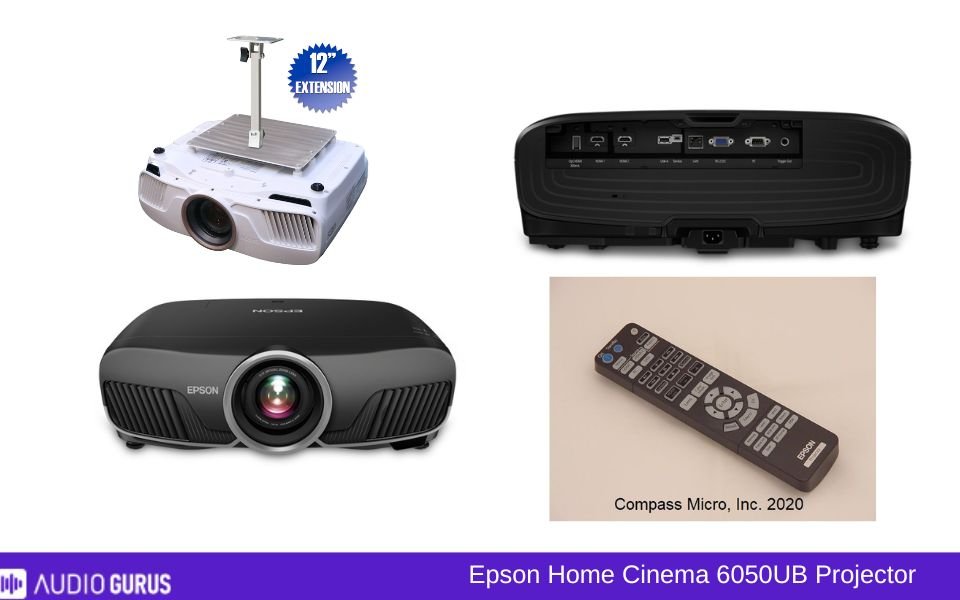
The Epson 6050UB is a popular projector among home theater enthusiasts, and its reputation comes with good reason. This is an ideal pick for anyone serious about creating a cinema-like experience at home. If you have a dedicated, medium-to-large-sized room that can be darkened, this projector will fit perfectly. It’s not for casual users or small spaces but shines for movie buffs and gamers who value picture quality and immersive visuals.
Our Verdict
The Epson 6050UB offers a balanced mix of stunning visuals, thoughtful design, and solid connectivity. It’s a near-perfect fit for anyone building a home theater in a dedicated space. The highlights? Exceptional 4K visuals, vibrant colors, and deep blacks. But it’s not flawless. Occasional light bleed, limited gaming performance, and a lack of smart features might make you pause. If you’re okay with the quirks and want a premium experience, this projector delivers. It’s not cheap, but it’s built to impress those who value quality over convenience. Verdict: A great investment for the serious home theater enthusiast.
PROS
- Exceptional 4K image quality
- Vibrant and natural colors
- Excellent HDR performance
- Deep black levels
- Quiet fan operation
- Motorized lens adjustments
- Versatile connectivity options
- Great for dedicated theaters
CONS
- Bulky and heavy design
- No built-in smart features
- Input lag for competitive gaming
GENERAL
| Projector Type | 3LCD |
|---|---|
| Screen Size | 50 |
| Brightness | 2,600 lumens |
| Contrast | 1,200,000:1 |
| Resolution | 4K Enhancement (1920 x 1080 x 2); maximum resolution 4096 x 2160 |
| Throw Ratio | 1.35 – 2.84 |
IMAGE QUALITY
| Resolution | 4K Enhanced (UHD) |
|---|---|
| Brightness | 2000-4000 lumens |
| Contrast | 100000+: 1 |
| Aspect Ratio | 16:9 |
| Pre-Calibration Color Accuracy | No |
| Post-Calibration Color Accuracy | |
| Color Gamut | DCI-P3 |
| Picture Mode | Bright (or Dynamic) , Cinema (or Movie) , Black and White (or Monochrome) , Nature , D. Cinema , 3D Mode |
| Picture-in-Picture | N/A |
PROJECTION TECHNOLOGY
| Illumination Technology | Lamp (Bulb) |
|---|---|
| Display Technology | LCD |
| Geometric Correction | Yes |
| Edge Blending | N/A |
| DICOM | N/A |
| Frame Interpolation | Yes |
| Anamorphic Ready | Yes |
THROW DISTANCE AND SCREEN SIZE
| Throw Ratio | Short Throw |
|---|---|
| Screen Size Range | 50 |
| Projection Distance | 10.3' – 29.4' |
| Optional Lenses | N/A |
| Vertical Lens Shift | Yes |
| Horizontal Lens Shift | Yes |
| Lens Memory | N/A |
| Zoom Ratio | 1 – 2.1 |
| Power Zoom | Yes |
| Power Focus | Yes |
| 24/7 Duty Cycle | N/A |
THROW DISTANCE AND SCREEN SIZE
| Throw Ratio | 1.35 – 2.84:1 |
|---|---|
| Screen Size Range | 50 |
| Projection Distance | 10.3' – 29.4' |
| Optional Lenses | No |
| Vertical Lens Shift | ±96.3% |
| Horizontal Lens Shift | ±47.1% |
| Lens Memory | N/A |
| Zoom Ratio | 1 – 2.1 |
| Power Zoom | Yes |
| Power Focus | Yes |
SMART FEATURES
| Wireless Screen Mirroring | Miracast , Intel WiDi (Wireless Display) |
|---|---|
| Wireless Casting | Miracast |
| Streaming Apps Built-in | No |
| Voice Control | |
| Smart Calibration | N/A |
| Auto Keystone | N/A |
| Smart OS | N/A |
| Automatic Lens Cover | N/A |
| Ambient Light Sensor | N/A |
| Dynamic Image Adjustment ( | N/A |
| User Profiles/Personalized Settings | N/A |
| Crestron RoomView | N/A |
| Close-Captioning | N/A |
| Parental Controls | N/A |
| Customizable Home Screen | N/A |
| CEDIA | N/A |
AUDIO
| Built-in Speakers | N/A |
|---|---|
| Audio Power | No |
| Speaker Type | No |
| Sound Modes | No |
| Dolby Audio Support | No |
| Dolby Digital | N/A |
| Dolby Digital Plus | N/A |
| Dolby Atmos | N/A |
| DTS Audio Support | N/A |
| DTS-HD Master Audio | N/A |
| Audio Formats Supported | |
| Audio Enhancements | |
| Auto Audio Sync | N/A |
| Dynamic Range Compression | N/A |
| Loudness Equalization | N/A |
PERFORMANCE
| Input Lag | < 30ms |
|---|---|
| Refresh Rate | 60Hz |
| Frame Rate | |
| Eco Mode | Yes |
| Full Power Mode | Yes |
| Standby Mode | Yes |
| Manual Keystone Adjustment | Yes |
| Auto Keystone | N/A |
| 4-Point Keystone | N/A |
| Keystone Vertical (Keystone Vert) | Yes |
| Keystone Vertical + Horizontal (Keystone V+H) | Yes |
CONNECTIVITY OPTIONS
| Bluetooth | N/A |
|---|---|
| Bluetooth Audio Support | N/A |
| HDMI | Yes |
| HDMI (MHL) | N/A |
| HDMI (HDCP 2.2) | Yes |
| HDMI (HDCP 2.3) | N/A |
| HDMI 2.1 | N/A |
| USB-C | N/A |
| USB-A | Yes |
| VGA | Yes |
| USB Media Player | N/A |
| Ethernet | Yes |
| DVI | N/A |
| SD Card Slot | N/A |
| Optical Audio Output | N/A |
| Wi-Fi | N/A |
| Wi-Fi Direct | N/A |
| Wi-Fi Connectivity | N/A |
| RS232 (Control Port) | Yes |
| 3.5mm Audio Out | N/A |
| 3.5mm Audio In | N/A |
| Multi-Room Audio Support | N/A |
| RCA Composite Video | N/A |
| Component Video (YPbPr) | N/A |
| S-Video | N/A |
| 12V Trigger | Yes |
| Microphone Input | N/A |
| HDBase T | N/A |
| 3-RCA Component | N/A |
| 3-BNC Component | N/A |
| 5-BNC RGBHV, Comp | N/A |
| Microphone Input | N/A |
BUILD
| Screen Size | 300.95 |
|---|---|
| Dimension | 7.6 |
| Weight | 24.7 lbs |
| Lamp Life | 3,500 hours |
| Cooling System | N/A |
| Dust-Proof Design | N/A |
| Shock Resistance | N/A |
| High MTBF | N/A |
| Warranty | 3 years |
RATING:
| Video | 4.06 |
|---|---|
| Connectivity | 3.61 |
| Audio | 2.86 |
Design
The Epson 6050UB has a sensible and robust design. Though it's practical, it's not aiming to compete in any beauty competitions. It mixes with most home theatre configurations without garnering too much notice because of the black matte appearance. Some consumers have noted that its weight is more than what they would have anticipated. Remember its weight and bulkiness if you want to ceiling-mount it. To install it, you will probably need a strong mount and maybe second hands.
The careful positioning of connections on the rear makes connecting many devices somewhat simple. Some consumers, however, wish the remote was a bit more user-friendly. For gloomy spaces, the illuminated buttons are a good addition; unfortunately, using the settings menu might be awkward.
For those who seek flexibility in their arrangement, the motorized lens is quite a benefit. Fine-tuning is easy when you change zoom, focus, and lens shift without actually touching the projector. Some customers, however, say that motorized features might be a little sluggish.
Connectivity
Connectivity-wise, the Epson 6050UB has a lot of choices. Two HDMI ports make it ideal for linking many devices, including Blu-ray player, game consoles, or streaming sticks. Most consumers like the simplicity with which one may move between inputs. If you want to future-proof your system, however, the absence of a more current HDMI 2.1 capability might be a drawback.
One major victory here is the Ethernet port addition. This is a lifesaver for individuals who want steady streaming via wire internet connections. There are also wireless choices, although some consumers note varying Wi-Fi performance—especially in households with many smart gadgets.
The USB port—which may be utilized for firmware upgrades or device powering—is another interesting aspect. This little feature has spared consumers from the headache of locating nearby additional outlets. It is noteworthy nonetheless that this projector lacks built-in smart applications. For streaming, you will need an outside gadget like a Roku or Chromecast, which some may see as a drawback.
Performance
The Epson 6050UB excels in this regard. Users beam about the picture quality. Sharp, detailed images produced by the 4K enhancement technology provide films and games with great looking quality. The great color reproduction of the projector helps colors to be vivid and natural. Watching a nature documentary on this projector transports one to the woods right here.
Its HDR performance is one very remarkable quality. The Epson 6050UB deftly manages strong highlights and deep blacks with HDR10 and HLG compatibility. Some consumers even claim it matches the image quality of upscale TVs. On the other hand, there are sporadic concerns about the insufficient brightness in HDR mode for rooms with high ambient light. Your experience may not be the greatest if your room is not completely dark.
Gamers feel differently about this projector. Though it has amazing images, the input latency isn't the lowest available on the market. While casual players may not notice, for competitive gaming this might be a fatal flaw. Fast-paced action sequences in movies or games may sometimes occasionally display little motion blur, as some users have also seen.
Still, another noteworthy aspect is the black levels of the Epson 6050UB. The sharp, clear elements in gloomy settings enhance the immersive experience. This projector can almost make a home theatre arrangement seem nearly as nice as a commercial cinema when combined with a decent screen. It's not ideal, however; some users have seen sporadic light leakage in the corners, which might be annoying in really gloomy sequences.
Usually quiet, particularly in Eco mode, the fan noise is You could detect a tiny hum, however, if you are seated near the projector and running it in high-performance mode. Though most people find this annoying, it's worth noting.
Where and When to Use
Dedicated home theatre rooms are where this projector fits most. It shines, especially in dim surroundings when its color performance and brightness may really be outstanding. Seeing films late at night with the Epson 6050UB is like a luxury experience.
You might find it difficult to attain the same degree of image quality if you want to use it in a living room or anywhere with plenty of natural light. Blackout curtains have been attempted by some users to enhance the experience; they are effective but add an additional step to your arrangement.
Movie evenings, sporting events, and binge-watching your favorite series all provide perfect settings for this decision. However, for afternoon casual watching, it may not be the ideal choice. Gamers may find it fun for single-player or story-driven games but less so for quick-paced competitive games.
Compatible Devices
The Epson 6050UB runs easily on many different devices. Usually, users combine it with Apple TV, Fire TV, or Roku, streaming sticks. Though, as was already said, competitive players may experience input latency, gaming consoles like the PS5 and Xbox Series X also perform really well.
Other well-liked solutions with simple connections include Blu-ray players and PCs. For a more realistic experience, some consumers have even linked it to sound systems via HDMI ARC or optical audio outputs. Just make sure your home theater's sound setup corresponds with the quality of the projector to prevent any bottlenecks.
Ease of Use
Most people find it easy to set up the Epson 6050UB. Once you get acquainted to the on-screen menu, it is really simple to acquire the ideal alignment with the motorized lens adjustments. As the default settings may not fit everyone, some users advise utilizing a calibration tool or professional service to get the greatest image quality.
Although it is useful, the remote control may need an update. It's not as user-friendly as it could be; exploring the options might take some time to get accustomed to. The absence of built-in smart features implies that streaming requires an outside gadget, thereby complicating the configuration.
Another area consumers have conflicting emotions about is maintenance. The projector's filter has to be routinely cleaned, and while the bulb life is good, it will eventually call for replacement. These are common projector problems, but if you want a low-maintenance gadget, they should nonetheless be considered.
Cost
You can't deny that the Epson 6050UB is a worthwhile purchase. It is not a cheap projector; its pricing reflects its upscale characteristics. Most consumers, particularly about similarly priced rivals, believe it provides great value for money. Some, however, believe it more difficult to justify the expense without built-in smart features or contemporary HDMI capability.
It's crucial to include lamp replacements and maintenance in your budget as over time they might contribute to the total cost. Having said that, most consumers think the visual quality and performance justify every dollar.
ADVANCE COMPARE ENGINE
Select Two Audio / Video System for Detailed Comparison
ADVANCE SEARCH ENGINE
Find Your Sound System by Any Desire Specification


