Best HEOS Compatible Speakers: Review and Guide

31 October, 2022 by Admin

Although HEOS makes it easier to work with multiroom audio, the sound could be improved further with dynamics. You can choose HEOS wireless speakers based on your room size and setup scenario. There are several options to arrange a setup. You can pair two HEOS 1 or 3 for stereo and then connect multiple HEOS 5 in different rooms for seamless sound throughout the house.

It always not necessary to pick HEOS compatible speaker. HEOS Link will work with any receiver or amplifier which you can use to set speakers in different rooms. in most cases, HEOS 1, 3, 5 or 7 speakers will result in easier setup and seamless audio playback. Although user experience may tell you about interruptions, this is mostly due to weak Wi-Fi signal.

Denon and Marantz also have receivers with built-in HEOS. With that you can create multiroom sound based on the number of zones. HEOS and Alexa works together that makes controlling speakers quite easy. If you want a soundbar for TV, you can also do this with HEOS. Once you setup the soundbar, use HEOS to connect surround or rear speakers.

What is HEOS and How does it work?

HEOS stands for Home Entertainment Operating System. This is a system that allows multi-room speaker setup wirelessly and is a platform made by Denon. Along with Denon, Marantz receivers also support HEOS feature. Denon has several wireless speakers, soundbars and receivers with HEOS compatibility. You will need internet connection as HEOS will work via Wi-Fi.

Working over Wi-Fi allows transmission of uncompressed audio files. This is a better option than streaming with Bluetooth. It supports MP3, AAC, Apple, DSD, FLAC, wav, wma. Along with streaming from internet or Bluetooth, you can play songs from CD/turntable in HEOS compatible wireless speakers via HEOS amplifiers.

Create stereo or surround sound with HEOS. Make sure to pair speakers of same model or brand for stereo like two HEOS 5 speakers. You can also use HEOS for rear speakers. In case you want HEOS surround, make sure the receiver supports this. If you don’t have a HEOS receiver, then you can also use the HEOS Link. This is a preamplifier via which you can connect non-HEOS receiver or soundbar.

Control Option:

Download the HEOS app in iOS or Android. Install it and you are good to go for installation. The following devices will work with HEOS app: iPhone, iPad, or iPod running iOS 7 or higher, Android Smartphone or Tablet running Android 2.3 or higher and Kindle Mobile device. 

Best HEOS Compatible Speakers:

HEOS wireless speakers are available for different use cases. Based on your room size you can choose the wireless HEOS speaker, or you can also pick a soundbar. HEOS system is quite versatile as you have the option to go for a complete home theater system.

Denon Home 350 Wireless Speaker Review and Guide To Use:

6.04 Mixed Usages
7.6 Music:
6.7 Movies:
1 Outdoors:
6.2 Podcasts
8.7 Voice Assistant:

Denon Home 350 speakers are great for music and produce stereo sound on its own. The speakers have excellent frequency response. It works with Airplay and HEOS; this makes it a versatile speaker. It shows decent performance with movies and shows. Playing music from different streaming platforms is very easy. Make sure you have a stable Wi-Fi connection. While you can also enjoy movies with clear vocals, we suggest a stereo pair or a 5.1 system.

Our Verdict

If you want a versatile speaker with an all-in-one solution, then Denon Home 350 is best for you. Use it to setup multiroom audio with the same song in all rooms or different ones for different rooms. While the bass shows its presence, if you consider yourself a bass head, you will need a subwoofer. The sound quality is engaging and impactful, especially for music.

PROS
  • Supports hi-res audio
  • Clear highs and decent lows
  • Bluetooth and Wi-Fi available
  • Good sonic accuracy
  • Easy to use with multiple control options
CONS
  • No rating against dust or water
Where to Buy

Specification

GENERAL

Recommended Usage Home Bluetooth Speaker , Home Wi-Fi Speaker
Release Year 2019
Power Source AC Only
Multi-Device Pairing: N/A

BUILD QUALITY

Material Quality Great
Water Resistance: No
Dust Resistance No
Floats In Water: No

STYLE

RGB Light: N/A
Color Variation Black and White.
Sizes And Variants N/A

PORTABILITY:

Power Source: AC Only
Hand Carry N/A
Weight 15.0 lbs (6.8 kg)
Volume: 939 in³ (15,390 cm³)
Connectivity: Bluetooth & Wi-Fi and Wired

BATTERY:

Battery Powered: N/A
Battery Life N/A
Charging Time: N/A
Power Saving: N/A
Charging Port: No Battery

Bluetooth Specification:

Bluetooth: Yes
Bluetooth Version: Unspecified
Bluetooth Range: 328.1 ft (100.0 m)
Bluetooth iOS Latency: 575 ms
Bluetooth Android Latency: 499 ms
Multi-Device Pairing: N/A

Wi-Fi Specification:

Wi-Fi: Yes
Wi-Fi Version: Wi-Fi 5
Wi-Fi Frequency Band: 2.4GHz & 5GHz
Apple AirPlay: Yes
AirPlay Latency: 2 ms
Google Chromecast: N/A
Chromecast Latency: N/A

Wired Connectivity:

Aux Input: Yes
USB Audio: N/A
Other Ports: Yes

CONTROLS (physical buttons):

Ease Of Use: Great
Music Play/Pause [Button/Touch]: Yes
Call Answer/End [Button/Touch]: N/A
Volume Up/Down [Button/Touch]: Yes
Track Next/Previous [Button/Touch]: Yes
Microphone On/Off: N/A
Additional Controls: Yes

VOICE CONTROL:

Voice Assistant: Yes
Voice Activation: Yes
Speakerphone: N/A
Alexa: Built-in (Wi-Fi Only)
Siri: No
Google Assistant: No
Microphone Mute: Yes
Far-Field Performance: Excellent
Ambient Noise Performance Excellent

App:

App Name: Heos
iOS: Yes
Android: Yes
EQ: Bass/Treble
Stereo Pair Mode: Yes
Party Mode: Yes
Multi-Room: Yes

AUDIO QUALITY [TESTED RESULT]:

Frequency Response Accuracy: Great
Soundstage: Okay
Dynamics: Decent

IN THE BOX

Accessories: Denon Home 350 speaker, Power cable, Screw for wall mounting.
User manual: Yes

Specs:

  • Supports ALAC, FLAC and WAV files up to 192kHz/24-bit
  • 6 class D amp
  • USB and Aux in
  • Dimension: 380 x 225 x 180 mm
  • Supports Hi-res audio

Denon Home 350 is a one of the HEOS built in speakers that supports both Bluetooth and Wi-Fi. It works with voice assistants. It consists of 2 0.75” tweeters, 2 2” mid-bass drivers and 2 6/5” woofers. Wi-Fi makes it easy to stream from Amazon Music, Deezer, TuneIn, etc. This speaker with Denon HEOS and Alexa makes it easier to control different options with Alexa.

Built-in microphone helps in this case to pick you voice even in noisy environments. It has a glass top and mesh like grille. Build quality is decent. If you are an Apple user, use Aiplay 2 or simply pair with other Aiplay supported speakers. Precise tuning of the speaker ensures balanced audio profile. Although the bass is decent, it is futureproof as it supports sub with built-in HEOS like the Denon DSW-H1.

If you are using the DHT-S716H soundbar, you can use this speaker as surround. You can also use two of these 350 Home speakers as HEOS rear surround speakers. This 350 Home speaker has an average soundstage, and it can get quite loud. If you want a small speaker, then check the Denon Home 150

[amazon box="B0837K4WXB" title= " "] [/amazon]

It has two Class D amplifiers and a total of 4 drivers. If you want to broaden the sound, place it nearby walls. You can pair two of these but, if you use Airplay mostly, you won’t get stereo.

What can you do with HEOS?

With the HEOS app you can tweak bass and treble settings. While using the app, make sure to update it to the latest firmware in order to use Amazon Alexa. With HEOS you can connect two of the speakers or can create You can also pair two speakers together to create a multi-room audio by connecting several speakers in different rooms.

For adding several speakers in a group, use the Room option of the app. Then give the group a name so that it’s easier to understand. The app gives you group volume control or individual volume sliders as well. While setting up speaker using HEOS app, go to the back side and check for a Connect button. A step-by-step instruction is given below as well.

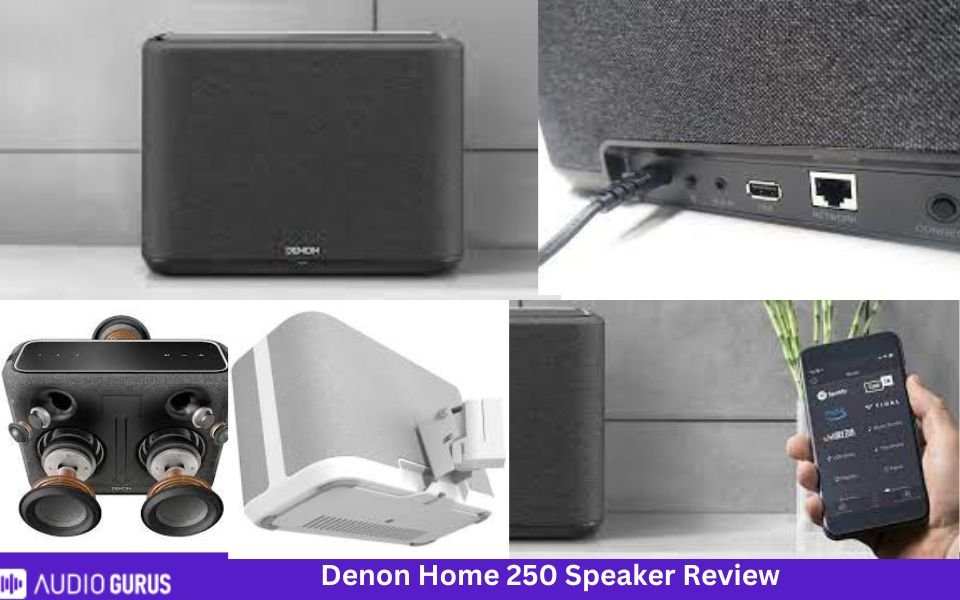
Denon Home 250 Wireless Speaker Review and Guide To Use:
5.7 Mixed Usages
6.8 Music:
6.3 Movies:
1 Outdoors:
6.7 Podcasts
7.6 Voice Assistant:
Specification

GENERAL

Recommended Usage Home Bluetooth Speaker , Home Wi-Fi Speaker
Release Year 2019
Power Source AC Only
Multi-Device Pairing: N/A

BUILD QUALITY

Material Quality Great
Water Resistance: No
Dust Resistance No
Floats In Water: No

STYLE

RGB Light: N/A
Color Variation Black and white
Sizes And Variants N/A

PORTABILITY:

Power Source: AC Only
Hand Carry N/A
Weight 8.16 lbs
Volume: 466.6 in3
Connectivity: Bluetooth & Wi-Fi and Wired

BATTERY:

Battery Powered: N/A
Battery Life N/A
Charging Time: N/A
Power Saving: N/A
Charging Port: No Battery

Bluetooth Specification:

Bluetooth: Yes
Bluetooth Version: 802.11ac
Bluetooth Range: N/A
Bluetooth iOS Latency: N/A
Bluetooth Android Latency: N/A
Multi-Device Pairing: N/A

Wi-Fi Specification:

Wi-Fi: Yes
Wi-Fi Version: Wi-Fi 5
Wi-Fi Frequency Band: 2.4GHz & 5GHz
Apple AirPlay: Yes
AirPlay Latency: not specified
Google Chromecast: N/A
Chromecast Latency: N/A

Wired Connectivity:

Aux Input: Yes
USB Audio: Yes
Other Ports: Yes

CONTROLS (physical buttons):

Ease Of Use: Great
Music Play/Pause [Button/Touch]: Yes
Call Answer/End [Button/Touch]: N/A
Volume Up/Down [Button/Touch]: Yes
Track Next/Previous [Button/Touch]: Yes
Microphone On/Off: Yes
Additional Controls: Yes

VOICE CONTROL:

Voice Assistant: Yes
Voice Activation: Yes
Speakerphone: N/A
Alexa: Built-in (Wi-Fi Only)
Siri: No
Google Assistant: No
Microphone Mute: Yes
Far-Field Performance: Excellent
Ambient Noise Performance Excellent

App:

App Name: HEOS
iOS: Yes
Android: Yes
EQ: Bass/Treble
Stereo Pair Mode: Yes
Party Mode: Yes
Multi-Room: Yes

AUDIO QUALITY [TESTED RESULT]:

Frequency Response Accuracy: Great
Soundstage: Decent
Dynamics: Okey

Rating System

Music: 6.79
Movies: 6.31
Outdoors: 1
Podcasts 6.74
Voice Assistant: 7.64

IN THE BOX

Accessories: Denon 250 speaker, AC power cord, Screw, Quick Start Guide, Safety Instructions, Warranty Information
User manual: Yes

Specs:

  • 4 class D amps
  • Has proximity sensor
  • 3 quick preset buttons
  • Dimension: 295 x 216 x 120 mm

What if Denon Home 350 is too large and Home 150 is too small for you? Well, Denon has got your back. You can see this Denon Home 250 wireless speaker which falls between 350 and 150 in terms of size and sound. Inside the speaker there are two 0.75” tweeter, two 4” mid-bass driver and a 5.25” passive radiator. It has crystal clear treble and precise midrange.

Similar to Denon 350, it works with Alexa and supports streaming through Bluetooth or Wi-Fi. The performance is adequate if placed in mid-sized rooms. You can use it to play music and it can get quite loud. It is better to use it as front speaker near walls rather than rear. Before you feel too much disappointed, understand that these are mono speakers. Pairing two of them might improve the sound.

Speaker placement plays a huge role in the audio quality. Denon HEOS speaker manual suggests placing it 3 to 12” from the wall and around 12” from TV or PC. Make sure to place it nearby your listening position and within Wi-Fi range for stable connection. In case you want to play music from PC or NAS, use the app, go to Music option and select Music Server.

Denon Home 250 Bluetooth compatibility allows you to stream files from Bluetooth enabled devices. You can also stream content from iPhone, iPad or iPod if it is upgraded to iOS 10.0.2 or later versions.

What can you do with HEOS?

HEOS app and system works in the same way as in Home 350 speakers. The app is user-friendly and is easy to use. Creating multiroom is simply a press away. You will experience True multiroom audio with HEOS. You can the same song in all rooms or different songs in each room. Connect additional wired speakers with Ethernet cable and the speaker’s name will appear on the app.

If you want to add wireless speakers, go to Settings in the app and click on Add device. With HEOS, this Denon Home 250 speaker can connect to 100000 internet radio through TuneIn. For changing the speaker performance, go to the EQ settings in the app to adjust bass or treble.

Denon HEOS 5 Review and Guide To Use:

[amazon box="B00KJJW39I" title= " "] [/amazon]

Specs:

  • 4 Class D amp
  • Picture formats: PG, PNG, BMP and GIF
  • Audio formats: WMA, AAC, MP3, WAV, ALAC and FLAC
  • Dual band Wi-Fi
  • Dimensions: 209 x 294 x 166 mm

 Denon HEOS 5 has a neutral audio profile. It delivers sound with optimum clarity. It has two tweeters, two woofers and a passive radiator. It is best for medium sized spaces in living room, bedroom or offices. If you prefer stereo sound or have a large space to cover, it is best to use HEOS to connect two of these HEOS 5 speakers.

Acoustical processing algorithms enhance the audio quality. Use Alexa to control audio playback with your voice. Go to Alexa app and press on Skills options. Add and enable the HEOS Home Entertainment. In the Smart Home option of Alexa app, find out your speaker. You can use Alexa to control other HEOS compatible speakers as well.

You can also use Google Assistant with HEOS. With the help of Google Home, app or device with built-in Google Assistant to use and control options with voice. HEOS speakers have very easy setup and installation procedure. They excel in producing sound from these compact speakers due to intelligent engineering.

The speaker size is different from others and although it isn’t a battery powered portable speaker, it comes with a handle. We presume its because you can hold it to carry it from one place or room to another. On the rear side you will see the following ports: USB port, 3.5mm audio jack and Ethernet. HEOS 5 speaker is powerful than the HEOS 3 but HEOS 7 is much better than the 5.

What can you do with HEOS?

With HEOS app, you can stream content from Spotify, TuneIn, SoundCloud, TIDAL, Deezer, Napster, etc. You can also play files from USB, NAS, smartphone or tab. It supports multiroom and Hi-res audio. Once the setup is complete, the speakers will become available in different music streaming apps like Spotify, TuneIn or others.

HEOS app integrates quite well with those music services. If you face any connection interruption with HEOS, or feel discouraged by reading other user feedback, understand that each user has a different setup. If the Wi-Fi network faces a barrier by travelling through walls or too many devices are connected that makes it congested, playback might be interrupted. So, make sure your internet has strong signal and is stable.

Denon DHT-S716H Home Theater Soundbar Review and Guide:

[amazon box="B07XPF1BNM" title= " "] [/amazon]

Specs:

  • 6 Class D amp
  • Supports WMA, AAC and MP3, FLAC, WAV and ALAC
  • JPG, PNG, BMP and GIF
  • 72 x 1100 x 148 mm

Denon DHT-S716H is a 3.0 soundbar that has a total of 9 drivers. There are three tweeters and six mid-range cones.  This Denon HEOS soundbar delivers rich and deep audio. Its warm sound profile ensures movies are engaging. Just because it is a standalone soundbar doesn’t mean it is poor sounding. It is futureproof so if you want you can add wireless sub and surround sound.

With a length of 43.3”, you can easily place it under 55 or 65” smart TVs. If you aren’t satisfied with single soundbars, you can always check Denon HEOS 5.1 home theater system. For smaller setup, a 3.1 home theater system is also available. It supports the following surround sound formats: Dolby TrueHD, DTS-HD Master, Dolby Digital, Dolby Digital Plus, DTS Decoding.

However, you won’t find Atmos of DTS: X. if you want 3D sound with Dolby Atmos and DTS:X, you can check the

Denon Home 550 compact soundbar Review

7.1 Mixed Usages
7.1 SOUND QUALITY
7.1 BASS ACCURACY :
8.7 AUDIO & VIDEO LATENCY:
4.6 AUDIO ENHANCEMENT FEATURES:
8 BUILD QUALITY :
Specification

GENERAL

Number of Channel 2.0 Channel
Placement Type Wall-mountable
Connectivity Type Both (Wired & Wireless)
Subwoofer Feature Without Subwoofer
Rear Speaker N/A
Central Channel Speaker N/A
Audio Enhancement Features Yes
HDMI input/output Yes
Analog Audio In 3.5mm (Aux) Yes
Loudness High Volume ( > 92db )
Warranty 24 months Months

Connectivity:

Digital Optical Audio Input ( Toslink ) 1 Optical Audio Input
HDMI ARC 1 (shared)
HDMI Out 1 (shared)
Full HDMI In 1
Analog Audio In 3.5mm (Aux) 1
RCA Ports
USB Port 1 USB Port
Ethernet Jack Yes

Audio Quality ( Tested )

Dialogue & Vocal Accuracy Frequency deviation from target is less than standard error (3.4 dB ); which means soundbar is very good to reproduce dialog and instrumental music
Bass Accuracy ( for music, film scores, movies, and games) Soundbar 's Low-Frequency-Extension is more than 35 Hz. Which means It can reproduce the deep thump and rumble in the low-bass accurately.
3- Dimensional Sound Accuracy ( Sound Stage) soundstage has good focus overall but but some sound tracks seem to be bit more diffused and lack separation.
Total Harmonic Distortion ( Center Channel ) No Dedicated Center Channel Speaker. So, it can not produce sound quite as clear as 3.0, 3.2 , 5.1 or 7.2 channels Soundbar. But It has decent center performance to produce accurate audio and dialogue.
Surround Sound Imaging ( Rear Channel ) No dedicated or alternative channel for surround content. So it downmixes surround content to stereo.
Streo Dynamics ( Loudness ): Dynamic Range Compression @ Standard Volume (80 dB) is more than standard deviation (<2 dB).
Audio & Video Latency Here no visible latency via ARC (15 ms) and Optical (38 ms) but visuals difference may found via Full HDMI Input (-56 ms).

Audio Enhancement Features:

Digital Room Correction: N/A
Auto Volume Adjustment/ Night Mode: Yes
Equilizer Options: Presets
Bass Adjustment ( Thump & Punch of sound) Yes
Treble Adjustent ( Brightness and Clarity od Audio) Yes
Surround Level Adjustment: N/A
Virtual Surround Effect: Yes

Supported Audio Format ( HDMI ARC)

eARC Standard Yes
Dolby Atmos Yes
Dolby Digital Yes
Dolby Digital Plus Yes
DTS Yes
DTS: X Yes
Dolby True HD ( eARC only ) Yes
DTS- HD MA (eARC only) Yes
5.1 PCM ( eARC only ) Yes

Supported Audio Format (Full HDMI In' port ):

Dolby Atmos : Yes
DTS:X : Yes
Dolby Digital : Yes
Dolby Digital Plus: Yes
DTS : Yes
Dolby TrueHD : Yes
DTS-HD MA : Yes
5.1 PCM Yes

Audio Format Support ( Optical Port ):

Dolby Digital : Yes
DTS : Yes

Drivers Specs

Tweeter Size and Type : 0.75" Dome (2)
Midrange Size & Types: 2.1875" Cone (4)
Woofer Size & Type : 2"x3.5" Passive Radiators
Subwoofer Driver None
Other

Build Material

Enclosure Passive Radiator
Finish The Denon has a great build- made of plastic, its feels solid and durable. Sides of the bar is made of fabric.
Color Black
Soundbar Width 25.6" (65.0 cm)
Soundbar Height 3.0" (7.5 cm)
Soundbar Depth 4.8" (12.2 cm)
Subwoofer Width N/A
Subwoofer Depth N/A

Rating System

SOUND QUALITY 7.1
BASS ACCURACY : 7.1
AUDIO ENHANCEMENT FEATURES: 4.6
AUDIO & VIDEO LATENCY: 8.7
BUILD QUALITY : 8

It has 4K HDMI Input and HDMI Output so connection with TV is much easier. Four HDMI input is much better than one or two and will be an advantage for people with several devices to connect.

You will also find analog line in, USB, optical (Toslink) and RCA digital audio in.Controlling this Denon HEOS soundbar is easier with knobs on the bar itself, or the remote. Remote isn’t backlit but with few buttons, it is user friendly. The remote has few buttons that includes 6 presets. You can save customized inputs with different sound mode and volume level. Similar to other Denon HEOS speakers, this soundbar doesn’t support Airplay.

What can you do with HEOS?

Similar to other Denon speakers, this soundbar supports HEOS multiroom audio. So you can play music files or TV audio to other HEOS compatible speakers. With HEOS expand this 3.0 system to 3.1 or 5.1 home theater system. Connect HEOS built-in speakers like HEOS 3 speakers along with a HEOS subwoofer like the DSW-11 model.

HEOS outdoor speakers:

[amazon box="B01CTUJQL2" title= " "] [/amazon]

HEOS 1 is a Denon wireless outdoor speaker that you can use in indoor as well. It is humidity resistant to suit well in outside environment. Splashguard protection ensures that it remains protected against water splashes. This compact speaker can deliver a punch and you can enjoy music by streaming through Wi-Fi or Bluetooth. it has a good battery life of around 6 hours.

Heos compatible Devices for Speakers:

Multiple speakers throughout the house need a media to connect each other. For this, HEOS amplifier and receivers will help.  The Drive HS2 is a HEOS multi zone amp with which you can create a 4-zone multi-room speaker system. If you have wired speakers and want a multiroom setup with Bluetooth, you will need a HEOS Amp HS2.

Denon HEOS LINK Wireless Pre-amplifier User Exprience:

1 Mixed Usages
1 VIDEO FEATURES:
1 CONNECTIVITY OPTIONS:
1 AUDIO FEATURES:
1 MULTIZONE:
1 AMPLIFICATION:
Specification

General

Receiver Type Preamp
Number Of Channel 2 Channel
Number Channel Processing 2
Audio Feature Auro 3D
Video Feature 4K Passthrough
Watts Per Channel 100 W
Zones 4
Radio Internet Radio , Pandora , Spotify , Tidal , SiriusXM
Amplifier

Connectivity

Ethernet Yes
Wi-Fi Yes
Bluetooth Yes
USB Yes
RCA LIne Input: yes
RCA LIne Output: N/A
RCA Pre-Outs: N/A
XLR Line Inputs: no
XLR Pre-Outs: N/A
Phono Input: N/A
Optical Inputs: 1
Optical Output: 1
Coaxial Inputs: N/A
Multi-Channel Input: N/A
Headphone Out: No
HDMI Inputs: No
HDMI Outputs: No
8K Inputs: No
Composite Video Input N/A
Composite Video Output: N/A
Component Video Input: N/A
Component Video Output: N/A
Front A/V Inputs: N/A
Speaker A/B: N/A

AUDIO FEATURES:

Maximum Channel Processing 2
Dolby Atmos no
Dolby Atmos Height Virtualization N/A
Dolby Atmos Music N/A
Dolby TrueHD N/A
Dolby Digital Plus N/A
Dolby Surround Upmixer N/A
Dolby Pro Logic N/A
Dolby Digital EX N/A
Surround EX N/A
DTS:X N/A
DTS Neural:X N/A
DTS Virtual:X N/A
DTS Neo N/A
DTS-HD Master Audio N/A
DTS-HD High Resolution Audio N/A
DTS 96/24 N/A
DTS Express N/A
DTS-ES N/A
IMAX Enhanced N/A
PCM 16-bit, 20-bit,
Music Playback via USB yes
High Resolution Music Playback via USB and/or Network yes
High Resolution Audio Formats via USB FLAC, WAV, ALAC, DSD (up to 2.8 MHz and 5.6 MHz), MP3, WMA, AAC, AIFF
Gapless Playback Yes
DSD via HDMI N/A
DSD via USB yes
DSD to PCM Converter Yes
USB DAC Yes
Jitter Reduction N/A
DTS Dialog Control N/A
Dialog Enhancement N/A
Dialog Level Adjustment N/A
Dialog Normalization N/A
Dialogue Lift N/A
Compressed Music Enhancer n/a
High-resolution Music Enhancer N/A
Audyssey Dynamic EQ N/A
Audyssey Dynamic Volume N/A
Audyssey LFC N/A
Audyssey Sub EQ HT N/A
Audyssey DSX N/A
Direct Mode N/A
Pure Direct Mode N/A
Independent Subwoofer Outputs Yes
Auto Speaker Calibration System with Mic. n/a
Audyssey App Support N/A
Bass Sync N/A
Optimized Bass Redirection N/A

VIDEO FEATURES:

HDMI Version N/A
Enhanced ARC N/A
HDCP Version N/A
HDR10+ N/A
Dynamic HDR N/A
Dolby Vision N/A
HLG (Hybrid Log Gamma) N/A
QMS (Quick Media Switching) N/A
3-D Ready N/A
Video Signal Passthrough N/A
Video Signal Upscaling N/A
Analog To HDMI Upconversion N/A
Component Video Upscaling N/A
isf Certified Calibration Control N/A

Amplifiers

Channels 2
Front Wide Channel Support N/A
Current Feedback Topology N/A
Discrete Amplification N/A
HDAM N/A
THX™ Certification N/A
Continuous 6 Ω Rated Yes
Certified 4 Ω Performance Yes
Bi-amp Capability no

Gaming Features

Auto Low Latency Mode (ALLM) N/A
Variable Refresh Rate (VRR) N/A
Quick Frame Transport (QFT) N/A

Zones

Zones 8
Powered Zones n/a
Zone 2 Outs n/a
Zone 3 Outs n/a
RS-232C Interface N/A
+12V Trigger Output 1

Radio

Analog Tuner n/a
Digital Radio N/A
Internet Radio TuneIn
Pandora Yes
Spotify Yes
Tidal Yes
Deezer Yes
SiriusXM Internet Radio Yes
Napster N/A

Additional Features

On-Screen Display no
GUI Languages 12
Web Browser Control N/A
IP Control for CI Yes
Control4 SDDP Yes
PreAmp Mode Yes
Display no
Remote Controller no
Remote Control In/Out no
LCD Display N/A
Detachable Power Cord N/A
Setup Assistant Yes

Power

Power Output (6 Ω, 1 kHz, 2 n/a
Rated Power Output (6 Ω, 1 kHz, 1 channel driven, IEC) n/a
Dynamic Power per Channel (3 Ω, Front) n/a
Dynamic Power per Channel (4 Ω, Front) n/a
Dynamic Power per Channel (8 Ω, Front) n/a
Power Output (8 Ω, 20 Hz - 20 kHz, 2 n/a
Maximum Effective Power Output (6 Ω, 1 kHz, 1 channel driven, JEITA) n/a
Power Supply AC 120 V, 60 Hz (for North America) AC 220 - 240 V, 50/60 Hz (for Europe)
Toroidal Transformer N/A
Power Consumption 20W
No Sound Power n/a
Standby Power n/a

Rating System

AUDIO FEATURES: 1
VIDEO FEATURES: 1
CONNECTIVITY OPTIONS: 1
MULTIZONE: 1
AMPLIFICATION: 1

Build

Dimensions (W x H x D) 6.1x2.9x7
Weight 1.3 kg
Chassis ABS plastic
Front Panel status led
Speaker Terminals 4
Large Speaker Terminals n/a
Color-Coded Speaker Terminals N/A
Transparent High-Grade Speaker Terminals N/A
High Grade Audio Components N/A
ECO Mode / Hybrid Standby Function N/A
Auto Power off Yes
Warranty 2 years

Specifications

THD digital n/a
Analog Distortion n/a
Phono Distortion n/a
Input Sensitivity and Impedance (Line) 200mV/10 kΩ
Input Sensitivity and Impedance (Phono MM) n/a
Rated Lineout Level and Impedance n/a
Rated Output digital n/a
S/N Ratio (Line, IHF-A) n/a
S/N Ratio (Phono MM, IHF-A) n/a
S/N Ratio (digital) n/a
Phono RIAA Deviation n/a
Frequency Response (Analog In) 10 Hz to 100 kHz (+1 dB, -3 dB)
DSD Sampling Rates via HDMI n/a
DSD Sampling Rates via USB 2.8224/5.6448 /11.2896 MHz
Video Input Sensitivity/Output Level and Impedance n/a
Video Frequency Response n/a
Ethernet Standard IEEE 802.3ab
Wi-Fi Standard 802.11ac
Wi-Fi Terminal Frequency 2.4, 5GHz
Bluetooth Version 4.2
Bluetooth Frequency 2.4 GHz
USB Terminal type-a
FM Frequency n/a
FM 50 dB Quiet Sensitivity (IHF, 1 kHz, 100% MOD.) n/a
FM S/N Ratio n/a
FM Harmonic Distortion (IHF, 1 kHz) n/a
AM Effective Sensitivity n/a
AM Frequency n/a

Specs:

  • Frequency response: 10 Hz to 100 kHz: +1, -3dB
  • Dual band Wi-Fi
  • S/N ratio: 100 dB
  • 74 x 155 x 150 mm

With Denon HEOS Link preamplifier, you can connect any receiver, amplifier or home audio and create multiroom wireless system. On the front panel there is a status LED and on the top section you will find volume and mute button. The rear panel is flooded with ports: IR out, Trigger out, Coax out, optical out, optical in, USB, aux in, analog pre out, subwoofer connector, etc.

It also has two buttons: Bluetooth and Connect. Place the preamp close to the device through which you will connect speakers to create multiroom. It could be a receiver or amp. Also, make sure to be within strong Wi-Fi range. It supports the following files: WMA (192kbps), AAC and MP3 (320kbps), WAV, ALAC and FLAC: (24-bit/192kHz) and DSD (2.8MHz, 5.6MHz).

Looking into consumer feedback, we didn’t encounter any app bugs. Use the free app, create an account and go through any available firmware update. When connected to a good quality device, the sound is pleasing and impressive. It can transfer high-res digital file to external DAC or vintage stereo receiver. Whether you are connecting an old school receiver or speakers, the audio is glorious and noteworthy.

Connect the receiver or amp through preout, coax out or optical out. To achieve a HEOS multiroom system you can connect wired or wireless speakers. For wired speakers you need Ethernet cable. You can stream content from external device and play it through the network to multiple speakers. Use the EQ settings to adjust bass and treble. For changing the sound, you can select either Normal or High.

Denon HEOS Link allows streaming from music services, via Bluetooth, or connecting other devices. This HEOS preamplifier will work with both Denon and Marantz receivers but make sure they are sold after 2010.

Denon (AVRS540BT) 5.2 Receiver User Experience and Review:

[amazon box="B07C49F2LD" title= " "] [/amazon]

Spec:

  • Stereo RMS power: 70W
  • Discrete power amp
  • Supports HEOS Link
  • Built in Bluetooth
  • Dimension: 17.2x6x13.4”

While we talk about Denon or Marantz receivers, Audyssey room calibration software is something that we look into. Denon AVRS540BT doesn’t support Audyssey or AirPlay. It supports DTS HD Master, Dolby TrueHD. For wireless multiroom audio, you need to connect it to Denon HEOS Link. The front panel is made of metal and quality of construction is very good.

It has 5 HDMI In, I HDMI out, composite in, analog in, optical in, sub out, etc. It can smoothly drive high quality speakers. Audio quality is rich and detailed with excellent dynamics. It supports 4k @60Hz input and output. If you connect it to a 4k Ultra HD TV, you can enjoy high resolution images. With HDR 10, HLG, DV and BT.2020, you will view vibrant colors.

As it supports 3D video passthrough, you can connect it to 3D-compatible Blu-ray, games and broadcast devices to 3D-compatible HDTVs. Multiple HDMI inputs allow you to connect different devices like Blu-ray Disc players, game consoles and etc. Go wireless with Bluetooth connection and stream through smartphone or tab.

GUI and setup assistant make the installation easier. The remote control has several buttons and you can use it to adjust channel level button, select sound mode and etc. You can create a 5.1 home theater system and also connect additional sub with sub out. Multiple subwoofers are better than a single one. Two or four subwoofers deliver broader sweet spot in terms of lower frequencies.

This receiver is packed with several settings and adjustment option. You can select room EQ or set Surr. Parameter. For Auto setup use the Sound Calibration microphone and place it on listening position. Use the Manual setup option if you want to set each option like crossover, distance, bass, levels, manually.

Marantz Receptor AV 8K Ultra HD SR5015 User Exprience:

[amazon box="B08F9ZHQTF" title= " "] [/amazon]

Specs:

  • Supports voice assistants
  • 4k and 8k signal passthrough
  • Multiple HDMI ports
  • Power output: 100 W (8-ohm, 20 Hz - 20 kHz, 0.08% 2ch Drive)

Unlike Denon, this is a Marantz receiver with built-in HEOS. It also has several basic features that are missed out in Denon. It supports Wi-Fi, AirPlay and Dolby Atmos. This Marantz NR1510 Slim 5.2 Channels supports Amazon Alexa, Google Assistant and Apple Homepod.For multichannel surround, it supports DTS HD Master, DTS:X, DTS Neutral:X, DTS Virtual:X, Dolby Atmos Height Virtualization.

All these means you will receive an engulfing, room filling audio with overhead effects when connected to speakers or soundbar. This means movies will be immersive, realistic with enveloping sound. It uses Audyssey MultEQ XT room calibration software and supports Dynamic EQ and Dynamic Volume. Aydyssey is one of the most reliable software for room calibration.

It is one of the best HEOS multizone receiver that is suitable for any type of content. With this 7.2 channel HEOS receiver, you can create a 5.1.2 home theater. Dedicated Atmos speakers will produce powerful sound. If you want to create multiroom audio, you can create a 5.1 system and use two channels to play audio in another room.

HEOS multiroom integrated feature allows two zones. In terms of connectivity, it has 6 HDMI In and 2 out, there are other basic ports like composite in, analog in, optical, coax, 2 sub out, USB, etc. With built-in phono in, you can also connect turntable. Support for HDR, HLG, Dolby Vision, HDR10+, Dynamic HDR makes images clearer and richer.

Picture adjust and noise reduction improves picture even more. The receiver wins in terms of dynamic range and excellent clarity. choose any one of the audio enhancements as per the content: DRC, Cinema EQ, etc. HDMI 2.1 with the support for VRR, ALLM and QFT makes it the best HEOS built-in receiver for gaming. Lower lag and faster response time make the gaming scenes clear.

How to setup HEOS?

Follow these steps to establish HEOS connection. The image will give you an idea of on screen prompts:

  • Plug in the speaker to the power outlet and place it in desired position.
  • Take you smartphone, go to HEOS app
  • Use the audio cable to insert into Aux in of the speaker and headphone out of the smartphone
  • Tap on next and check LED light on the speaker to see if its yellow.
  • Then press on the Connect button on the speaker
  • See whether the light glows green continuously
  • On the app, select Next. The light will be solid green
  • Then select ‘light is solid green’
  • Connect the speaker to the Wi-Fi
  • Since you have multiple speakers, give a name for the speaker and the room

HEOS vs Sonos:

[amazon bestseller="Sonos multiroom speakers" template="bestseller_table" items="5"]

Comparing Sonos and HEOS, the HEOS supports 5GHz band of Wi-Fi which isn’t available in Sonos. Sonos supports multiroom as well where you can connect speakers in different rooms over Wi-Fi. Some of the best Sonos multiroom speakers are Sonos Play 1, Play 3, etc. Denon HEOS is comparatively pricier than Sonos systems.

Bluetooth function is available in all Denon HEOS compatible speakers or receivers. With Sonos, this isn’t the case. It’s rare to find a speaker with Bluetooth, Sonos Move is one of them. Sonos app is simple and easy compared to HEOS app. Consumers sometimes complain about lag or bug issues of HEOS app. For others HEOS app worked smoothly.

HEOS app has more function, features and options. If you get to know them you won’t find it harder to use. Setup or installation is easy for both but with Sonos it might be easier.

Parting words:

Are you looking for a HEOS compatible speaker? Some of the best HEOS compatible speakers are HEOS 5 and Home 350. If you want a HEOS compatible outdoor speaker, you can use HEOS 1. Denon HEOS gives you the freedom to spread audio throughout your house in the easiest way possible. Streaming via music services and Bluetooth is the best way to listen to music.

Denon HEOS is a versatile multiroom platform with unlimited possibilities. Consumers also use Sonos for audio in multiroom and it is a competitor of Denon. Denon is best for home theaters. This is because they excel in making the best receiver or amplifiers. If you want a home theater and multiroom audio, this is possible with Denon receiver with HEOS built-in.

HEOS app works well but some may experience few issues as well. Grouping different speakers for different rooms and naming them makes it easy for you to understand. User manual will help you understand each option and how to use the HEOS app. Most HEOS compatible speakers work support Airplay or you can connect smartphone with 3.5mm port. 

What is HEOS Link?

Instead of selecting a HEOS compatible speaker, you can choose HEOS Link. This preamplifier with HEOS will work with receivers or amplifiers that doesn’t support multiroom audio.

Which HEOS speaker is right for me?

HEOS 5 and 7 wireless speakers are best for large spaces, HEOS 3 speaker is best for medium sized rooms. In space limitations, use the HEOS 1.

More Articles


Best Bluetooth speaker for Car [Top 5 Review With In-depth Specs]
SoundBot SB360 is a cheap Bluetooth speaker for cars that delivers good sound quality. You can use it to listen to podcasts as well. Jabra Tour is another great speaker under $100. It has good battery life and supports voice commands for control. It also comes with a handy mobile app which isn’t available on the others. Most of the speakers come with long battery life and even if the battery drains out, charging is easy. In most cases, a USB is available and you can charge it in your car. Things to consider while choosing the best Bluetooth speaker for car: The following lists some basic features that you should look into while shopping for the best Bluetooth speaker for car. Performance: It is likely that you are looking for the Bluetooth car speaker for listening to music along with other purposes. For that, audio quality is important. However, bear in mind that these are very small Bluetooth speakers that work with 2W or 3W power. So, they are best for general listening, and you will not receive shaking bass. Mostly, the speakers are capable of producing loud and clear sound. Phone calls: The next important feature of using these speakers is answering and ending phone calls. They offer clear sounds at both ends. Along with call answer/end options. They have other options like reject call or transfer call. Wireless hands-free phone calls will make your journey worry-free. Control options: Control options are limited in these speakers. most have multi-functional button with which you can perform several commands like answer call, end call, reject call, etc. some speakers have volume up and down buttons that can also be used as next/previous track option. Voice command: Some speakers support voice commands like ‘yes’ to receive a call. They also work with voice assistants on your phone like Siri and Google Assistant. Avantree CK11 needs the smartphone to connect to Wi-Fi for the voice assistants to work. Top 5 Bluetooth speaker for car: Here we select 5 best in-car bluetooth speaker in different categories and review them with details specification. Jabra Tour Bluetooth In-Car Speakerphone Review SPECIFICATION: [ds]-860-[/ds] DETAIL rEVIEW: Jabra Tour speakerphone is an all-in-one Bluetooth car speaker. With Bluetooth, it offers hands-free calling. You can use the speaker for GPS, listening to podcasts, music and many more. DSP and acoustic echo cancellation process ensure crystal clear sound. HD voice microphone ensures clearer voices. Based on your phone call, the speakerphone can redial the last number and tell the name of the caller. This Bluetooth speaker for cars can connect to two mobile phones at once. It is suggested to place the Jabra Tour speakerphone on your sun visor in your car. While driving use the USB cable and car lighter socket for charging. With PC, connect it to the USB port. Control options are great with multiple buttons for basic controls. The speaker will turn on/off automatically as you enter/exit the car. As you pair the mobile phone via Bluetooth for the first time, use 0000 as passkey. Use basic voice commands like ‘answer’ to answer calls as you drive instead of pressing any button. Jabra voice commands are for the speakerphone and there is also option for phone voice commands. If you enable that, you can use voice assistant in your smartphone like Siri. In terms of sound quality while playing music, the speakerphone shows decent performance. It can get loud and produces enjoyable sound. This speakerphone is easy to use with voice guidance that tells you about pairing, battery low, etc. The build quality of the speaker is good, and the cost is cheap. This 3W speaker is best for phone calls and suitable for music. We wish it would include play/pause button but since the device is designed mainly for phone calls, music is secondary option. That said, audio playback is pleasant.   Avantree CK11 Hands Free Bluetooth Car Speaker Review SPECIFICATION: [ds]-861-[/ds] DETAIL rEVIEW: Avantree CK11 has a cassette-type shape that you need to attach to the sun visor. There is a volume knob that makes volume control easier. This volume knob is a multi-functional button that can be used to pair or reconnect devices. This is used for answering/ending phone calls. Other than this, there is a power on/off button and microphone mute/unmute control. This Bluetooth speaker for car has auto power on/off option that detects motion as you open the car door. It allows you to connect another mobile phone which you can use for phone calls or music. It is easy to switch between calls and music between the two connected devices. You can use your smartphone’s voice assistants like Siri or Google Assistant to perform voice commands. Use Siri via the speakerphone to call, ask for directions or send any message via voice commands. For that make sure the phone is connected to Wi-Fi, then pair it with CK11 speakerphone and use the desired voice assistant. In order to charge the phone, look if the LED light blinks 5 times with red indicator. Then charge it for 3 hours with USB wall charger/car charger or if you are using PC use the USB port. It is a 3W speaker that uses echo and background noise cancellation feature to produce the best sound possible. Overall, the sound quality remains loud and clear even if you open your windows. You can listen to music, podcast or audiobooks as well. It is affordable, comes with free car charger and performance is quite good.   Soundbot SB360 Bluetooth Car Kit Review SPECIFICATION: [ds]-862-[/ds] DETAIL rEVIEW: SoundBot SB360 is a circular shaped Bluetooth speaker for cars that has magnetic mounting disc. To place in cars, choose a flat and smooth surface on the dashboard and attach it. Along with sticking it on the car, you can attach it to your shirt with the included stainless-steel clip for clearer calls. The speaker has a built-in microphone and comes with USB and aux cable. LED indicator shows different light for different operations. It has a next and previous track button and a MFB button for multiple purposes.Control options are outstanding in the SounBot SB360 car speaker. With only 3 buttons, you can do almost everything to control the speaker. There are no volume controls so use the car sound system or phone to increase or decrease the volume. You can use the MFB button to answer, end calls, redial number, transfer a call to the phone or reject a call. Press the MFB to play or pause the music. Insert the USB charging cable to the car adapter and then to the cigarette lighter socket. Then, insert the aux cable into the aux port of the car. To play, turn on the car stereo, then choose aux as input. Once you turn on the speaker, it will automatically go to pairing mode. While pairing, use 0000 as pin code. You can use the voice assistant like Siri on your phone. For that, press and hold the Next button for 2s. The speaker supports multi-device pairing, you can connect up to 2 devices to it. In terms of sound quality, the speaker shows decent performance with average loudness and good clarity. Phone calls are stable, loud, and clear. Signal strength and clarity are good as well. Overall, it is one of the best Bluetooth speakers kit for car under $20.   VeoPulse B-PRO 2 Car Speakerphone Review SPECIFICATION: [ds]-863-[/ds] DETAIL rEVIEW: VeoPulse Car speakerphone B-Pro 2 looks like a camera. This Bluetooth speakerphone works with Android, iOS phones, or any tabs. It can detect when you enter the car or leave it. So, as you enter the car, the speaker turns on and establishes a connection. It has volume + and - option which you can use to go to next/previous track. You can take phone calls, use GPS, listen to podcasts, audiobooks, or music through the speaker. When a call comes, the speaker will read the number and by saying ‘yes’ you can easily receive it. You can use voice commands to initiate a call, send sms and many more with your smartphone. Compared to other VeoPulse models like B-Pro or B-Pulse, the B-Pro 2 has better sound performance. Like other car speakers, you need to attach it to the sun visor. Use the smartphone to see the battery life of the speaker and easily determine whether it needs charging. For charging, use the supplied cable and cigar lighter charger. It can also be connected to the PC directly. However, it is suggested not to charge other phones. The speaker has built-in echo filters that minimize any echoes or noise. Like most other Bluetooth car speakers, it can also remain connected to two devices with Bluetooth. It has two 3W speakers that work to produce powerful sound. Overall, the calls are crisp and clear and, the music is loud. It has easy setup and control options.     Besign BK06 Bluetooth 5.0 in Car Speakerphone Review SPECIFICATION: [ds]-864-[/ds] DETAIL rEVIEW: Besign BK06 is one of the best Bluetooth speakers for cars under $30. It uses Bluetooth for connecting to smartphones. This speaker can be used for music, calls and listening to podcasts. Once you open the car door, the built-in motion sensor turns on automatically and pairs to the phone. The speaker has excellent control options including volume+/-, multifunctional button, Siri or voice command, mute. You can use the MFB to answer, end calls, redial, reject, play/pause, two phone switching, etc. Like others, you can use it to connect to two smartphones at once. It allows you to use the voice assistant in your smartphone like Siri for giving commands. Attach it in your car sun visor with the included clip. The battery life is impressive and will give you a talk time of 20 hours. It has two 2W speakers that produce louder and clearer sound. Calls are crystal clear even on noisy roads. This small and compact speaker is easy to use, and the control options are excellent. While charging, use the included USB cable. It is a great device for hands-free calling or listening to music.   Parting words: The best Bluetooth speaker for cars should be able to deliver crystal clear phone calls along with rich and loud music. In case you want an affordable noise cancelling speakerphone for cars, have a look at Besign BK06. It has long battery life, and the control options are versatile. The control options are often limited in these speakerphones. Like the Avantree CK11 doesn’t have play/pause button and the SoundBot SB360 Bluetooth speaker doesn’t have volume up/down control options. To control the volume, you need to use the mobile option. Most of these Bluetooth car speakers have auto on option. They can detect motion and activate easily. The speakers are best for users sitting in the front seat of the car. In the back seat, the sound might ‘feel’ lacking. Why should I choose a Bluetooth car speaker? Along with enjoying music on the go, Bluetooth car speakers are the best way for hands-free calling options. They also offer wireless connectivity with your phone or tab for easy streaming. How to control the Bluetooth car speaker? Not all Bluetooth car speakers include a mobile app. We found the mobile app in Jabra Tour. For most of them, pressing the buttons is easy as you will sit closer to the speaker. Another easier option is voice commands. Most of the speakers work with voice assistants in your smartphone.
-Read More
Best preamp for Audio Technica Lp120
By adding a phono preamp, also called a phono stage, to your turntable, you can make it work with modern amplifiers. Aside from that, it also has standard equalization. So then, why do you need one? There is a chance that your turntable doesn't have one. If it doesn't, you won't be able to play records that have one. Or maybe you just want to make the sound better than what the device's built-in preamp can do. Like many other types of products, phono stages can be bought at a wide range of prices. But whether you want to save money or spend a lot, we have a phono preamp that will meet your needs. We've used our extensive review archive to pick the best phono preamps on the market right now, so you can be sure that the product you buy is of high quality. Here are the best preamps for Audio Technica Lp120. Rega Fono MM MK2  Pros  Detailed and spacious performance from the   Excellent management of the timing and dynamics  Updated  sleeker design  Cons  Nothing to mention   To say that there were high expectations for the successor of the Rega Fono MM MK2 would be somewhat of an understatement. The Rega Fono MM MK2 was widely regarded as one of the finest phono stages that could be purchased. Thankfully, it not only meets them but exceeds them as well. The design has been refined to within an inch of its life, which has resulted in a product that is significantly more streamlined while preserving the winning simplicity of its forerunner. The sound of the MK2, which won an award for its quality, now has a greater dynamic range and greater clarity, making an already excellent performance even more impressive. The phono preamp that offers the best sound quality for its price.  Cambridge Duo MC/MM Pros  Full-bodied and warm presentation from the   Times well, good dynamics  Beautiful to look at and a joy to put to use  Cons  Not nearly as powerful as it could be  This one is a real winner. It's clear that a lot of thought went into making this device because it has an offset volume dial, a simple design, and labels on the back that are easy to read even when you're looking over the top of it. Also, the audio quality has not been in the least bit ignored. Overall, the presentation is excellent. It has qualities like space and unity, as well as dynamic sound and perfect timing. Even though it can't quite compete with the Rega Fono MM MK2, it does a good job of keeping up with itself, which shows that it deserves to be taken seriously. Edwards Audio Apprentice MM  Pros  A satisfactory amount of specifics  Timing and dynamic range are both important.  Music that is skillfully knit together.  Cons  Nothing at all considering the cost.  It's as rare as hen's teeth to find phono stages that aren't too expensive but still sound great, so we're very excited to see a new competitor in this space. Even though it is small and doesn't look like much, a lot of work has gone into how it works on the inside. They give a song's vocals enough weight without drowning them out with bass. In addition to this, it has a great sense of timing. One of the best phono preamps you can buy for the money. Rega Fono Mini A2D   Pros  Musically excellent  At this price, you get a lot of space and detail.  Ability to rip vinyl  Cons  There is not much to see here.  After more than half a decade since its introduction, this phono preamp continues to be one of the best that can be purchased for less than £100 or $100. The tracks are served up with heaping helpings of zeal and enthusiasm, with an additional helping of musicality and dynamics on the side. Additionally, given that it comes equipped with a USB port, you can use it to digitize your record collection.  Moon 110LP v2  Pros  Presentation that is polished and unbroken  Imaging in stereo that is very spacious  Outstanding construction and end result  Cons  With moving coil cartridges, the argument is less compelling.  Even though it doesn't have the most catchy name, the 110LP v2 does an excellent job of enhancing the sound quality of your vinyl records. The tidy aluminum box is finished to the high standards set by Moon, and it is switchable, which means it is capable of handling both moving coil and moving magnet cartridges. Moon's high standards were met in the production of this box.  This phono stage will be suitable in terms of its quietness and lack of hum provided you keep it at a safe distance from other products that are powered by the mains and power cables. Even though the features aren't particularly advanced, it's obvious that the Moon put more of their attention into the sound quality.  Because of this, the Moon 110LP v2 is thought to be one of the best phono preamps you can get for this price. It makes a sound that is smooth, fluid, and refined but still has a satisfying punch, and it works especially well with moving magnet cartridges. It is highly recommended that you give this little box a try if you are looking for a phono stage that is both high in quality and affordable.  Graham Slee Gram Amp 2 Communicator  Pros  Class-leading specification  Absolutely impeccable timing  Sound that conveys meaning  Cons  When it comes to weight or punch, it’s not the best  Another tried-and-true favorite that continues to deliver, the Gram Amp 2 is as relevant today as it was when it was first introduced to the market six years ago. You can see why this is the case; simplicity is the name of the game here, and it is an approach that holds up exceptionally well over time. It is a moving-magnet phono stage that only has one output and one set of inputs; there are no additional features or bells and whistles. The sound quality is of the highest caliber; it is incredibly detailed, with the upper register being especially impressive. Additionally, there is a PSU1 that can be chosen.  Linear audio upgrade consisting of a 24V DC brick that evens out the variations in voltage that come from a standard household power supply. It will set you back a little more money, but if you want to take this already fantastic low-cost model to the next level, then it is absolutely worth it.  Musical Fidelity LX2-LPS   Pros  Presentation that is open and full-bodied  Fluid dynamics  Ace vocal performances  Cons  It could use some more punch and drive.  It's rare to find a turntable at this price that works with both moving magnet and moving coil cartridges, and it's even rarer to find one that does so with such ease. This phono stage has a lot of features, some of which may not be necessary, but it still performs very well. It sounds very good because it has a lot of space and body, and it has a good amount of bass. Even though it's not the best in this price range, it's definitely among the best. iFi Zen Phono   Pros  Delivers a performance that is clean and detailed  A perfect equilibrium  A multitude of capabilities  Cons  Not the best timing in the class  When you use the iFi Zen Phono, our records will have a simple sound. This is a great addition to the list of good entry-level phono stages. In fact, you will have a hard time finding anything else at this price that is clearer. The iFi Zen Phono is well made, which is what you would expect from a company with such a good name in this field. It plays moving magnet cartridges the best, but it can also play moving coil cartridges. It is also important to note that the balanced circuit design reduces noise and crosstalk, which is a feature that is less common in this market segment. The best thing about this place is how it sounds. Even though it is clean, it doesn't feel at all like a hospital. If the goal of the game is to recreate each note and maybe make it better in some way, Zen Phono is definitely the better choice. The balance is also really good. This product does not provide the same level of enthusiasm and dynamism as a few of the options listed above, but we still can't help but fall in love with its genuine sonic personality. Because of this, I believe that it would be beneficial to try out for the role.  Chord Hui   Pros  Clear and unruffled Sound   Outstanding construction  Neat design  Cons  It could use a little more dynamism.  It is easy to get distracted by the high-quality DACs that Chord manufactures, but we must not forget that the company also produces analogue amplifiers. This phono preamp has a balanced XLR output in addition to the single-ended stereo RCA connections that are used for input and output. It looks and feels like the real deal. Because the process of setting it up can be a little finicky and because there is a wide variety of adjustments to become familiar with, we strongly advise to keep the user manual close at hand.  As long as you use the Huei with a turntable that has adequate capabilities, you will be pleased with the results. The sound as a whole has a pleasant level of overall balance, a respectable level of insight, and an open, stable, and inviting stereo image. Although it is not quite as dynamically expressive as the top performers at the money, it is still a solid performer that ought to be taken seriously.  Rega Aria  Pros  Outstanding perceptiveness  Strong in all respects  MC loading adjustments  Cons  Nothing of significance at all  However, despite its high quality construction, this model is more on the tough than the stylish side. It can work with both moving magnet and moving coil cartridges, which gives it more uses than many similar products. The sound is responsive and quick, which is what you would expect for the price, but what really sets it apart from other, less capable units is its sense of calm. A strong all-arounder that should be paired with a turntable that can do what it needs to do. Musical Fidelity MX-VYNL  Pros  Transparency, that is truly remarkable    Articulate and agile presentation  Outstanding construction and end result  Cons  Absolutely nothing on this level  This device's controls are very easy to use, which makes it a very useful and useful piece of equipment. It's a good thing that's not even close to the only good thing about it. The sound is very clear and detailed, which makes it easy to find low-level instrumental threads and sonic textures. It has a smoothness that makes its competitors seem more mechanical. It doesn't hold back when it comes to biting and attacking, either. A remarkable balance between being smart and being bold. Rega Aura  Pros  Presentation that is both engaging and exciting.  Impressive detail resolution  Excellent construction  Cons  A lack of available options for curves of equalization Incompatible with those that have a moving magnetic field.  When Rega decides to go big, the results are typically spectacular, as the Aura phono stage demonstrates. Rega as a brand typically focuses on the more affordable end of the high-fi market because it caters to a wider range of customers. This is not a Swiss Army knife type of device, as it is solely focused on extracting maximum performance from moving coil cartridges. Those who have moving magnets will need to look in a different location.  When taking into consideration that the vast majority of cartridges that are likely to be used in conjunction with the Aura will be of the suitable type, this is not as much of an issue as it may initially appear to be. After the cartridge has been optimized with the appropriate electrical loading, you will discover that the Aura makes it possible for your record player to sing by delivering a sound that is full of excitement and drive. An entertainer of such high caliber is extremely uncommon in our experience. The Rega Aura is not inexpensive, but when used in a system with the appropriate amount of talent, it is worth every penny and then some.  Cyrus Phono Signature/PSX-R2 phonograph  Pros   A sound that is both balanced and insightful.  Expressive dynamics  rhythmically stable on the feet  Cons  inaccessible and poorly marked  The contrast of the display suffers off axis.  Front panel buttons feel vague  Using a remote control makes adjusting the sound just as simple as switching the channel on the television. Or at the very least, it ought to; despite being an improvement that is much appreciated, the remote control could benefit from having its functions more obviously labeled, as the phono preamp is controlled by only a select few buttons. Alternately, Cyrus could have produced an entirely distinct remote control for this device. However, there are many inputs. The sound is extremely talented, and it is packed to the brim with a variety of textures and insights. Strongly suggested as an option.  Vertere Acoustics Phono-1 MkII  Pros  Performer who is both dynamic and entertaining  Impressive resolution  consistency in meter and rhythm  A wide variety of possible modifications  Simple appearance  Cons  Lacks bling value  The Vertere Acoustics Phono-1 MkII doesn't look like much, but if you're looking for a phono amplifier that costs more than a thousand dollars or pounds, you have to give it a listen. It works well for the price, and it has a lot of helpful features and settings that should help you get the most out of any cartridge. It is full of details and musicality, which makes it a pleasure to hear. Pathos In The Groove   Pros  Refined acoustic production  Modifications to the loading of the cartridge  Excellent construction and finishing  Cons  Nothing to mention   Given that Pathos is renowned for its eye-catching designs, we were somewhat dissatisfied to see its latest collection, In The Groove. A bit conservative, no? Nevertheless, you can't deny that it has the feel of a high-end piece of equipment. It not only looks good but sounds great as well; the presentation has a touch of sweetness, and the harmony is fluid and full-bodied. When you add it all up, you get a flexible phono preamp that will perform admirably with a wide variety of different systems.  Aesthetix Io Eclipse  A sound that is both natural and informative  Exquisite design and build  Use with caution is required.  Cons  Inflexible in its approach  Utilizes a significant amount of shelf space  17 thousand dollars for a phono preamp? Even though it's an insane amount of money, this apartment is absolutely incredible. The sound is truly otherworldly, provided, of course, that you use it in conjunction with some respectable turntables. The ability to convey low-level changes in dynamic range is truly mesmerizing, as is the midrange's beautiful layering, the treble's wealth of insight, and the ability to do so. This is the item for you if you are looking for one of the very best.  Burmester Phono preamplifier 100   Pros  Sound that is fluid, dynamic, and informative  Modular nature  Superb build  Cons  a lack of available options for curves of equalization  On this, switching between moving magnet and moving coil cartridges is as simple as flicking a switch, which is a welcome feature given that expensive equipment isn't always as user friendly as this one. It has almost all the features that were on our wish list, including a test record that comes with it so that you can fine-tune the equilibrium. What about the noise? The warmth that we have come to associate with Burmester is maintained despite the fact that it packs a considerable amount of punch. It's every bit as good as you'd hope for something with such an expensive price tag, which is saying a lot.  Frequently Asked Questions  Why do you need to use a preamp?  The signal level that is outputted by a turntable cartridge is insufficient to be fed into a conventional audio signal input on an amplifier/receiver or powered speakers because it is too low. The frequency response of the signal coming from the cartridge of the turntable is non-linear as well.  A phono preamp, which provides the necessary gain in addition to frequency response correction, is used to rectify this issue (RIAA equalization).  If you attempt to play vinyl records on a stereo that does not have a phono preamp, the music level will be very low, and there will be no bass at all in the music that is produced.  Does a more expensive phono preamp result in higher sound quality?  When it comes to the majority of home audio equipment, a higher price tag almost always indicates a higher quality product. When it comes to phono preamps, the price range of approximately $200 seems to be an excellent compromise between price and quality.  It is possible to construct a phono preamp for that price with components of adequate quality because a phono preamp is essentially just a very simple electronic circuit. If the rest of the equipment in your home audio is not of very good quality, it does not make much sense, in my opinion, to spend more than $200 on a phono preamp before upgrading those other pieces. With the exception of tube phono preamps, where the cost of quality comes at a higher price than it does for solid-state phono preamps, all other things being equal.  What exactly is the main distinction between MM and MC Phono Preamps?  Turntables can utilize one of two primary varieties of phono cartridges for playing records. Both the Moving Magnet (MM) and the Moving Coil are in Motion (MC).  When compared to the signal that is produced by an MM cartridge, the output signal that is produced by an MC cartridge is significantly lower. Therefore, a phono preamp that is MC compatible offers a higher gain than a phono preamp that is MM compatible.  Final Thoughts  The preamps listed above are some of the best on the market, so it would be wise to investigate them. Once you have narrowed down the candidates, you may like to schedule an audition to see their performance.   You can then determine which of the preamps delivers the sound quality you want. You can also use this list as a reference to compare it other amp models or brands not included on this list. We recommend auditioning at least one or two of the preamps on the list to obtain a more realistic comparison. 
-Read More
Terms and Terminology of Home Theater
Your old TV isn't good enough to watch movies, TV shows, or sports events on anymore. You wish you could do more with the media you have at home. Home theater words can be hard to understand. If you've ever been around a home theater expert, you may have felt like you didn't know as much as they did. It all depends on how you talk about things. I'll teach you how to talk like a pro about home entertainment systems. To start, you should just get familiar with the main ideas. The parts of any good home theater system will be easy to recognize. This setup includes a video source, a receiver, surge protectors, a sound system, cables, and screens. In the sections that follow, each of these topics will be looked at in more depth. 4K resolution 4K resolution means that there are about 4,000 pixels across the width of the screen. Several different 4K resolutions are often used in digital television and digital filmmaking. The most common 4K standard for TV and consumer media is 3840 2160. The movie projection industry, on the other hand, uses 4096 2160. Active Subwoofer A subwoofer with an amplifier built right into it. This form of subwoofer should get a line-level preamp signal from an AV receiver. This means that the signal hasn't been amplified yet. Then, the subwoofer amplifies the sound signal and sends it to the speaker. Active subwoofers usually have basic volume and equalization controls on the unit that let you change the output volume and tone. Most subwoofers made for home theater use will be active. A passive subwoofer, which is less common, is the other choice. Amplifier A loudspeaker or subwoofer needs an amplifier to get power. It takes low-voltage (line level) audio (usually less than 2 Vrms) and sends it out with enough power to power a loudspeaker. An amplifier can be a part of an A/V receiver, a stand-alone product, or it can be made correctly into a subwoofer or speaker cabinet. Aspect Ratio The aspect ratio tells us how a TV picture looks. When you divide the width of an image by its height, you get its aspect ratio. For example, the shape of a TV picture is usually 4:3. This means that there are four units across and three units down. When you divide 4 by 3, you get 1.33. So, a 4:3 image has an aspect ratio of 1.33:1, which means it is 1.33 times wider than it is long. If you look at the back of a DVD case, you can see what the film's aspect ratio is. It may say 4:3 or it may say 1.33:1 – or both! 1.78:1 is the aspect ratio of a 16:9 HDTV picture. AV Receiver An AV receiver serves as a switcher for numerous input sources and an amplifier/processor for surround sound systems. A receiver makes it easy to switch between different input sources, like satellite TV boxes, game consoles, and DVD/Blu-ray players. The AV receiver has both audio and video connections for all of the devices that can be plugged in. Afterward, the receiver transmits the video signals to the screen (such as an LED TV) and the audio signals to the sound system. An AV receiver is different from such an AV amplifier because it has a radio tuner built in. A 5.1/7.1 surround sound audio signal will also be processed by the receiver and sent to the linked surround sound speaker system. Bandwidth The most data that can be sent through an Internet connection in a certain amount of time. Bandwidth is often confused with internet speed, but it's actually the amount of data that can be sent over a connection in a certain amount of time, measured in megabits per second (Mbps). Bass trap Bass traps are a type of acoustic treatment that helps get rid of problems with low frequencies in a room. They are made to help fix a room that has a "boomy" sound. This "boomy" effect happens when the corners of a room (where a wall meets another wall or a wall meets the ceiling), which are more solidly built, reflect these low frequencies and create standing waves. In the case of standing waves, the amplitude of a low-frequency peak is equal to the amplitude of a corresponding trough, and the distance between diagonal corners is also equal to the (or harmonic of the frequency at half, quarter length etc.). Black Level Video black level is the brightness level of the darkest (blackest) part of an image or the brightness level at which no light comes out of a screen, making a pure black screen. In general, video displays need to be calibrated so that the black they show matches the black in the video signal. If the black level is not set correctly, visual information in a video signal could be shown as black, or black information could be shown above black information (gray). Different TV standards have different amounts of voltage for the black level. The black level in PAL is the same as the blanking level, but the black level in NTSC is about 54 mV higher than the blanking level. Blu-ray Disc A Blu-ray disc is similar to a DVD in that it is an optical storage disc. Blu-ray is the same size as a CD or DVD, but it can't be played in a regular CD or DVD player. A Blu-ray disc is better than a dual-layer DVD because it can hold about six times as much information. This means that a Blu-ray disc can hold high-resolution video and audio files that wouldn't fit on a DVD. So, a movie can be watched in 1080p high-definition video and heard in uncompressed multi-channel Dolby TrueHD or DTS-HD Master Audio. If you want, you can think of it as a high-definition DVD. bps (bits per second) Bits per second (bps) or bits per second (bit/sec) is a common way for computer modems as well as transmission carriers to measure how fast data is sent. As the name suggests, the speed in bits per second (bps) is the same as the number of bits sent or received every second. Bit rate, sometimes called bitrate or the variable R, is the number of bits processed in a given amount of time expressed as a decimal fraction of a second. Most of the time, these terms are used in the fields of data communications, telecommunications, and computer science. Sometimes, bigger units are used to show faster data speeds. One kilobit per second is equal to 1,000 bits per second (bps), and one megabit per second (Mbps) is equal to one million bits per second, or 1,000 Kbps. Burn-in The term "Burn-in" refers to a process in which semiconductor parts are put through extreme stress tests to find any early problems caused by bad materials, design, or manufacturing. Burn-in systems are used to do these tests, and the test conditions are set up to be like real-world situations. Coaxial Coaxial cables are used to send different radio, video, and audio signals. It consists of a solid conductor core, a layer of plastic insulation, another thin layer of conductor, and then a layer of plastic insulation on the outside. For a digital sound coaxial connection, it is best to use a 75-ohm coaxial cable to make sure that the signal is sent correctly. At each end of a coaxial connection for digital audio, there will be an RCA plug. Codec The word "codec" stands for "coder-decoder." In home theater, a codec is a term for different digital compression algorithms, like the ones used to compress and decompress audio on DVD as well as Blu-ray discs. So, we can talk about the DTS 5.1 codec or the Dolby Digital codec. Color Depth The color model of RGB is used by most TVs to show a picture. Here, each pixel's color is made up of different amounts of red, green, and blue. The number of bits used to describe each color for each pixel in a video is called its "color depth." About 16 million colors can be made with 8-bit color. About 1 billion colors can be made with 10-bit color. About 68 billion colors can be made with 12-bit color. 8-bits are usually used for each color in consumer video. This is how standard Blu-rays work, for example. 4K UHD Blu-ray uses 10-bit color, and the extra colors help with HDR content in particular. Ultra HD also allows for 12-bit color, but most TVs only have 8-bit or 10-bit color right now. Color depth and chroma subsampling are two terms that people often mix up. But they are not the same. Contrast Ratio The contrast ratio is defined as the number of sRGB bits in the brightest (white) and darkest (black) color signals which a panel can output. It is written as a ratio and tells the number of times brighter the white level is than the black level. For example, a contrast ratio of 2000:1 means that the white level is 2000 times brighter than the black level. Theoretically, a higher contrast ratio is better because it makes the whites whiter and the blacks darker. This makes the image look more real and detailed, especially when it's dark. People often say that an OLED TV has a contrast ratio of 1. This is because the black levels are perfect, which is measured as 0. But don't let the numbers alone fool you too much. In the real world, it doesn't always mean much. If you put a TV in a room with a lot of light, the picture won't show its full contrast ratio because the light will wash out the picture. So, if you watch movies in a dark room, the contrast ratio is more important. Just know that this is something to keep an eye out for. Center Channel Even though it's not the most essential speaker in a home theater system, the center channel speaker gets used the most. It usually has all of the dialogue and most of the effects that happen in the center. For optimal results, position the center channel speaker either below or above your screen. The only time this isn't true is when the projector screen has holes in it. In this case, the center channel is put right behind the screen. Coaxial Coaxial can refer to any cable that has a center “hot” pin with a surrounding shield. The Coaxial cables can be used for antenna or cable TV, but they can also refer to RCA style cables used to connect analogue outputs and inputs on audio devices. Coaxial can also refer to speakers where one driver (typically a tweeter) is located in the middle of another (typically a midrange driver). Component Video People often mix up "component video" and "RGB," since the cables are usually red, green, and blue. Component video is being phased out because of copyright concerns from content providers and film studios, despite the fact that it can transmit standard and high definition material in analogue form. Component video is also called Y/Pb/Pr, which means that the luminance (Y) information has been sent on one cable and the red (Pr) and blue (Pb) information is sent on the other two.  Composite video Composite video is a type of analog video signal that sends a single channel of standard-definition video (525 or 625 lines, usually). Video information is encoded on a single channel, but unlike high-quality S-Video, which uses two channels, or the even higher-quality component video, which uses three channels (three or more channels). Audio is sent over a separate connection in all of these video formats. CRT (Cathode Ray Tube) CRT (Cathode Ray Tube) TVs use the CRT to project each of the primary light colors red, green, and blue. A phosphor-coated screen on the back of the tube is painted with lines by an electron gun. The scan lines have been aligned because then they merge into one picture. Burn-in can happen to CRT models. Digital Tuner The DTV converter box has the digital TV tuner that an older analog TV needs to be able to pick up digital TV signals from the air. Digital or high-definition TVs include an internal digital tuner that receives broadcast digital TV signals. Unless you are one of the few people who still uses a CableCard, the set-top box you got from your cable or satellite provider likely came with a digital TV tuner. The CableCard thus acts as the tuner. Distortion Distortion happens when the audio signal is too strong for the medium being used to send or record it. Interference is anything that isn't supposed to be in an audio transmission and changes the recording or sound from how it was meant to be. Distortion happens when the shape of the output is different from the shape of the input, but the loudness and dynamics are the same. DLP The DLP Digital Light Processing (DLP) chipset family uses an optical micro-electro-mechanical system and a digital micromirror device. Digital light processing is used for both traditional static displays and interactive displays, as well as non-traditional embedded applications like medical, security, and industrial uses (DLP). Digital signage, TVs with front projection, and TVs with back projection all use DLP technology. Schools and businesses often use front projectors. It's used in about 85% of all digital movie projections, and some 3D printers use it as a light source to cure resins, which makes it possible to make solid, three-dimensional things through a process called "additive manufacturing." Dolby Atmos A type of surround sound which uses objects to create a three-dimensional sound field by integrating the impacts of height and individual speakers. Instead of the front left, front right, center, surround left, surround right, and LFE channels that are used in a standard 7.1 surround sound setup, Dolby Atmos can use up to 128 separate audio objects. The mix was done on a 10-channel, 7.1.2 bed, so any 5.1 or 7.1 system should be able to play it well. Then, for systems that work with Dolby Atmos, an extra 118 things can be added around the sound field. Dolby Pro-Logic Dolby Pro Logic, the first of Dolby's surround sound formats, lets you separate the left and right channels from a stereo or Dolby Surround soundtrack to make a 4.0 surround output. The left and right front stereo speakers, the center channel, and the left and right rear mono speakers all make up these four channels. When it came out, this was a big step forward, but now we might expect at least 5.1-channel surround sound. Dolby TrueHD A way for Blu-ray discs to use Dolby's multi-channel audio standard. Dolby TrueHD uses lossless compression to fit more data on a CD. The audio you hear, on the other hand, is not compressed, so it sounds just like the new studio master recordings. The dynamic range is great all the way from the lows to the highs. I love it! But if your audio setup isn't very good, you won't get much out of it. It's a rival to Blu-ray discs' DTS-HD Master Audio. You might be able to use either format or both. Dolby Vision This technology, called "Dolby Vision," came out for the first time in 1997. The primary advantage over regular HDR is that information about how each scene should be shown can be sent to the TV scene by scene. It could also change based on what each TV can do. You might be able to use a firmware update to make your current gear work with Dolby Vision. DTS-HD Master Audio Multi-channel audio format made by Digital Theater System (DTS) that can only be played on Blu-ray discs. In DTS-HD Master Audio, the audio data is compressed so that it can fit on the CD, but what you hear is the uncompressed audio. The sound is reproduced just as it was on the studio master tapes. The dynamic range is good, the bass is strong, and the highs are clear and bright. It's great, but you'll need a good sound system to get the most out of it. On Blu-ray discs, it goes up against Dolby TrueHD. Either choice is possible. DTS:X DTS:X is an object-based surround sound format made by DTS. Like Dolby Atmos, DTS:X lets you create a 3D sound field by using both regular surround sound speakers and speakers in the ceiling. The sound in a DTS:X presentation will change based on how the speakers are set up in the room. This makes sure that you can enjoy DTS:X sound with different kinds of speaker setups. You just need to make sure your AV receiver can decode DTS:X soundtracks. DVD Audio DVD Audio is a digital audio format that is used on DVDs. Because a DVD has more space than a CD, it can store and play back better quality music than a CD. DVD-Audio can play high-resolution stereo files of up to 192 kHz/24 bit and 5.1 surround sound files of up to 96 kHz/24 bit. DVR A digital video recorder (DVR) is a piece of computing equipment that may record video and save it to a local or remote mass storage device (MSD) such a hard drive, USB flash drive, Secure Digital (SD) memory card, solid-state drive (SSD), or network. Digital video recorders, portable media players, TV gateways, and set-top boxes having direct to disk recording capabilities are all included in this broad category. Digital video recorders (DVRs) are often just computers that are hooked up to a video recording device. In these cases, the software needed to record video is already built into the DVR. Many digital video recorders (DVRs) are considered consumer electronics. In some countries, like Canada, these devices are also called "personal video recorders" (PVRs). Professional film and video production could use similar small devices with built-in 5-inch diagonal displays and SSD support. These recorders usually don't have the same limitations that cameras' built-in recorders do, so they can support more codecs, record for longer periods of time, and have higher bitrates. Dipole Speakers Dipole speakers have two speaker drivers in the same cabinet. This means that the sound can be sent in two different directions. Simply put, they work best as surround speakers in a 5.1 or 7.1 system. When one part is trying to push, the other side is pulling, so the signal from dipole speakers is out of phase and hard to find. For this type of speaker to work well, it needs to be put in the right place. Bipole speakers, which can be set up in a wider variety of ways, are another option. Driver This is the part of the speaker that moves and makes noise. Most of the time, larger drivers can reproduce lower frequencies, while smaller drivers may be able to reproduce higher frequencies. They work by quickly squeezing the air ahead of them and moving it. EDTV The Consumer Electronics Association uses the term "enhanced-definition television" (EDTV) to market a subset of HDTV hardware and software. This phrase refers to devices that support progressive scan, which is also known as 480p (NTSC-HQ) and 576p (PAL/SECAM). Interlaced scanning, which is called 480i (NTSC) and 576i (PAL/SECAM), is the opposite of this (PAL, SECAM). EDTV doesn't have to be about extreme activity. Equalization A circuit in a piece of audio equipment called an equalizer (EQ) changes the signal in a certain frequency range. There are hardware equalizers, but so many contemporary home theater systems have had this function built directly into the software, whether automatically or with sliders and slider sets that the user can control. The tone control is one of the easiest ways to change the sound. It usually has a bass as well as treble slider. The full range of equalizers includes parametric EQs, which let you change the width of the band, the center frequency, and also the amount of gain or trim, as well as graphic EQs, which let you choose a band and change it to affect a certain frequency range, and parametric EQs, which let you change the width of the band, the center frequency, and the amount of gain or trim. Frequency This is the technical term for how often a force from the outside makes air move. In home theater and music, we talk about a tone's or sound's frequency range or frequency band. Tweeters are in charge of making high-frequency sounds, while regular drivers and woofers are in charge of making low-frequency sounds. The upper and lower limits of a band where any particular frequency can be found in a linear or logarithmic form are called the "frequency range." Even though the average individual can listen to frequencies between 20 Hz and 20 kHz, by the time they hit their 30s, most people's listening has already peaked around 15-16 kHz. We usually "feel" frequencies below 20 Hz rather than "hear" them. Flat Screen TV This type of display is also known as a "flat-screen TV." Contemporary flat-screen TVs are much easier to move around the room than CRT TVs, which are bigger and heavier. Because it is so thin, a flat-screen TV could even be mounted on the wall to save space. They can be as short as 10 inches or as long as 70 inches or more. LED and OLED are currently the most popular types of flat screen technology on the market. Plasma and LCD tv sets have both been replaced by newer technologies. Frame/Frame Rate During a recording, a video or film camera takes a new picture, or frame, at regular times. The frame rate of a camera is how many still pictures it can take in one second. A high frame rate makes sure that any movement in the picture looks smooth and natural. The frame rate for traditional film cinematography is 24 frames per second. A video's frame rate can be different in many places around the world. Most of Europe, such as the UK, uses a frequency of 50 Hz, or 25 fps/50 fps. In the United States and Japan, the standard is 30 frames per second and 60 fields per second, respectively. Some special broadcasts, like those of sports games, may use higher frame rates of 50/60Hz to better show fast-moving action. FPS Frames per second (FPS) is a measure of how well a video is recorded, played back, or played in a game. Frames per second (FPS) is a term that is often used when talking about video recording and playback. It measures the frame rate. Regarding 10–12 frames per second is about all our minds can handle. Whenever the frame rate is more than this, it looks like the picture is moving. The more frames per second (FPS) there are, the smoother the video seems to move. 24 frames per second is the norm for full-motion video. Different video formats have different frame rates (FPS). Lower FPS rates cause computer files to be smaller. HD DVD HD DVD stands for DVD with a high definition and/or density. Toshiba's high-density data storage optical disc format was comparable to Blu-ray. In comparison to standard DVDs, it can contain a lot more information, making it great for HD content. When major content producers abandoned it in favor of Blu-ray in 2008, it was officially retired. HDMI HDMI Means High Definition Multimedia Interface. A connection that allows for the transfer of digital audio and video. In today's world, this form of cable connection is the norm for AV equipment. The minimum need for a modern television or Blu-ray/DVD player should be one of these. You should utilize this connection instead of the component or SCART connections if possible. All digital video signals (including HD) and up to 8 channels of lossless digital audio may be sent via a single HDMI connection (including Dolby TrueHD and DTS-HD Master Audio – with HDMI 1.3). That's great news since it means there are fewer cords cluttering the space behind your TV. HDMI ARC/eARC In the case of HDMI, "ARC" refers to the Audio Return Channel while "eARC" refers to the enhanced ARC. Some of the HDMI ports on a TV, AV receiver, or sound bar may have the ARC designation. This allows the TV's sound to be played via the AV system's speakers. For this to function, the HDMI ports on both your TV and receiver/soundbar must be compatible. This may help streamline your network. This feature may eliminate the need for an additional optical connection while listening to in-TV audio, such as when using the Netflix or Amazon Prime Video app. If your TV doesn't have a digital audio out, this is a great alternative. Dolby TrueHD/DTS-HD Master Audio and Dolby Atmos are just some of the higher bitrate audio formats that can be sent over the newer eARC (Enhanced Audio Return Channel) standard. HDR High Dynamic Range is the abbreviation for this effect. Method of expanding an image's tonal range. Deeper blacks. More luminous whites. There should be a wider range of hues. Result? A more realistic image will result. To stream material from an HDR-capable Blu-ray player to an HDR-capable TV, you will need an AV receiver that also supports HDR. HDR is available in a number of flavors, including Dolby Vision, Hybrid Log-Gamma, HDR10, and HDR10+. A certain version may only be used if your whole hardware setup is compatible with it. HDR10 HDR10 is an open-source HDR format that is supported by a wide variety of devices. The current standard for both sources and displays. HDR10+ HDR10 with the latest improvements. It's similar to Dolby Vision in that it uses dynamic information to alter the contrast and color gamut based on the context of the current scene or frame. It's starting to appear more often in items from certain brands. HDTV High-Definition Television is abbreviated as HDTV. Compared to standard definition television (SDTV) and enhanced definition television (EDTV), high definition television (HDTV) delivers much sharper visuals. High-definition video signals have to include at least 720 vertical lines of information per frame when using progressive scan, or 1080 lines when using interlaced scan. Thus, both 720p and 1080i, and especially 1080p, are high-definition transmissions (also known as full HD). A 16:9 ratio is recommended for the film as well (widescreen). HDV When compared to SD video, high-definition video (HDV) is clearly the superior technology. When compared to regular video and older video formats, the file size, screen size, and quality of this newer format are all superior. Compared to standard definition video, high definition video allows for a wider range of technical factors to be adjusted. Horn A horn is a kind of high-frequency driver in which a guide in the form of a horn is fitted around a tweeter to direct the sound in a certain direction. Nearly often, the speaker itself serves as inspiration for the horn's design. Klipsch is responsible for bringing the horn's widespread use in live sound reinforcement to the home theater market. Integrated Amp This device is both an amplifier and a preamp, which means it can do both. A receiver usually has an AM/FM tuner and often has video switching functions to set it apart from an integrated amplifier. Impedance Impedance is the amount of resistance that a load, like a speaker, puts up against an amplifier. It does exactly what it sounds like it does. The total number of parts in a loudspeaker determines how much current the amplifier sends to the system. This is a function of how the speaker is made. Speakers with impedances that work well with amplifiers and make sound that is consistent across all frequencies were made with these things in mind. A speaker with a higher impedance will need a stronger amplifier to make sound in the same conditions. Image Resolution The size of an image is based on how many pixels were used to make it. This is what you get when you multiply the number of lines of vertical pixel data by the image's aspect ratio. HDTV needs at least 720 lines of pixels in the vertical direction, and the typical aspect ratio is 1.78. (16:9). So, 720 vertical lines times 1.78 (the aspect ratio) equals 1280. (horizontal lines). So, we can say that this 720p picture has a total of 921,600 pixels (1280 x 720). Depending on where a picture comes from, its resolution may change when it's sent to your TV. This is not the same as the TV's original resolution, which you can't change. Imaging The word "imaging" is similar to the word "soundstage" in that it describes how a set of speakers places sounds in the three-dimensional space in front of the listener. If your speakers have good imaging, you'll be able to place each instrument or sound effect in the virtual world exactly where it is. LFE Low Frequency Effects data from a movie is usually put on a separate track with a fixed sampling rate and a range of frequencies (20–120Hz). This is the extra channel that is added to a 5.1 or 7.1 audio track. It is often used to "sweeten" the low end of an effect or scene, like in explosions. Unless told otherwise, an A/V receiver will send signals from the LFE to the subwoofer output and send bass to any "Small" speakers. LED TV A kind of flat-screen TV that looks like an LCD. LED TVs light up their screens with light-emitting diodes (LEDs), while LCD TVs use compact fluorescent light bulbs (CFLs) (CCFLs). Even so, both of them have LCD screens. At first, there was a lot of confusion because not all TV manufacturers called their LCD TVs with LED backlights LED TVs. The term "LED TV" is being used more and more. LCD TV A word for a TV that has a flat screen. A liquid crystal display is what an LCD stands for. An LCD display is made up of "pixels" that are small pieces of liquid crystal and a backlight. The brightness of each pixel can be changed by sending an electric signal that changes the molecular structure of the liquid crystal. By using a color filter to separate each pixel into its red, green, and blue sub-pixels and then changing the amount of light that goes into each sub-pixel, a wide range of colors can be made. A TV image is made by changing the brightness and color of each individual pixel in real time. This technology is also used to make displays like computer monitors and projectors, as well as TVs and radios. Line Doubler/Tripler/Multiplier One way to improve picture quality, or PQ, is to show more horizontal lines on the screen. An anti-interlaced line-doubler stores both fields of each frame in a memory buffer and draws them all at once (i.e. progressive scan). Lumens The lumen (lm) is the unit of luminous flux in the International System of Units. Luminous flux is the total amount of visible light that a source gives off in a given amount of time (SI). A luminosity function is a model of how the human eye responds to different wavelengths of light, and this is how luminous flux changes from power (radiant flux). One lux is just the same as one lumen per square meter. Multi-zoom Multi-zone or multi-room refers to a system that can send sound to more than one room, either through the line level or through the speakers. This could be about the installation or the equipment. People often use the term "multi-zone" to mean that they can send sound from more than one place. Midrange Most of the sound spectrum is in the midrange, so it's not surprising that it's often the subject of discussion when judging speakers or other audio equipment. This is right in the middle of the sound spectrum, so the range of frequencies is from 600 Hz to 1.5 kHz. Here, the upper mids start, and you can hear frequencies up to 2.5kHz. MPEG MPEG is a video file format made by the Moving Picture Experts Group, the same people who made MP3 and MP4. Depending on how it will be used, it can use either MPEG-2 or MPEG-4 file compression. NanoCell A term used by LG to brand its top-of-the-range LED TVs. NanoCell TVs use a similar LED technology to QLED TVs. Therefore, they have an increased color range and better viewing angles compared to standard LED TVs. Native Resolution Native resolution is the number of actual dots on the screen. A display with a "Native Resolution" of 1280 x 768 has a width of 1280 pixels and a resolution of 768 pixels in the vertical direction. The physical dots a monitor can digitally copy are what make up its "Supported Resolution." The resolution that a flat-panel TV was made with. Input signals that are higher or lower than the native resolution must be upconverted or downconverted to show correctly. Optical Audio Connection A TOSLINK cable is a type of cable for both audio and video. A way for different devices to share digital audio signals. Put together to make a number of DVD players and video game consoles. The audio signal is turned into light and sent through an optical fiber cable. Using formats like Dolby Digital and DTS to get stereo and 5.1 surround sound data. OLED TV A type of flat-screen TV that doesn't use light-emitting diodes (LEDs) to make the picture. OLED stands for organic light-emitting diode. An OLED has an organic layer that gives off light when an electric current flows through it. Since these TVs don't need a backlight, they may be very thin and light. Also, it uses little power, has a large viewing angle, and has a good contrast ratio. People often say that they have the best picture quality that is currently available. Passive speaker For a passive speaker to be heard, its signal must be boosted by something else. A thing is "passive" if it can do its job without being plugged into a power source. There are crossovers and speakers that don't do anything. In a subwoofer or loudspeaker, a passive radiator is a driver and radiating surface that isn't connected to the amplifier's power supply but is nonetheless used to counteract the effects of the latter on the active driver or drivers. Passive Subwoofer This subwoofer needs a separate amplifier to work. This subwoofer needs to be hooked up to a home theater receiver in order to work. The subwoofer is useless as a speaker box on its own. Since the signal is amplified before it goes to the subwoofer, passive subwoofers usually don't have volume or tone controls. Subwoofers made to work with a home theater system often have electronics that work. Power Output The power output of an amplifier is the amount of power it produces in response to a particular voltage input. The results are usually given in watts, and there are many ways to measure the power output. OTA Over-the-air programming (OTA) refers to the many ways that devices like mobile phones, set-top boxes, electric cars, and secure voice communication equipment can get updates to their software, configuration settings, and encryption keys (encrypted two-way radios). Over-the-air new features have the benefit that they can be sent to everyone on the channel each from a single place, without users being able to say no. Pixel Pixel is Short for picture elements. A TV screen is made up of a grid of tiny dots, squares, and rectangles. Every one of them is called a "pixel." Each of these pixels can be set to show a different color and a different amount of brightness. When all of these dots, or pixels, come together, they make an image on the screen. If you stand very close to your TV, you might be able to see the pixels at work. The number of pixels used to make the display on your TV is its native resolution. Plasma TV Plasma TV is another word for a TV that has a flat screen. A plasma screen is made up of tiny pixels filled with gas and covered with phosphor. When an electrical signal is sent, gas and phosphorus react to make colors. By changing these colors, we can make a picture on the TV. Really clever, huh? Plasma TVs used to have the best picture quality, but all manufacturers stopped making them recently. Passive Speaker  For a passive speaker to be heard, its signal must be boosted by something else. A thing is "passive" if it can do its job without being plugged into a power source. Crossovers and speakers that don't use electricity don't need an active amplifier. A passive radiator is a driver or radiating surface on a subwoofer or loudspeaker that is not electrically connected to the amplifier. Instead, it is used to push back on the active driver or drivers. Progressive Scan A way to make the resolution of your TV look bigger is by scanning twice as many lines of image on the TV slowly (one after the other) (in succession). This way, you can see all of a frame's lines at once, which makes the picture look more uniform. This is done 30 times per second (fps) with NTSC (i.e. 30 fps). QLED TV LEDs are at the heart of Samsung's QLED TV technology. They are made with quantum dot technology, which is why they are called QLED. QLED TVs are better than regular LED TVs in a number of ways, such as having a wider range of colors, being brighter, and having wider viewing angles. But they are more expensive. Room Acoustics Room acoustics is a branch of acoustics that looks at how sound behaves in closed or mostly closed spaces. The acoustic "fingerprint" of a place can change the quality of a sound, whether it's speech, music, or noise. Since acoustics is about how sound waves interact with different surfaces, it makes sense that there are many different things going on in the acoustics of a single room. The general flow of sound waves in a space is affected by hard surfaces, loud sources, and high ceilings. RMS (Root Mean Square) A number that shows how something has changed over time. It's used with amplifiers to get a good idea of how much power they put out in watts. Root-mean-square (RMS) values are multiplied by the voltage and wattage measurements to get the power. The average power is more important than the peak power because it tells us more about how the amplifier will work in the real world. Refresh Rate The refresh rate of a TV is the number of times per second that the picture is "refreshed." The flicker will be less noticeable in fast-moving scenes if the image is updated more quickly. Because of differences in technology, this number will be a little off in different parts of the world. Interlaced TV in PAL countries has a frame rate of 25 fps, and each frame has two drawing passes. So, the rate of refreshment is written as 50Hz (25 x 2). (25 x 2). In the United States and Canada, the standard refresh rate is 59.94 hertz (Hz), which is the same as 29.97 frames per second (fps) (29.97 x 2). These refresh rates came from using interlaced scan pictures, but when progressive scan pictures were used instead, they stayed the same. Some new TVs now have refresh rates of 100 or 120Hz. Some say that digital signal processing can be used to get even higher refresh rates. RCA Plug RCA Plug is also called phono plug. These ports are a standard for connecting audio and video and can be found on many different kinds of electronics (DVD players, TVs, etc.). The red and white plugs are for stereo audio, the yellow plug is for video, and the red, green, and blue plugs are for component video. Digital audio links that use coaxial cables are also often used. Rear Projection A TV system that uses CRT, DLP, or LCD technology to project the image onto a mirror inside the cabinet. Some video projectors can flip the picture when used with a screen that projects from the back. RGB (Red Green Blue) The RGB color space is used by both the digital video camera and the RGB gun on a CRT. It is a generic color space with a high bandwidth that combines both color and black-and-white data. Most of the time, RGB is not good for sending or compressing (see also YCbCr) (see also YCbCr). Screen Gain Gain is a measure of how reflective a projection screen or other projection surface is. The gain shows how much light the screen tends to reflect than a normal white (magnesium oxide) board. Sensitivity A number that shows how much sound a speaker can make with a certain amount of electricity. Most of the time, the sensitivity of a speaker is measured in decibels of sound pressure level (SPL) at one meter from the speaker when it is being powered by one watt (2.83 volts at eight ohms). This test usually uses a certain frequency range, but this varies from manufacturer to manufacturer. Soundbar This line of speakers meant to go along the top or bottom of a TV. The goal is to improve the sound of the TV without having to set up a separate AV receiver and sets of speakers for surround sound. Most soundbars will use audio processing techniques to make it sound like there are more speakers there than there actually are. Most of the time, it is an active speaker that can be wired directly into the audio output of a TV. SDR This is short for "SDR," which stands for "Standard Dynamic Range." Standard definition (SDR) video has a much smaller dynamic range than high dynamic range (HDR) video. A standard dynamic range (SDR) TV can't play HDR content because it needs a higher level of brightness, contrast ratio, and color spectrum. SDTV "SDTV" is short for "Standard Definition Television." Standard Definition Television (SDTV) doesn't have as good of a picture as EDTV or HDTV (HDTV). Each frame of a standard definition video stream has either 480 (in North America) or 576 (in Europe) lines of information that can be seen from the top down. So, you might see a 480i (480 lines, interlaced) or 576i (576 lines) SDTV broadcast (576 lines, interlaced). Both HDTV and EDTV are better than standard definition TV in terms of picture quality. Subwoofer One that can play bass notes that are very low. This item is often called "sub" for short. A subwoofer is a low-frequency speaker that is connected to an AV receiver as part of a surround sound speaker system. But you only need a stereo amplifier to listen to music on one. You may get much better bass performance in your room if you use a speaker whose only job is to play low-frequency sounds (also known as the LFE track). If you get rid of your subwoofer, your surround speakers can also sound better. The neighbors can't stand it! Surround Sound The process of sending sound to many different places. Almost all of the sound we hear on TV and radio is stereo, which means it was recorded and mixed to be heard on two speakers in front of you. Surround sound can help people understand where sounds are coming from, both in the theater and at home. Think about the six speakers in a 5.1 surround sound system as an example. Typical home theater setups have left and right front speakers (or stereo speakers), a center channel for speech, left and right surround speakers (behind you), and a subwoofer (for bass). Two more speakers are in the back of the room as part of the 7.1 speaker set-up. Screen-door Effect On cheaper LCDs, you can sometimes see the grid of colorful pixels that make up the image. This makes it look like you're looking at the picture through a screen door. Surround speakers Surround speakers are also called back speakers or back effect speakers. In a home theater system, the surround speakers are in charge of making background noise. In a 5.1 setup, there are two surround speakers. In a 7.1 setup, there are four. If you like to watch movies at home, you need a surround-sound system. A soundbar just can't compare to a multi-channel system, whether it's 2.1, 5.1, or Atmos 5.1. When there are a lot of people around, it's easy to hear how the bigger and more interesting sound is better. SVGA Super VGA, or SVGA, is a group of resolutions and interfaces for computer monitors that were made to improve on IBM's VGA specification. The Video Electronics Standards Association (VESA) created this display standard, which has a higher resolution than that of the 640 x 480 Video Graphics Array (VGA) standard. The computer can show up to 16 million different colors, depending on its hardware and memory. S-Video S-Video is an analog video transmission format with 525 or 625 lines of resolution that is used to send standard definition video. It is also known as separate video, Y/C, and, incorrectly, Super-Video. When luma and chrominance are put on their own encoding channels, the picture quality is better than with composite video, which puts all of the video information on a single channel. It also gets rid of some of the things that make composite video look bad, like "dot crawl." The picture quality of S-Video is better than that of composite video, but it can't compare to the three-channel encoding and higher color resolution of component video. THD To quantify the degree of harmonic distortion in a signal, we may calculate its total harmonic distortion (THD or THDi), which is the quotient of the powers of all harmonic components over the power of the fundamental frequency. The related phrase distortion factor is occasionally substituted for it. Of audio systems, lesser distortion implies the components in a loudspeaker, amplifier or microphone, or other equipment generate a more accurate reproduction of an audio recording. Throw Distance The throw distance of a projector is the horizontal distance between the projector and the screen. It is expressed as a ratio describing the distance to the screen in proportion to the width of the screen. The projector's lens determines the device's throw ratio. THX Whether it's understanding the exact location of enemy gunfire or relishing the moment as you stand in the heart of an arena, the THX Spatial Audio App offers superior 7.1 surround sound with precision‌ and accuracy to make your game come alive. TOSLink The Toshiba Optical S/Video Link (TOSLINK) is a common kind of optical fiber plug. [4] Commonly used in consumer audio equipment (via a "digital optical" socket), optical audio transmits a digital audio signal from a source device (like a CD player or DVD player) to a destination device (like an AV receiver) that can decode the signal. This signal can be two channels of uncompressed lossless pulse-code modulated (PCM) audio or compressed 5.1/7.1 surround sound (like Dolby Digital or DTS Surround System). Lossless versions of Dolby TrueHD and DTS-HD Master Audio, as well as more than two channels of PCM audio, cannot be sent through TOSLINK due to its limited bandwidth. Tweeter A loudspeaker intended to reproduce high frequencies - commonly in the area of 2 kHz to 20 kHz. The high-frequency sound is reproduced by the tweeter, and the low-frequency sounds are reproduced by the woofer, both of which are found in a standard bookshelf speaker. Upscaling Upscaling means modifying a low-quality video feed to a higher resolution. Scaling video signals from one resolution to another is what a video scaler does. For instance, a DVD player may play an SD movie (480 lines NTSC, 576 lines PAL) and upscale this picture to 720 (or 1080) vertical lines to match the resolution of an HD monitor. When applied to a high-definition TV or projector, this method may vastly improve the visual quality of regular DVDs. In this scenario, the DVD player or the TV/projector, whichever has the superior video scaler, will provide the best results for the upscaled video. Due to its dedicated nature as a video display device, the TV will often include a more effective scaler. UHDV Both 4K UHD and 8K UHD are digital video formats with a 16:9 aspect ratio, and both are used in modern ultra-high-definition television. The resolution of 38402160P is considered to be UHD (Ultra High Definition). Basically, this implies that an Ultra High Definition (UHD) TV has a higher pixel density. The result is improved picture quality on the television. Because of the greater screen size of UHD TVs, viewers may move closer to the screen without diminishing the quality of the image. UMD Sony's optical disc format, Universal Media Disc (UMD), was designed for use with the PlayStation Portable mobile gaming and entertainment system but has since been phased out. It has a storage capacity of up to 1.8 GB, making it suitable for storing media like games, movies, and music. VGA Connector A system for transmitting video in analog form. The 15-pin D-type connector is the standard for this sort of port on electronic gadgets. Although its primary use are on PCs and projectors, several modern flat panel displays still have USB ports specifically for connecting laptops. Viewing Angle Viewing angle, in the context of display technology, refers to the maximum angle from which a display may be seen without compromising image quality. The precise term for this angular range is a "viewing cone," which encompasses many different possible perspectives. A display's viewing angle may be thought of as either the angular range in which the display can be seen well, or as the angle of usually acceptable viewing, such as a twelve o'clock viewing angle for a display suited for viewing from above. VRR (Variable Refresh Rate) "VRR" refers to the ability to change the refresh rate of a display. Section of the HDMI 2.1 standard. A VRR-capable display will automatically adjust its refresh rate to match the data coming from the graphics card. Gamers will find this to be of special value. This ensures that the screen refresh rate will not interfere with the frame rate of the game you are playing. As a consequence, there will be no screen tearing during gameplay. As a bonus, it may lessen the load on the electrical grid. NVIDIA G-SYNC and AMD FreeSync are two such examples. The display and graphics card must be compatible with the same version of VRR. Wide Color Gamut The term "color gamut" is used to describe the range of colors that may be shown by a given system. This gadget might be a television or a projector. The color gamut specifications for televisions have evolved throughout time. The emergence of HD and 4K televisions, for example, marked a significant shift in these norms over time. A new protocol, BT.2020, was developed for 4K Ultra HD. More color depth was included as part of this new standard. The broad color gamut is a common term for this new and enhanced color standard. Widescreen If you're familiar with the usual 4:3 (1.33:1) aspect ratio, you'll notice that a widescreen picture is both wider and shorter. Whenever the term "widescreen" is used, it is almost always in reference to a 16:9 (1.78:1) aspect ratio, since this is the most common size for modern flat-screen televisions. Movies, however, are often filmed with much wider picture sizes, such as 1.85:1 or 2.39:1. Since our 16:9 TV can only display images with a 4:3 aspect ratio, we see black bars at the top and bottom of movies that were filmed with a wider aspect ratio. Woofer A loudspeaker intended to reproduce low frequencies - commonly in the area of 40 Hz to 1 kHz. A conventional bookshelf speaker may feature two speaker drivers - a woofer for the low frequencies, and a tweeter for the high frequencies.. WXGA Wide XGA (WXGA) is a group of non-standard resolutions created from the XGA display standard by expanding the width of the image to accommodate a wider screen. WXGA is a popular widescreen resolution for budget LCD TVs and computer displays. Given the development of multiple roughly comparable timings optimized for various tasks and generated from different bases, the precise resolution delivered by a device branded as "WXGA" may be rather varied. Y/C cable The Y/C connection allows high-quality video signals to be sent from one device to another. When video equipment has to combine luminance and chrominance signals and route them down a single wire, Y/C jacks are a big help
-Read More
How to Turn on Hisense TV Without Remote
You're just about take a seat in front of your Hisense TV to watch a bunch of your favorite shows back-to-back, but somehow you can't find the remote. And perhaps, the remote doesn't work at all. What's next? What good is a Hisense TV if you can't even turn it on or watch your favorite programs without a remote? If you lose the remote for your beloved Hisense TV, don't worry. There are other options. Let's take a closer look at the entire process. Read on to find out how to turn on your Hisense without a remote. How Can I Turn My TV on Without the Power Button or the Remote? Even though the remote that happened to come with your Hisense TV is the easiest way to control it, there are other ways if you lose it or want to try something else. In this section, we'll show you How to Turn on Hisense TV Without Remote. The Basic Option The manual method is a very easy way to turn on a Hisense TV. Find the button that turns on your Hisense TV. It may be found near the bottom of the television. To turn the TV on, just press the button. Press the power button once more to turn the TV off. The Hisense TV has also physical buttons for changing the channel, changing the volume, and going to the menu. This method is simple, but it can't work. Because you can never reach your TV. So, you can try the methods below that are easier. The user guide on their website says that most of Hisense's Roku TVs have the power button right in the middle of the bottom edge. On some of the sets, the physical buttons have been replaced with more of a sensor. This can make it a little harder to find the place. In general, this area will be connected to the Hisense logo and should be right below it. It's also essential to remember that Hisense TVs have three different kinds of physical buttons: Single-type button. Vertical-type button. Circular-type button. Let's learn more about them so we can see how they are different. Read: How to Connect 4 Speakers to a 2 Channel Amp Single-type control button Most of the newer Hisense Android TVs, like: 32-Inch 32H5500F. Other H55 series TV models. Most people find it hard to find this button. Since it's under the Hisense logo, which is also where the TV's LED light is. This almost makes it impossible to find. Unless you turn the TV on its side. Or touch the bottom. Now, here's how to turn on the Hisense TV with this single-type control button: Find the tiny power button right next to the Hisense logo. Press it and keep it pressed for 2 to 3 seconds. Or until the screen of the TV turns on. Read: How to Reset Vizio TV Without Remote Vertical-type control button Most smart TVs, no matter what brand, have this kind of physical control button. Because its design is practical and easy to use for most people of all ages. It can be found on Hisense TVs: Hisense Roku TV H4 series. Other similar Roku TV models. A control button with a vertical shape is more useful than the first one. This allows you to: Turn the TV on. Turn off the sound. Change the source of the input. You can turn up or down the volume. Here's how to turn on a Hisense TV with a control button that goes up and down: Find the control panel on the left or right side of the back of the TV. Find the on/off button. Which is usually at the panel's bottom. Press it once after that. Read: How to Connect 4 Speakers to a 2 Channel Amp Circular-type control button On other 4k, ULED, and Roku Hisense TVs, you can find a control button in the shape of a circle. Here are some models with this type of physical control button: Roku 4k TV. A4 series models. H3B series models. H6B series models. H6G series models. Other similar models. And they may be found all over the place. Most often on the lower left or right side of the back of the TV. Or to the left of the IR receiver. Almost all of the same things can be done with it as with the vertical-type control button. Except that it's made to be more dense and round. To switch on a Hisense TV, press the circular-shaped control button. Find the panel of buttons near the bottom of the TV. Or under the Hisense logo. Then, press the button that says "on." Which button is in the middle? The Mobile Apps The vast majority of smart TVs come with a dedicated smartphone app. This app lets you control everything. But Hisense TV doesn't come with any apps. But each TV could be used with other apps as well. These apps can be downloaded to your Android or iOS device. Hisense TV is compatible with both Android and Roku operating systems. So, you can cturn on your Hisense TV with both types of apps. Make sure that your TV and phone are both connected to the very same Wi-Fi network. Roku TV App With this app, you can not only turn your TV on and off, but you can also control it in other ways. This app also lets you use your voice to control it. So, you can use your phone to control your TV. Tell us how to control your TV with this app. Go to the Google Play Store or the App Store on your phone. Try to find the app called "Roku Official Remote Control." Get this app and install it. Start the app, then look for your Hisense TV. Connect the TV to the app. At the bottom of the screen, you will see a tab called "Remote." In order to turn the device on, click on the power button located in the screen's centre. Android TV App Both Android and iOS devices can use this app. Use this app to turn on your Hisense TV by following these easy steps; On your iOS or Android device, open the Play Store. Try to find the app called "Android TV Remote Control." Install the app, then start it up. Now, find your Hisense TV and connect it to the app. On your phone's screen, there will be a big power button in the middle. If you tap this button, your Hisense TV will turn on. This app also lets you use your voice to control it. It lets you run your TV without a remote control. MiRemote App This is a really cool way to turn on the Hisense TV. First, make sure your Hisense TV has a sensor for infrared light. From the remote control, signals are sent to this sensor. Despite that, your remote doesn't work. But you can control your TV with this sensor. Infrared sensors are also built into most new Android phones. So they can be used to turn on your TV just like a remote. Just go to the Play Store and get the MiRemote app. Start the app and do what it says on the screen. This app can be used to control more than just your Hisense TV. It can also be used to control your air conditioner, microwave, etc. RemoteNOW You can look for ways to control your TV through the app store on the phone. For Android, there is an app called "Remote Now" that lets you control this same TV without getting up. RemoteNOW tends to work like a virtual tv remote which can be used instead of your real one. It lets you change channels, change TV settings, and do a lot more. You can easily add new apps and organize your Hisense TV from the RemoteNOW interface. The app can be downloaded from the Play Store or the App Store. On your phone, open the RemoteNOW app. Then, connect both your smartphone and your Hisense Smart TV to a certain WiFi network. On the RemoteNOW app, tap the TV icon. Now, choose which Hisense Smart TV you want. It will be put together. Now, you can use your phone to run your Hisense Smart TV. Google Assistant Google Assistant is a voice assistant that can be used to control your Hisense TV and many other smart home devices. So, if you don't want to use a remote, you can use Google Assistant to turn on your Hisense TV: Connect your TV and phone to the very same Wifi network. Get the "Google Home" app from the play store and put it on your phone. Open the app and look at the list of devices for your TV. Tap the model of your Hisense TV to link it to the app. Tell Google, "Okay, Google, turn on the TV." In the same way, you can use your voice to turn the TV OFF, change the volume, channel, or play a video. Google Chromecast Streaming devices such as Google Chromecast are becoming more popular. Chromecast allows you to broadcast entertainment from your phone to a larger TV screen. Also, you can use this thing to control your TV. Sure, if you already have this device, it's a great way to turn on the TV and control it. But your Hisense TV has to be able to work with HDMI CEC. Find this feature by looking in the user guide or in the settings. Follow these easy steps to turn on your Google Chromecast-enabled Hisense TV; To get to the menu on your Hisense TV, press the "Home" button. This button is on the TV and in the apps for phones and tablets. Click "Settings" in the menu and then tap "Input" to change how you type. Next, pick "HDMI Control" and turn it on. Plug the Google Chromecast into your Hisense TV's HDMI port. You can link your phone to the Chromecast by getting the Google Home app on your phone and going through the setup process. Choose a video on your phone, tap "Cast," and then choose "Chromecast." Your TV will turn on by itself, and the video will show up on the screen. So, when you want to send a video from your phone to your TV, you can use the Chromecast to turn on your Hisense TV. Use A Universal Remote Control You can pair a universal remote control to your TV and use it to turn your Hisense TV. Let’s assume that you have a universal remote that you use for other gadgets in your home. You can pair the universal remote to your TV and use it to turn on your Hisense TV. To pair universal remote to your Hisense TV, you will need universal remote codes. You can use any of these codes to complete the process. Hisense 4 Digit Universal Remote Codes 0848 0009 0156 0216 0073 0508 0696 1170 0780 0219 0220 Final Words Hisense TVs have become very popular among people who want high-quality devices at prices that aren't too high. They have a lot of features and different operating systems to give customers a lot of options. People who have lost their remotes or just want something different will be glad to know those who are out there. If you've lost or broken your remote control for your Hisense TV, use the steps outlined above. Try them out and stick with us. FAQs You might have questions about your Hisense TV. Here are some of the most common questions asked by users and the answers we tried to give. Where are the physical buttons on my Hisense TV? Hisense TVs have basic control buttons like power, volume, channel, and menu, just like other brands. You can find these small buttons on the bottom of the front panel. Can I reset my Hisense TV without a remote? Your Hisense TV has a button on the back or bottom that lets you start over. It is a small hole that says "RESET." Help sort a paperclip or use a pen, put it in the hole, as well as press for seconds or until the TV turns back on. It will force your Hisense TV to start over. What does HDMI CEC mean on Hisense TV? Consumer Electronics Control is what CEC is short for. With this feature, you can use the same HDMI cable to control more than one device. With HDMI CEC, you can control all the devices that are hooked up to your TV with just one remote. This feature can be turned on in the TV's settings under "Input" and "HDMI Control." Can I control my Hisense TV with a universal remote? Yes, a universal remote will work with a Hisense TV. If you pair a universal remote, you can control everything. But you need to understand the code to connect the two. Here is a full list of both 4-digit and 5-digit RCA universal remote codes, as well as the way to program them. Why my Hisense TV is too slow? Sometimes the TV is too slow to respond, making it take longer to change channels. This is because there isn't enough memory space, the internet is slow, there are software bugs, updates aren't installed yet, or apps aren't working right. Clear the "Cache" in the settings, update the software, install any updates that are still waiting, and reset your Hisense TV to fix these problems.
-Read More
How to Reset Hisense TV with No Picture
We can have problems with our TVs at any time, no matter how old or new they are, and it can be hard to tell if they can't be fixed. Even though Hisense TV is a great budget TV with great sound and picture quality, it can sometimes have a black screen problem that keeps you from watching your favorite shows and Movies. There are many things that could make a smart TV not show anything. This article has tips that make fixing the black screen problem easy. Read on to find out how to do this. Reasons for Hisense Smart TV No Picture Even though Hisense just got into the market, it has sped up the process of making smart TVs that aren't too expensive. But there are many things that can cause a Hisense Smart TV to have no picture. First, it could have been broken by a software update. It could have just been a bug that caused the screen to go black when a certain thing was done on the TV. It could also happen when a piece of hardware breaks. If your TV's screen isn't working but you can still hear it playing in the background, there may be a problem with the circuit board. However, you can try the steps below to see if there's a simpler answer. If you are using an external device and don't see an image, you might be on the improper input channel. When you choose "HDMI 1" from the input menu, the device that is hooked up to "HDMI 1" should be shown. The cable that connects your machine to the TV could also be loose or broken. But to find out what the real problem is, the greatest part to do is a "factory reset." This is the only way to understand what this problem is all about. So, here's how to reset a Hisense Smart TV that doesn't have a picture. Read: Speaker Impedance Rating Reset Hisense TV with No Picture A factory reset will be necessary since you can't determine whether the fault is with the hardware or software merely by glancing at the TV screen. The following are four methods for resetting a Hisense Smart TV that is not showing any images. Taking the TV off the power source Here's how you can manually reset the TV. First, if you haven't already, you'll need to turn off your TV. After that, you should unplug everything else that is plugged into the TV. These devices could be USB, set-top boxes, cable network connections, and so on. You'll need to disconnect the TV's power cord now. Don't turn on the TV for at least 2 minutes. Everything in the TV's RAM gets deleted, so you've performed a soft reset. Attach the TV pack to its power supply and turn it on when the timer goes off. If the problem was just with the software, the TV should now be able to show its picture like it always does. Read: Why Can’t I Download Apps on My Samsung TV Use the Reset Button Most Hisense TVs will also have a simple, small button on the back that you can press to turn the TV off. It will be near the part of your TV where the input and output ports are. Press and hold the reset button for about 15 seconds to reset the TV. The TV should turn itself back on by itself. When you do that, you stop pressing the reset button. If you can see the picture on your TV after pressing the reset button, that means it worked. Most Hisense TVs will also have a simple, small button on the back that you can press to turn the TV off. It will be near the part of your TV where the input and output ports are. Press and hold the reset button for about 15 seconds to reset the TV. The TV should turn itself back on by itself. When you do that, you stop pressing the reset button. If you can see the picture on your TV after pressing the reset button, that means it worked. Read: A Complete Guide To Home Theater System Reset Hisense Roku TV with Remote buttons If your Hisense Roku TV isn't showing any pictures, you can reset it by pressing a simple set of buttons. Do these things. Press MENU on the remote for your Hisense Smart TV Choose "Support," and then click "Enter" to confirm your choice. Depending on the model of your remote, the "Enter" key may be called "OK" or "Select." Click "Self Diagnosis" and press "Enter" to confirm. Choose "Reset," which is the last choice. To confirm your request, enter your security PIN. Reset your Hisense Smart TV to the way it was when it was made. 0000 is the default PIN for all Hisense Smart TVs if you have never changed it. If you changed your account information and can't remember your new PIN, talk to a local Hisense Smart TV representative. Reset your Hisense Smart TV without a remote If your Smart TV doesn't show any picture, you can't reset it with the remote. You can use the power cycle to do a soft reset, which is good news. If your Hisense TV doesn't have a picture: Disconnect any USB cables or external hard drives Put the Hisense Smart TV to sleep. Pull out the power cord Wait two (2) minutes prior to actually plugging in the TV again. Turn on your Smart TV Soft resetting gets rid of system bugs, but if you want to sell or give away your Smart TV, you should look at the other two options instead. In addition, this feature is compatible with both new and old Hisense Smart TV models. Resetting procedure for old Hisense Smart TVs If you have an old Hisense TV and the screen goes gray while you're watching, you should try to reset it first before thinking about buying a new Smart TV. To turn on the Smart TV again: Press and hold the "EXIT" button on your remote for at least 15 seconds. It will take around 15 seconds for the Hisense TV service menu to appear Click "OK," and the TV will turn off. It's best to wait 20 seconds after resetting the Smart TV before turning it back on. This method only works for models made before 2013. Factory Reset Your Hisense TV With Black Screen If your Hisense TV still has a black screen, factory reset is the very last thing that will help. Follow the given steps below to reset your Hisense TV to factory settings. Press the * button four times on your remote. This will read out the menus so you can change settings on your Hisense Roku TV even if the screen is black. Press the button on your remote that says "home." Move down and click on settings. Now scroll down to the system and click on it. Select Advanced system settings when you get to the bottom. Choose to reset the factory. Scroll down and choose "Reset everything to factory settings." Now that you've reset your Hisense TV to factory settings, check to see if the black screen problem is fixed. Customer Support If you've tried everything to fix the black screen problem and it's still happening, customer service is your last chance. Contact customer service as soon as possible and their professionals will attempt to fix your issue by sending a technician, providing a new television or issuing a return against the television. They will try to resolve your problem. Ultimately, however, it's all up to the warranty on your television. Replace TV As a last resort, you may have to buy an entirely new Hisense TV if you're experiencing a black screen issue due to a hardware issue, such as an out-of-date backlight or power board. Other smart TVs, such as those from Vizio or Samsung, provide similar features at a lower cost. Conclusion If none of these methods work, the only option is to take it to a service facility and have it inspected by a certified specialist. If the TV is still under warranty, you may be able to get a new one right away. If it doesn't, you might just have to pay to get the part fixed or just buy a new TV. This article shows you a few simple ways to fix the Hisense TV. With clear steps, we've shown how to fix a Hisense TV that has sound but no picture. I hope that helped. FAQs This FAQ is here to solve some of your problems regarding the hisense TV Why is the red light blinking on my Hisense Tv? If your Hisense TV's red light starts to blink, it means that it has found a problem. There could be a short in your TV or a problem with the motherboard. To fix these problems, you need to call a technician near you or ask for help from the Hisense team. What does it mean when Hisense Tv Screen goes black? When the screen on your Hisense TV goes black, it means that your TV has a black screen problem, which can be fixed by replacing the bad t-con board. But before you do that, you can try turning off and on your device to see if that helps. What to do if my tv keeps going black? You can try some troubleshooting steps, and turning off and on your device is one of the basic and easiest. Sometimes turning off and on your device doesn't fix the problem right away, but if you try it at least once, it may fix your black screen problem.
-Read More
10 Mistakes Hooking Up Home Theater
When you had finished installing your new home cinema system, you noticed that something didn't sound quite right. Is there anything you could have done better? There are a wide variety of faults that might occur, from minor problems to ones that could lead to the early failure of a device. When putting up an audio or audio/video system, it's critical that all of the components, including the space itself, function in harmony with one another in order to maximize efficiency. The chain is only as strong as its weakest link, and just purchasing high-quality equipment isn't enough. In spite of the fact that certain audio/TV rooms have inherent compromises, some faults are terrible. As a result of this, I've compiled a list of the 10 Mistakes Hooking Up Home Theater scenario. Buying the wrong speaker cables That 50-foot run from your surround sound speakers' AV receivers isn't going to be possible with just some leftover 24-gauge cable, so you'll need a more costly cable for that purpose. This is why, in a nutshell: There is resistance in every cable. Because we're discussing electrical resistance, it seems a bit backwards. The more resistance a cable has, the thinner it is. This is by far the most important, however there are others. The frequency response that may be achieved at the end of a cable run decreases as the resistance of the cable increases. When driving two speakers, the amount of load the amplifier needs to handle varies with frequency. You may affect the sound, especially at higher frequencies, if you use too-thin wires to provide resistance. Connecting a home theater system is easy with 16 gauge wire, but if your runs are going to be longer than 40-50 feet, you'll get better sound quality with 12 gauge cable since it has less resistance and won't act as a sound equalizer. A multi-zone audio system should be rethought if the wires need to be run further than 50-60 feet. As they didn't include them when they purchased their speakers, many end up buying the most costly cables at the last minute. In the sense that your system would not function without them, interconnect cables are critical components. Battery-powered HDMI cables or gold-plated RCA cords won't improve the sound quality of your system. For a three-foot cable run between a DISH satellite receiver and an AV player, you're unlikely to have any problems if the cable is adequately manufactured. No issues or loss of frequency response will occur because of the little distance. Digital HDMI wires are the same. Over ten feet is where the difficulty lies. Avoid overpaying by planning ahead and keeping things simple. Buying the Wrong Size Television The average screen size bought by customers is currently 55-inches, which means that a lot of bigger screen sets are making their way into many homes. It is not always preferable to have a huge television in a room with a limited amount of space to see it from. A viewing distance of 1-1/2 to 2 times the width of the screen is ideal for HDTVs with 720p and 1080p resolution. For a 55-inch television, this implies you should be 6 to 8 feet away from the screen. There is a larger probability that you will see the line or pixel structure of the picture, as well as any processing abnormalities, if you sit too near to a TV screen (but you won't hurt your eyes). With today's 4K Ultra HD TV trend, you can now have a better viewing experience at tighter sitting distances than previously advised. A 55-inch 4K Ultra HD TV, for example, allows you to sit as close as 5 feet from it. 4K Ultra HD TVs may have a closer viewing distance since the screen's pixels are smaller in comparison to the screen's size, making the structure of the screen less obvious (perhaps as close as just a little over one times the screen width). Buying a TV that's too tiny is another common blunder. If the TV is too tiny or you sit too far away, the experience of watching TV becomes more like seeing through a little window. For a satisfying 3D viewing experience, a screen has to encompass as much of your front field of vision as possible, without being so huge that you notice the screen's pixel structure or unattractive artifacts. This is particularly true if you are contemplating a 3D TV. Take a look in the room where the TV will be put before deciding on a screen size. Take note of the available space in terms of width and height, as well as the sitting distances from the TV screen. Once you've recorded your dimensions, you'll need to bring your tape measure to the shop as well. When shopping for a new television, make careful to see it from a variety of angles and distances (based on your own dimensions) to decide the best and worst places to place it in your home. Your TV size selection should be based on the mix of your personal preferences and the amount of space that you have available. It is one of the most common reasons for returning a television because it is either too large or too tiny for the room it is intended for. To get the greatest TV for your needs, you must first decide on the size of the screen you want to use. Buying Wrong HDMI Cables The "any old HDMI cable will do" mindset has been banished courtesy to the geniuses at HDMI Licensing. It was possible to use any HDMI cable up to 20 feet in length when it only supported 1080p video and audio. Integrated Ethernet and 4K capability are now available. The HDMI cables you purchase today should be able to withstand the "next big thing" in the future, if you're planning ahead. Cables installed in the wall or crawl space, where they can't be improved or removed, are a particular problem. In the long run, you'll thank yourself for paying attention to HDMI cable labeling. Always purchase "High Speed" HDMI cables as a starting point, as they are more likely to have the most up-to-date design and so support the majority of the most recent features. If you don’t know what’s available in HDMI, here are the basic features: HDMI Ethernet Channel High-speed bidirectional communication is made possible by the addition of a data channel to the original HDMI connection. Internet-enabled HDMI devices may share an Internet connection over the HDMI link, without the need for a separate Ethernet cable, as long as the connected devices have this functionality. It also serves as a connecting platform for HDMI-enabled components, allowing them to transfer data back and forth between them. Audio Return Channel This is a genuine audio channel that allows a TV to transmit audio upstream to the A/V receiver through the HDMI connection from either a built-in tuner or DVD player A second cable is no longer required (or AV receiver input connection). 3D Cabling must be capable of handling 3D formats and resolutions up to dual 1080p for HDMI-enabled devices. 4K Resolution Support Compared to a conventional 1080p transmission, these new ultra-high HD resolutions provide a fourfold increase in detail. HDMI resolutions up to and including 4K are supported by these cables. There is a catch with HDMI cables: certification does not indicate that all possible cable lengths have been examined. However, we've seen too many cases when longer cables exist on the market, and they simply don't do the job. It's Best to Use Active HDMI Cables for Longevity and Future-Proofing Modern active HDMI cables include a chip that is powered by the HDMI connector's 5V power supply. Long-distance degradation of digital signals may be compensated for using these "smart" connections. Remember that HDMI can deliver billions of bits of data each second. That's a LOT of information that may easily be messed up. When it gets out of whack, you don't receive a picture anymore. In most cases, active HDMI cables eliminate this issue and allow you to use the format at previously unimaginable distances. Active cables' costs are also falling as the chipsets within them become more affordable to produce. In order to get 1080p video over a regular high-speed connection, you'll need to run the line no longer than 25 feet. To extend a line longer than 15 feet and with 4K in mind, an active HDMI cable should be considered. Ignoring room acoustics It's hard to believe that you can hear a $2,000 difference in speaker wire and interconnects when half of what hits your ears is reflected due of your room acoustics. Hard surfaces such as hardwood floors should be avoided. If you're utilizing hardwood floors, you'll want to use absorption to reduce reflections. First-reflection-killing acoustic panels are optional, and their placement is dependent on the room's liveliness and the off-axis qualities of the speakers themselves. Direct sound is preferable than reflected, muddled, and incoherent sound because it is easier on the hearing. After clapping my hands hard once in the sound room, I'll be ready to go. This will help me get a sense of how loud the room is.  Clap your hands and listen for lengthy decay, slap echo, or flutter echo. Fast, repeating flutter echo is created by hard opposing parallel surfaces, while the sound of slap echo occurs when a hard object is struck by another object. It's important to get rid of flutter and slap, but at least get rid of the decay. First Reflections If your loudspeakers perform properly off-axis, absorption of the initial lateral reflection is not necessary. Most individuals, according to Dr. Floyd Toole's studies, like the extra openness that comes with not receiving the early reflections. It is possible to get a better center phantom picture for two-channel listening by using early reflections to fill in the large frequency response hole. Mixers recognized that a powerful straight sound field made their work simpler, hence the notion for eliminating early lateral reflections was born. Mastering engineers like to listen in more reflecting locations, according to a new JAES article, which backs up the previous statement about their listening preferences. That's great, since that's where customers are most likely to pay attention. A minimum of three inches of fiberglass or solid (not sculpted) foam is required to "eliminate initial reflections," as the term suggests. The lower the treble, the worse the quality of the sound. The "THX Clap" Test It's better to have one person stand next to the speaker and clap their hands while you sit in front of the speaker and listen for fluttering or slap echo. People sitting in the crowd are the only ones who can hear the flutter echoes from the loudspeakers. It doesn't matter whether you can hear yourself talking in other parts of the room. How reverberant is the room? The litmus test is the ability to understand what is being said. Move about the room and have a chat with the person speaking from the dialog's center channel position. You're done if it works. In the event that this is not the case, consider adding some absorption or scattering. The Room Has Windows and/Or Other Light Issues A dimly lit room is adequate for most TVs, but video projectors in particular benefit from a darker setting. In no way, shape, or form should you mount your television on a wall directly across from a window. To prevent light from leaking into the room while the curtains are closed, make sure they are completely opaque. Also keep in mind the TV's screen surface. TVs with matte or anti-reflective surfaces reduce glare from windows, lights, and other light sources, while those with a glass-like covering on the screen panel shield the LCD, Plasma, or OLED display from accidental damage. Glass with an additional layer or coating may reflect light, which can be distracting in a setting with other light sources. Curved-screen TVs, when placed in a room with windows or other uncontrolled sources of light, may cause unwanted light reflections as well as alter the form of those reflections, both of which are aggravating. In a highly lit retail area, stand in front of and off to the side of the screen to notice how the TV responds to the light. It's also a good idea to check out the TVs in the store's darkened display room to see how they seem. It's important to remember that merchants often use "Vivid" or "Torch Mode" on their TVs, which enhances the color and contrast of the image, but this doesn't eliminate the possibility of light reflection issues. Objects in front of speakers or poorly placed speakers Moving that ficus tree will allow the speaker to be heard. In any case, it doesn't care about your Night Ranger and Whitesnake songs. Another typical blunder is to place a low table immediately in front of the chairs, blocking the view of the speakers from the listening position. However, it's a terrible location for music or conversation. It's difficult to concentrate and hear clearly because of the combination of direct sound from your speakers and reflected (delayed somewhat) sound off of the table. There's nothing worse than having a center speaker beneath a screen with the second row of seats elevated, as discussed in a recent post regarding optimum front LCR speaker placement. The speaker's height should be adjusted to the audience's position. The tweeters in your front channel should be placed at or near sitting ear level. To eliminate diffraction, speakers on shelves must be moved out to the front edge of the shelf. Foam or other acoustical dampening material must be used around speakers in shelving units to prevent a hollow, resonant sound. You're going to get the bug for surround sound as soon as you start using it. You also want to be able to easily update your system when the time comes. This requires some forethought on your part. Often, this is only a matter of purchasing equipment that can be upgraded. If you don't use a Bose system or anything else with proprietary connections via the subwoofer, you should be able to upgrade most AV receivers and speakers with a regular AV receiver with speaker level outputs and connectors. In many cases, ensuring that your surround sound speakers are correctly installed is another important step in upgrading your system. Regardless of whether you're using in-ceiling or on-wall or stand-mounted surround speakers, I don't care what you do. You can ultimately update them with just a small amount of work if you connect them correctly and carefully. Instead of putting the wire through an opening in the wall and attaching it to a speaker, it could be better to use normal speaker binding posts instead. If you're building a house, you may want to install Surround Back speakers even if you don't intend to utilize them right immediately. Making preparations in advance may save you a great lot of time and effort in the days and weeks to come. Buying The Wrong Speakers A substantial sum is spent on audio/video components, but not enough consideration is given to the quality of the loudspeakers and subwoofer. This does not imply that you must spend hundreds of dollars on a small system, but it does suggest that you consider speakers that are capable of doing the job. Speakers are available in a variety of sizes and shapes, ranging from large floor-standing models to small bookshelf models, as well as both box and spherical designs — and, of course, a subwoofer is required for home cinema use. Tiny cube speakers may be fashionable, but they will not be able to fill a big room with high-quality music because they simply cannot move enough air. Large floor-standing speakers, on the other hand, may not be the greatest choice for a small area since they just take up too much space for your personal preference or physical comfort. In the case of a medium- or large-sized room, a set of floor-standing speakers may be the ideal choice since they often provide a complete spectrum of sound and have huge drivers that can move enough air to fill the space. As an alternative, if you have a limited amount of available space, a pair of bookshelf speakers in conjunction with a subwoofer may be the ideal solution to your needs. If you are using floor-standing speakers or bookshelf speakers for your home theater, or if you are using a combination of both, you will also need a center channel speaker that can be placed above or below a television or video projection screen, and you will also need a subwoofer for those low-frequency effects. While making any speaker purchasing selections, you should sample to a few at a dealer (or take advantage of a longer test time from online-only vendors) before making your final pick. Make your own comparisons, and bring your own CDs, DVDs, and Blu-ray Discs so that you can hear how they sound when played via different speakers. Although sound quality should be your first consideration, you should also consider the size of the speakers, how they will seem in your home, and how much money you have to spend. Unbalanced Speaker Levels You've set up the speakers, connected them, and turned them on, but nothing sounds right; the subwoofer fills the room, and the dialogue is drowned out by the music. The sound in the surrounds isn't loud enough. Get rid of any obstructions between your speakers and your listening location. Also, avoid placing your speakers behind an entertainment center's door. With a soundmeter and CD, DVD, or Blu-ray discs that have test tones available, or a test tone generator built-in to most home theater receivers, you can balance them. Setup programs on most home theater receivers make it easy to match your speakers' capabilities to the features of your environment. Anthem Room Correction, Audyssey, Onkyo/Integra AccuEQ, Sony Digital Cinema Auto Calibration, Pioneer MCACC, and Yamaha Digital Cinema Auto Calibration are just a few of the many names for these tools (YPAO). These systems employ a built-in test tone generator in the receiver and a given microphone to identify the size and distance of the speakers from the primary listening location, and then use that information to help modify the sound output level of each speaker, including the subwoofer. Despite the fact that none of these solutions are perfect, they assist to reduce the guesswork of balancing the sound that comes out of your speakers with the surrounding setting. The majority of the time, you have the option to further customize your listening experience by making manual adjustments. Not reading the user manuals and buying things based on brand or price instead of what you really want No, I don't believe you can figure it out. Always read the owner's instructions for your components, no matter how simple they seem, even before you take them out of their packaging. Before you begin connecting and configuring anything, be sure you understand how everything works. The on-screen menu system of many TVs now includes a user handbook (sometimes referred to as an E-manual) that can be accessed through the TV's on-screen menu. It's also common for manufacturers to give access to their official product or support website to browse or download a complete printed or on-screen user manual. In spite of the fact that it's helpful to start with a well-known brand, it doesn't mean the "best" brand for a certain item is perfect for you. Consider a wide range of brands, models, and prices while you're purchasing. In addition, be clear of deals that seem too good to be true. For the most part, high-priced items aren't going to live up to expectations in terms of performance or flexibility, regardless of whether or not they're advertised as "doorbusters." Ads should be carefully read. Not Getting Professional Help When You Need It There is still a problem even after you have connected everything, adjusted the sound settings, and utilized high-quality connections. In addition to the poor sound, the television also seems to be in poor condition. Before you get into a panic, check to see whether you've forgotten anything or if there's anything you can fix by yourself. If you can't figure out what's wrong, you may want to consider hiring a professional installation. Investing in a house call, even if it costs $100 or more, may save a home theater catastrophe and convert it into home theatre gold. A home theater installer should always be consulted if you are contemplating a bespoke installation. Depending on your needs and budget, a home theater installation may give a comprehensive component package that includes everything you need to enjoy your favorite movies and music. Final Thoughts If you follow these tips, you should be able to start making your own home theater. You're already on the right track if you don't make any of these 10 mistakes. These tips are for people who want to build their own home theaters, but don't be afraid to ask for help if you assume you need it. The extra money you spend on good advice is worth it for a fully functional home theater and peace of mind. With these suggestions, you can design a home theater you'll love for years to come, even if you live in an apartment. FAQs What is the best way to hook up surround sound? In order to get the best sound, you should put the front left and right speakers at a 22-30-degree angle. The subwoofer should be on the floor on either side of your screen. There are two front stereo channels, and you want them to be about two to three feet from the wall. What is needed for surround sound? It's important to have two to three speakers in front of you and two to three speakers on your sides or behind you if you want to have a good surround-sound system. The audio signal is broken up into many different channels so that different sound information comes out of each speaker. The most important sounds come from the speakers in the front of the room. Do you need a receiver and amplifier? A lot of the time, no. When you buy an A/V receiver, it comes with a built-in speaker. If you have an A/V receiver, you can get an audio signal, process it, send it to the speakers, and let the video go through to a TV or projector.
-Read More

ADVANCE COMPARE ENGINE

Select Two Audio / Video System for Detailed Comparison

ADVANCE SEARCH ENGINE

Find Your Sound System by Any Desire Specification